
跳转到主内容
加入维修社区 - 创建账户

2011 年发布的 ASUS Eee PC 1001PX 系列的维修指南与技术规格。该系列笔记本电脑配备 10.1 英寸显示屏和英特尔 Atom N450 处理器。

How to repair touchpad flat cable?

ASUS Eee PC 1001PX 硬盘更换

Hi guys, firstly I would like to thank who did that guide. It's wonderful. Unfortunately, I didn't find that one before trying it. So, I damaged that flat cable that connects the touchpad on motherboard. The link below is the picture of the damaged cable.
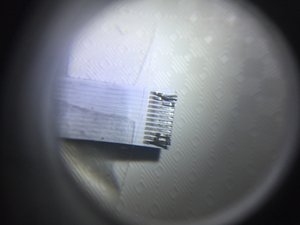
图片

What could I do to repair the damage? If the solution is purchase another cable, what's it?

Many thanks

回答此问题 我也有这个问题

这是一个好问题吗?

得分 1
1条评论

Hi Steffen,

Thank you for the answer, but to buy it by the eBay for who lives in Brazil is more difficult and the sellers don't put more specific data about.

Recently, I took a common ruler and measured the cable width. The picture shows it:

[image|1221870]

I knew it has 12-pin, but I need to find the pitch measuring because on the internet (Aliexpress website) I found more than one pitch measuring, but I think it would be 0.5mm, don't you?

Best regards

完成的

添加一条评论

1个答案

最有帮助的答案

Hi Diego,

I recently uploaded my repair guide on how to replace the DC jack power (charging socket) on an ASUS 1001PX which also includes the removal of the upper unit/touch pad. You will find it here: ASUS Eee PC 1001PX 充电插孔更换

What is actually needed in your case is a 12 pin flat ribbon cable which you easily find online, for example:

http://www.ebay.com/itm/Asus-EEE-PC-1001...

https://www.ebay.com/sch/i.html?_from=R4...

For sure, you can also buy the entire touch pad unit, for example, here: https://www.ebay.com/sch/i.html?_from=R4...

However, if you only need the flat ribbon cable, I suggest that you buy a single ribbon cable that is as long as your old one is and just fold it the way you need it. This should do the job!

Steffen

这个答案有帮助吗?

得分 1
添加一条评论

添加你的答案

Diego 将永远感激不已
浏览统计数据:

过去 24 小时: 0

过去 7 天: 3

过去 30 天: 30

总计 3,992