
跳转到主内容
加入维修社区 - 创建账户

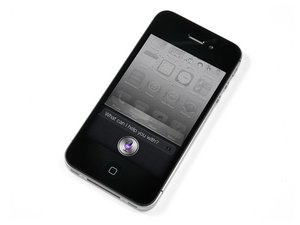
iPhone4S是第五代iPhone。网络制式为GSM/CDMA ,存储容量有8GB、16GB、32GB、64GB可选,机身颜色有黑色、白色可选。维修iPhone4S是容易的,需要耐心,用到的工具有螺丝刀、撬棒等。

iPhone 4s not charging

I have a iPhone 4s that had a very brief water incident and since then will not take a charge. I have tried different cables/chargers all the obvious. I have been able to take a battery out of a fully functional 4s and swap the battery with the troubled 4s. The battery from the troubled phone works properly and charges fine in the other phone and the phone that wont take a charge operates flawlessly when I put in a charged battery. However it will not take a charge, in fact when plugged into a charger the phone acts like it is in fact charging however it drains it instead. It seems as though the phone loses charge as fast as it would normally be charging. I was also able to hook it into a PC and back it up and remove all data just no charge. any ideas?

Thanks in advance

已回答! 显示答案 我也有这个问题

这是一个好问题吗?

得分 1
2条评论

I tried to charge my iPhone 4S with a lightning cable since I didn’t have the 30 pin connector at the time will this cause charging issues?

完成的

This doesn't even make sense; the lightning connector is nothing like the 30 pin dock connector used on the 4S. Even if it fits in the connector slot, how would you even begin to guess what part of the slot to shove it into?

If you do this, chances are good you're going to short some pin somewhere and damage your phone, so if you haven't already, please do not do this.

If you have then yeah, it certainly could cause charging issues if you've blown up some component on the charging port or the motherboard.

Yikes.

完成的

添加一条评论

2个答案

已选择的解决方案

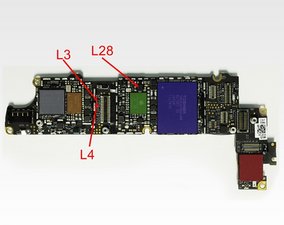
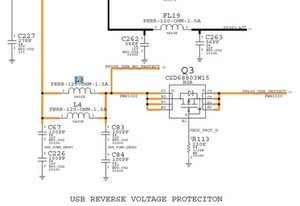
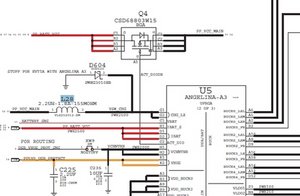
Rob, check on this. "Fake" charging is usually caused by a failed/damaged charging coil. Check for any physical damage, or if you have the knowledge and tools, check for function. You want to start by checking 3 inductors. For that, of course, you need a multimeter, or at least an ohm meter, to check for continuity. I hate to refer to those as fuses, but they most certainly control part of the charging circuit. First one is reference designator L3, it is a FERR-120-OHM-1.5A inductor. L4, right below it , has the identical value. Next would be the charger inductor L28 2.2UH-1.8A-155MOHM. All of these are pretty much available at mouser. com or digikey.com. Check the Diode D604, located just above L28. Hope this helps, good luck.

Block Image
Block Image
Block Image

这个答案有帮助吗?

得分 6

5条评论:

You saved my iPhone 4S, oldturkey03! L28 had no continuity, I got the same ome from an iPhone 4-mainboard.

Thankyou again!

完成的

That is great. Thanks for the feedback:-)

完成的

My luck was only for a short while. Now, the power management chip next to L28 is getting extremely hot as soon as I charge.

I appreciate any help.

Thanx.

完成的

tried a different battery yet?

完成的

Yes, several batteries. But the fault ,this time, was in the dock connector. Strange thing!

There must have been a faulty pin.

As you are pretty talented: Did you ever succeed in fixing an iPhone 3GS with "no WiFi, no bluetooth, no EMEI" - error? They say, it´s the baseband to be changed.

Best regards

Erling from Berlin

完成的

添加一条评论

Look at changing out your charger port. Ifixit has a great tutorial on how to do that. That should do the trick. Here is the tutorial for the dock connection. iPhone 4S Dock Connector Replacement

这个答案有帮助吗?

得分 4

1条评论:

Any reason to think that it will fix it since everything else regarding the port works?

完成的

添加一条评论

添加你的答案

Rob 将永远感激不已
浏览统计数据:

过去 24 小时: 0

过去 7 天: 6

过去 30 天: 32

总计 46,082