学生贡献的维基
此维基页面由我们教育项目的学生团队编写。
扬声器发出嗡嗡声或声音浑浊
耳机传出的声音发闷、听不清楚、断断续续或有干扰迹象。
距离发射器太远
耳机已达到与发射器的最大连接距离。
确保你在发射器 30 英尺(约 9 米)范围内使用耳机。
信号受阻
有物体、家具或墙壁阻挡在耳机和发射器之间。
确保耳机和发射器之间没有实体遮挡物。
数字信号干扰
发射器的信号受到附近其他电气信号的干扰。
请勿将发射器放在 Wi-Fi 基站或其他可能发射干扰耳机信号的电气设备旁边。
无法充电
设备因电量不足而无法工作。
对齐不当
发射器上的触点未与耳机上的接触点正确对齐。
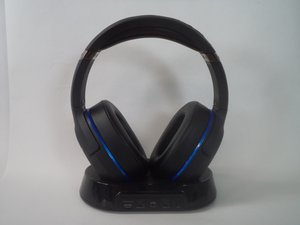
确保耳机右耳罩上的充电触点与发射器右侧的充电针脚正确接触。LED 指示灯为红色表示耳机正在充电,蓝色或粉色 LED 灯表示耳机未正确对齐。
发射器故障
发射器没有显示任何正常工作的迹象。
确保充电针脚没有严重损坏或腐蚀。如果发射器上的 LED 指示灯不亮,则设备可能出现故障。请参阅维修指南。
无法无线连接
耳机和发射器无法正确同步。
设备未配对
耳机未与发射器配对,因此无法正确连接。
确保耳机已充电,并且在尝试无线配对时按住配对按钮至少 5 秒钟。
光纤连接不良
光纤线未插好、松动或有某种损坏。
确保从发射器背面到主机背面的光纤连接两端均已插紧。
声音设置不兼容
当前配置的设置未针对此耳机进行优化或无法使用。
在“数字输出”或“数字光纤”下配置声音设置,并仅勾选“杜比数字 5.1 (Dolby Digital 5.1)”。此外,确保未勾选 DTS。
耳机无法开机
耳机无法显示任何成功开机的迹象,或电量不足以运行。
需要进行电源循环
执行电源循环有时可以解决一些非常基本的问题,包括耳机无法正常开机。
尝试执行电源循环,因为这可能会消除一些基本问题,请按照 此链接 中的指南操作。
耳机未充电
耳机无法开机,可能是因为电量不足。
请参考上方的“无法充电”章节,确保设备正在正确充电,并已留出足够的时间让设备充满电。
声音左右声道互换
声音从一个耳罩切换到了另一个耳罩。
预设错误/故障
当前选择的预设导致耳机出现问题,或者切换其他预设可以缓解此问题。
尝试使用耳机右耳罩上的按钮循环切换预设,并检查是否能清晰听到语音提示和不同的模式。如果不能,耳机中的扬声器可能已损坏。
麦克风收音不佳
输入到互联网麦克风的声音未被正确传输。
佩戴不当
耳机佩戴方式不正确,导致麦克风无法正常收音。
确保正确佩戴耳机:头带应放置在头顶,左侧应位于左耳上(头带内侧标有“L”),右侧应位于右耳上(头带内侧标有“R”)。
麦克风静音
麦克风已被静音,导致他人无法听到你的声音。
按下右耳罩上的麦克风静音按钮。耳机中会发出高音提示音,确认麦克风现已开启。
预设错误/故障
当前的麦克风预设导致问题,或者导致麦克风无法被听到。
长按右耳罩底部的麦克风静音按钮,循环切换四个麦克风预设,看看是否能解决问题。
信号受阻
发射器和耳机之间存在某种物体或墙壁,导致信号被阻挡。
确保耳机和发射器之间没有实体遮挡物。

团队

Arkansas State University, Team 1-5, Chamberlain Spring 2017 Arkansas State University, Team 1-5, Chamberlain Spring 2017 的会员
ARSU-CHAMBERLAIN-S17S1G5
3 名成员
创作了60篇指南

12条评论
https://youtu.be/_3zw0cGsRZw
The link above shows the same exact audio issue I’m experiencing recently, though his is an 800X and mine is an 800 on a PS4 Pro. It happens intermittently. I’ve had a pair for years that I had to send off for a battery issue, and they never had this problem. I’ve swapped the replacement out twice already for brand new pairs, all known troubleshooting has been done, and all the settings are correct…still nothing. I noticed that switching from “Chat Only“ to “All Audio” it goes away. When toggling between “Optical Out” to HDMI, the issue goes away as well, but only momentarily before it comes back, even on HDMI. Same with unplugging/plugging the optical cable. Bluetooth sources (cell phone) come in crystal clear at the same time that the PS4 is being distorted in the background. My Pro is new, and I don’t think it’s the console, because it wouldn’t explain why someone else is experiencing this same issue on a very different console, and my first pair worked fine on mine. Any advice?
LEIT - 回复 分享
Hi friend! I'm getting the same problem. Have you figure out the problem? The surround effects sounds noises! Could u send me an email if u have fixed it? klausbalzano @ gmail (…).
Klaus Balzano - 回复 分享
Transmitter not charging headset. They are synced and everything works but that. I replaced the headset but use the same transmitter. When i put the headset on transmitter the light stays solid green even though the headset isnt fully charged. Anyone know how to fix this??
Kenneth Roberts - 回复 分享
seems to be a issue cause I just got a pair of refurbished ones and had battery issues, did the tech support thing and concluded that the battery was defective, sent off for a brand new pair out of the box and am having same issue. followed all steps and instructions as given and nothing seems to fix this issue with the new ones. Following to see if there is an outcome of this.
Joe - 回复 分享
static an choppy sound issue getting very frustrated with this c’mon someone help me!
Matt Cleveland - 回复 分享