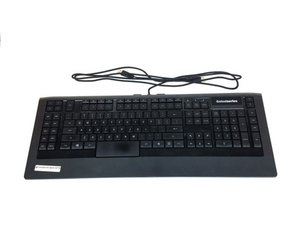
学生贡献的维基
此维基页面由我们教育项目的学生团队编写。
本故障排除页面将帮助你诊断 SteelSeries Apex 64145 的常见问题。
按键无响应
按下按键时,部分或全部按键没有反应。
USB 端口故障
将键盘连接到电脑的其他 USB 端口试试。电脑端口可能已损坏或无法正确识别设备。如果端口损坏,请查看此维修指南 SteelSeries Apex 64145 USB 端口连接器更换。
驱动程序损坏
如果电脑在插入键盘后没有立即检测到它,请尝试安装更新版本的驱动程序,或从 SteelSeries 网站 通过此链接下载可用的旧版本。
按键损坏
如果按键已出现物理损坏(裂纹、划痕、位置偏移),请参阅我们的更换指南,了解如何更换损坏的按键。SteelSeries Apex 64145 按键更换
LED 指示灯不亮
键盘插入后灯光不亮。
LED 灯珠烧毁
你需要购买新的 LED 灯珠并进行更换。请参阅我们关于如何更换烧毁 LED 灯珠以及应购买何种类型 LED 的指南。SteelSeries Apex 64145 LED 更换
键盘感觉不稳且左右摇晃
橡胶垫脚丢失或损坏。
垫脚磨损/损坏
用键盘包装盒内提供的备用垫脚更换当前的磨损垫脚。请参阅我们关于如何更换垫脚的指南。SteelSeries Apex 64145 橡胶支脚更换
按键卡住
按键按下后无法回弹到原始位置。
按键脏污
小心地向上撬起按键直到它弹出,然后用室温水彻底清洗按键。待按键干燥后,将其轻轻按压回键盘上的原始位置。
电脑无法识别键盘
键盘没有出现在电脑的设备列表中,或者无法在 SteelSeries Engine 中显示。
插入了错误的 USB 端口
键盘可能连接到了无法正确识别它的 USB 端口类型。例如,如果键盘目前连接的是 USB 2.0 端口,请尝试将其插入 USB 3.0 端口。确保键盘的两个 USB 插头都连接到相同类型的 USB 端口上。
驱动程序错误或缺失
确保当前的驱动程序是最新的,并且已正确安装在你的电脑上。前往 SteelSeries 网站获取有关如何下载其软件的说明,通过此链接即可。

团队

USF Tampa, Team S1-G1, Nance Spring 2017 USF Tampa, Team S1-G1, Nance Spring 2017 的会员
USFT-NANCE-S17S1G1
4 名成员
创作了60篇指南

4条评论
PART-1
The problem I am having is that a few keys are not triggering anymore
the keys are as follows:
(the period key, greater-than key, question mark key, right shift key & finally the quotation mark key) I might have to get the plastic circuit sheets to replace the ones I have. because it seems that part of the plastic circuit sheets might be damaged some how. I was playing a video game and then poof out of no where all the lights on the keyboard went out and keyboard stopped responding
I unplugged the keyboard and even tested it on another computer and it didnt want to go back on
so i opened the keyboard to check if something burnt out, I cleaned everything with rubbing alcohol and let it dry. put everything back together and boom keyboard started to function only to have the keys mentioned above not working I re-opened the keyboard several times to make sure nothing was pinching anything.
Twsted - 回复 分享
PART-2
i even tested it by just pressing the circuit allocated connections from the 3 plastic circuits sheets under the membrain sheet within the within the keyboard and it would not type those keys out,
but it does it for all the other keys. So im sure the plastic circuit sheets are damaged for some odd reason hoping that if I call or email Steelseries, that I can purchased a new set of circuit sheets from them.
This is my favorite keyboard as I do LOVE chiclets keyboards
I wish Steelseries would make a newer version of this APEX-350 without taking away ANY of the sets of keys or layout it already has , but rather improve on it. and have every key lit up individually colored - I can only wish
If Steelseries could make a Chiclet `mechanical` keyboard that would be insane :)
like a APEX-350 MARK-II mechanical keyboard, I would be first in line to buy it.
Twsted - 回复 分享
I have a problem so I left on holiday 3 weeks ago my keyboard apex pro tkl 2023 wireless was fine but when I came home it would not work at all . The plugs are in everything is in but won’t work at all. The led wouldn’t turn on , it doesn’t even show the menu pad . Won’t show anything when I’m charging it either . Can somebody help ?
Geek - 回复 分享
some of my keys f9-f12 light up orange and my keyboard just stops working
Kayston Phillips - 回复 分享