学生贡献的维基
此维基页面由我们教育项目的学生团队编写。
音箱无法通过蓝牙连接
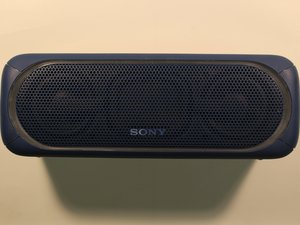
你的 Sony 音箱在蓝牙连接功能方面遇到了问题。
音箱已连接到其他设备
确保附近所有其他设备都已断开与音箱的连接,并关闭它们的蓝牙功能。然后尝试重新连接音箱。
不知道如何开启音箱的蓝牙连接功能
要连接蓝牙,请先确保音箱已充电并开机。此外,请确保你尝试连接音箱的设备也已充电并开启了蓝牙功能。接下来,按压音箱上的配对按钮,直至蓝牙指示灯开始闪烁。在你尝试连接的蓝牙设备上,选择“SRS-XB40”作为你要连接的音箱选项。如果提示输入密码,请输入“0000”。如果连接成功,音箱上的蓝牙指示灯将保持常亮。
无法重置 Sony 音箱
你不清楚如何重置设备。
不知道如何重置音箱
重置按钮位于音箱背面的橡胶盖下方。打开盖子,用大头针、曲别针或尖头物体按压“RESET”按钮。按下“RESET”后,像往常一样打开音箱。如果仍无法开机,请联系当地的 Sony 经销商。
音箱音频异常
你的音箱音频输出音量低或没有音频输出。
连接不良
如果使用辅助音频线连接,请确保线缆已牢固地插入音箱和你所使用的音频设备。如果使用蓝牙连接,请尝试断开连接后再重新连接音箱。如果这些方法都不起作用,请参考用户手册或咨询当地的 Sony 经销商。
无线信号干扰
为提高播放质量,请尝试改变设备的位置,或关闭其他无线连接。此外,你可以尝试尽量远离微波炉和其他蓝牙设备。
音箱掉电快
你的 Sony 音箱在充满电后很快就没电了。
电池续航时间短
电池续航时间预计为 12 小时,但可能会根据以下因素有所不同:环境温度、使用条件、音量大小。如果充电时橙色充电指示灯不亮,请检查以下内容:确保 micro-USB 充电线已牢固连接到 USB 电源适配器。确保 USB 电源适配器已牢固连接到音箱和交流电源插座。如果尝试了这些建议后设备仍无法开机,则设备可能需要电池维修服务。
LED 灯无法点亮
你的 LED 灯功能未能按宣传的效果工作。
不知道如何开启灯光
音箱开机后,你可以通过按住“EXTRA BASS - LIGHT”按钮约 3 秒来开启或关闭照明功能。

团队

University of Alabama, Team S1-G1, Bedsole Spring 2018 University of Alabama, Team S1-G1, Bedsole Spring 2018 的会员
UA-BEDSOLE-S18S1G1
4 名成员
创作了72篇指南

17条评论
I lost my charger..then I bought a different charger with six set of different voltage..so I'm charging my speaker with a 9v ac adapter and my speaker won't even charge..orange light keeps going on n off..what should I do
Safai Lio - 回复 分享
Hey man i had the same problem at first, you just got to make sure you put it at the proper voltage. These speakers take 5V or less. So turn it to something lower than that such as 4.5 or 3. it will t ake longer but it will work.
E N - 回复 分享
My SRS XB40 just won't hold a connection. After pairing it doesn't output music and drops almost immediately. This is happening with the phone. I have tried phone with other BT speakers and works just fine so this isn't the phone.
With a laptop I have to pair it every time and it holds the connection which is strange but I have to pair it everytine. I have tried to both initialise and rest but nothing. Is the Bluetooth module in the speaker dead? When I connect with a 3.5mm jack it works fine. Speaker charges fine. I've scratched everywhere online and no one seems to be experiencing this.
Mustafa Ziraba - 回复 分享
Is it possible that when the battery is dead, i mean realy dead,
the whole speaker won´t work anymore. Even with an external powersupply.
(charge lamp lights up, when put it on, it lights up for about 5 sek. then it changes automatically back into charching mode)
I just want to checkout first if fixing is an option for me. I dont have the knowledge to target electrical problems…
Thanks
tobi_hofer - 回复 分享
Is it possible that when the battery is dead, i mean really dead,
the whole speaker won´t work anymore. Even with an external power supply.
(charge lamp lights up, when put it on, it lights up for about 5 sec. then it changes automatically back into charging mode)
I just want to checkout first if fixing is an option for me. I don’t have the knowledge to target electrical problems…
Thanks
tobi_hofer - March 23
__________________________________________
This is exactly the same problem I’m having with my XB40. In my case at least, from what I’ve read of other people’s similar problem, I think I may have burned out something inside when attempting to charge the speaker with what I now suspect may have been an inappropriate charger, one that didn’t properly match up in regards to voltage and/or amperage. Not sure what I can do at this point.
tcny05 - 回复 分享