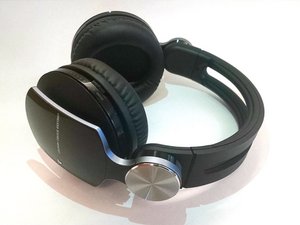
学生贡献的维基
此维基页面由我们教育项目的学生团队编写。
耳机内有嗡嗡声
出现爆音或持续的高频音调
接地错误
拔掉音频线并重新插回。如果嗡嗡声持续存在,可能的原因是接地错误或干扰。
灰尘干扰
彻底清理扬声器,或使用压缩空气吹出电子元件中的碎屑。电子设备应始终保持在清洁的环境中,以减少电子污染。
电子干扰
从 PlayStation 3 的其他 USB 端口移除未使用的无线适配器。如有必要,可使用短延长线将无线适配器连接到 PlayStation 3 的 USB 端口,以消除对连接到 PlayStation 3 的其他无线设备的干扰(延长线需另购)。
Sony 描述了几种情况。
如果嗡嗡声问题持续存在,可能需要更换扬声器。请按该指南中的步骤进行操作 扬声器更换指南。
蓝牙无法连接
耳机和游戏设备均已开启,但耳机蓝牙无法连接
重置耳机
1. 将耳机插孔插入 USB 适配器,并将 USB 适配器插入 PlayStation。
2. 使用细长的物体按压 USB 适配器上的隐藏按钮 [link to PlayStation instructions]
检查游戏机/计算机更新
PlayStation 会定期发送更新。有时这些更新会引入新的兼容性问题,但仍建议保持系统为最新版本。请查看最新的 PS3 更新。
设备无法识别(显示“未知设备”)
你的耳机需要恢复出厂设置。
1. 前往 PlayStation Store > Apps > All PS3 Apps,在你的 PlayStation 3 上下载 Pulse Elite Edition Manager 应用程序。
2. 打开该应用程序(位于 Xross Media Bar 的“Game”目录下)。
3. 通过 USB 线将耳机连接到 PlayStation 3。
4. 在应用程序的主菜单屏幕上,按 Select 按钮。
5. 选择“Factory Default”(恢复出厂设置)选项并按 X 键以更新耳机。下载开始后,大约需要 2 分钟才能完成。
蓝牙电路板损坏
=
Nintendo Wii 常见的故障源之一是蓝牙电路板。如果它和 Wi-Fi 模块未完全正常工作并正确安装到主板上,系统将无法启动。
如果可能,尝试用一个已知良好的蓝牙模块进行替换,以确定这是否为故障原因。
主板损坏
如果电源和无线电路板工作正常,那么问题很可能出在主板上。请遵循 [主板更换指南]。
有关为何会出现蓝牙连接问题的更多信息,请查看 此处!
音频插孔故障
耳机是通过音频线而非蓝牙连接的。声音断断续续或有嗡嗡声干扰
音频插孔污垢
1. 拔掉音频线并重新插回。
2. 使用蘸有外用酒精的棉签轻轻清洁音频插孔。
尝试更换线缆
将另一根音频线插入耳机,以测试原有的线缆是否损坏。
扬声器不工作
耳机没有声音
扬声器未通电
如果指示灯不亮,说明耳机已关闭。请确保电源开关处于“开启”模式。
如果电源开关已打开但指示灯仍未亮,可能是耳机电池耗尽。如果电池无法充电,请参考下一节“耳机无法充电”的故障排除内容。
耳机已开启,但游戏机/计算机处于静音状态
检查设备上的系统设置,确保没有静音。
[蓝牙连接] 耳机蓝牙连接失败
检查你的设备,确保蓝牙已开启且已选择你的蓝牙设备。如果两者都已通电但无法连接,请参考上方的“蓝牙无法连接”故障排除部分。
[有线连接] 耳机音频插孔无法连接音频线
碎屑可能会干扰线缆与控制器或耳机插孔的连接。请参考上方的“音频插孔故障”故障排除部分。
如果连接仍无效,请在其他控制器上测试该线缆。如果它可以在其他控制器上使用,则说明你的控制器需要维修或更换。请查看 Sony PS3 DUALSHOCK 3 控制器。
耳机无法充电
耳机 USB 线已插好,但无法充电
电压/电流不正确
请务必使用 PlayStation 前置端口的 USB 适配器给耳机充电(不要使用墙壁插座)。耳机的设计充电环境是 PlayStation 系统,其输出电压与墙壁插座不同。
适配器故障
检查 USB 适配器内部的连接针脚是否有弯曲、碎屑或其他异常情况。如果可行,请尝试用另一个兼容的 USB 适配器充电。你可能需要更换适配器。
USB 线故障
检查你的 USB 线是否能为其他设备充电或供电。如果不行,你可以焊接一个新的 USB 插孔 [link to fixing USB cable]。如果你不熟悉安全的焊接方法,建议使用/购买另一根 USB 线。
如果充电问题持续存在,说明电池可能正在老化或已失效。所有电池最终都会失效,因此请将你的电池性能与 Sony Pulse 规格 进行比较以评估性能。如果电池无法保持电量,请遵循此 电池更换指南。


7条评论
were can i buy the usb adaptor and can i use another usb adaptor
Deffkon - 回复 分享
I have just bought some Pulse elite to use with my PS4 and after the initial power had drained and it was time to recharge for the first time I plugged them in to my PS4 using my Turtle Beach usb cable. Nothing happened,no light on the headset,no indication to say they were charging but anyway, I left them charging all night. The next day I tried them but nothing,no charge,dead battery. Now I know the Turtle beach usb cable works as it is your bog standard universal usb cable,so I tried plugging them into my old PS3, into a normal electrical socket and my PC but still nothing. After loads of googling and still no real help I tried another usb cable I found AND IT WORKED! So,the moral of the story is; just because one cable works for one thing doesn't necessarily mean it will work for another.
Mark Philip Oakley - 回复 分享
Does it need to be charged for plug in or just for Bluetooth
swasted420 - 回复 分享
Hi guys, I bought a PS3 with Pulse Wireless Headset... Now all I receive is a straight orange light no blinking blue on the headset but the USB plug-in when I turn it on goes from flashing to constant like it is connected… tried to reset the headset by putting a pin near the ear hole and nothing seems to be happening any suggestions?
redmmguy - 回复 分享
I have a Sony Pulse Elite and it’s great. But the sad part is that every time I switch the power on, it is affecting the speakers of the headset either low or high volume on either speaker then gives a crackling sound when touching the power switch to fix the audio as there’s a need to position the power switch a bit for the speakers to work properly. Please help. Thanks.
Leon Franz Hanniel Reyes - 回复 分享