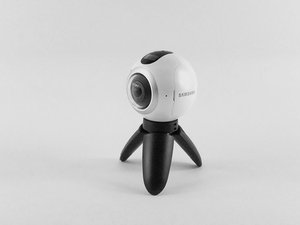
学生贡献的维基
此维基页面由我们教育项目的学生团队编写。
设备无法开机
设备无法充电或无法开机。
充电线故障
确保充电线在设备端和墙上插座端连接紧密。如果充电指示灯未亮,说明充电器有故障。请考虑更换充电器。
电池故障
如果设备的充电指示灯亮起,但设备在未连接电源时无法充电或无法保持开机状态,则说明电池有故障。请按照本指南更换电池。
照片和视频质量失真
视频或图像失真、模糊或变色。
相机镜头脏污
检查相机镜头是否有任何污垢或瑕疵。如果发现瑕疵,请使用玻璃清洁剂擦拭相机镜头。如果镜头内部发现污垢,请按照本指南拆卸镜头并清洁内部。
相机镜头损坏
检查相机镜头是否有缺口、裂纹或划痕。如果发现任何损坏,请使用本指南更换镜头。
音频质量低下
视频播放时听到的声音有问题。
麦克风脏污
如果录音回放时音频质量失真,请使用压缩空气罐清洁设备上的麦克风。
扬声器/麦克风故障
如果使用压缩空气清洁麦克风无效,请考虑使用本指南更换设备扬声器。
设备过热
设备随机关机或在屏幕上显示过热警告信息。
电池过热
如果你感觉电池变得非常烫,或者出现过热情况,请按照本指南取出电池。取出电池后,让其冷却至室温再尝试再次使用。
SD 卡处理速度不足
通常情况下,设备在将照片和视频录制到 SD 卡时,温度可能会有所升高。如果 SD 卡过热或出现过热现象,请考虑购买一张新的 SD 卡。
环境影响
如果你的设备当前处于炎热或干燥的环境中,导致额外受热,请将其移至可以散热的地方。
无法连接到其他设备
Samsung Gear 360 无法正常连接到其他设备。
通过 Samsung Gear 应用程序重新连接
在智能手机上启动 Gear 360 应用程序。手机的蓝牙和 Wi-Fi 直连功能会自动开启。只需点击“连接”并按照屏幕上的说明完成连接即可。如果连接失败,请尝试重启设备并检查蓝牙设置,确保已开启“可被发现”模式。
Samsung Gear 360 在操作过程中卡死
取出电池并重新装入。这通常可以重启相机,但这种情况出现得太频繁了,不符合我的预期。
延时摄影功能未按设定的时间间隔拍摄
我还没有找到解决此问题的方法。

团队

USF Tampa, Team S3-G5, Sullivan Spring 2017 USF Tampa, Team S3-G5, Sullivan Spring 2017 的会员
USFT-SULLIVAN-S17S3G5
4 名成员
创作了84篇指南

28条评论
I have new gear 360 2017. It turns on andconnects.. ...until I put in the sd card.. then it won't turn on.
rob hoy - 回复 分享
If the Samsung 360 will not turn on. Plug it into your power source and hold down the power button and the menu button at the same time, for fifteen seconds. This worked for my 360.
Mary Kelly - 回复 分享
Think I might have stumbled upon a solution of sorts: I had problems connecting my Gear 360 camera with the Gear 360 (New) app on my Samsung S6. No help from tech support, as usual. So, after bumbling around, I thought I'd
1. Uninstall Samsung Accessory Service (in the app manager).
2. I also uninstalled the Gear 360 app.
3. Unpaired the Gear 360 camera on Bluetooth.
4. Re-started everything.
5. Re-installed just the Gear 360 app on my phone.
6. Attempted to re-connect the Gear 360 camera from within the app.
7. I believe this would trigger the app to automatically install the proper Samsung Accessory Service app.
8. The app started to connect properly to the camera.
Now, the app still isn't impressive but at least that got the camera to connect to the phone app.
Good luck.
bastogne97 - 回复 分享
Just had the same problem, but i was able to fix it by reformatting the SD Card.
To check if this is the problem just remove the sd card and see if it turns on. If it does and says "No SD Card" try putting it back in and if it turns off again then you should reformat the SD Card to exFat32 on your computer. It worked for me and maybe it could work for you as well.
W Marketing Group - 回复 分享
I just bought the Gear 360 (2017) and paired it with my Galaxy S8+ .. it took a couple of photos using the phone and the Gear 360 (new) app. Then on taking the third photo it got stuck on "Capturing". No matter what i do it will not take photos now. I restarted it , the phone nothing happens. the shutter button on the camera also doesnt not works. if i reset it using the app, it will take a couple of photos and then the same issue.
any suggestion guys ?
Craig - 回复 分享