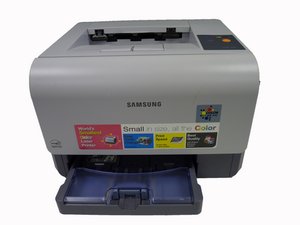
学生贡献的维基
此维基页面由我们教育项目的学生团队编写。
打印机无法打印
打印机对打印队列中的任务没有响应。
电源未连接
检查并确认打印机已正确插入电源,且电源线完好无损。
打印机需要重置
将打印机关闭后再重新开启。
成像单元故障
弹窗(即“Smart Panel”)提示打印机成像单元故障。请参考本指南更换此单元。
打印机无法打印且状态指示灯常亮红灯
打印机无法打印,且状态指示灯由绿色变为红色。
纸盒为空
向纸盒中补充新纸张。
卡纸
打开前盖板和后盖板。清理发现的所有纸张。
前盖板未盖好
推紧前盖板,确保其卡扣已扣合。
废粉盒缺失
如果废粉盒缺失,你需要装入一个新的。
废粉盒已满
清空废粉盒(指南?)。
废粉盒已磨损
参考本指南更换新的废粉盒。
打印机可工作但状态指示灯闪烁红灯
状态指示灯由绿色变为闪烁红灯。
碳粉余量不足
碳粉不足时打印机仍可打印,但无法保证稳定性。请更换旧碳粉盒,以避免打印效果不一致。
打印机无法打印,且出现 Smart Panel 程序弹窗
电脑屏幕上出现此弹窗。它提示需要更换成像单元。
成像单元故障
按照这些步骤更换成像单元。
纸张无法进纸
打印机尝试启动,但无法抓取纸张。
进纸辊故障
拆下纸盒。将打印机翻转至背面,以便触及底部。找到小滚轮。清洁滚轮……或者……用砂纸等研磨材料将滚轮表面打磨粗糙。
打印质量差
文档打印效果存在问题。
打印质量模糊
按照这些步骤更换定影单元。
打印质量不均 - 局部褪色
按照这些步骤更换碳粉辊(指南)。
文档上出现不需要的线条
按照上述步骤更换碳粉辊。

团队

University of Maine, Team 1-1, Diaz Fall 2014 University of Maine, Team 1-1, Diaz Fall 2014 的会员
UMAINE-DIAZ-F14S1G1
3 名成员
创作了48篇指南

4条评论
Samsung CPL 300 red comes on immediately after initial switch-on. Noticed that toner waste sensor light might be broken....does that have an effect or can it be simply be bypassed thankyou
Rene Thevenaz - 回复 分享
The toners are full and no paper jam . The front cover is tight. The waste tank is OK. The green status light comes on for about three seconds and then changes to solid red.Someone suggested that it might be the power supply is weak. Has anyone had this happen before? Thanks! Michael
Michael Nolan - 回复 分享
Anyone have an issue with status light red, but black toner light is flashing red and won’t print? I picked this broken printer up from an alley (garbage) and attempting to fix it. It has third party toner cartridges without digital connections, but the other colors are not giving flashing errors. I am investigating.
Kevin Kolasa - 回复 分享
Direct from the manual:
When the LED is blinking, the corresponding toner cartridge is low. Order a new toner cartridge. You can temporarily improve print quality by redistributing the toner. See "Redistributing Toner" on page 5.
When the LED is lit, the corresponding toner cartridge is almost empty. Remove the old toner cartridge and install a new one. See "Replacing Toner Cartridges" on page 5.3
Kevin Kolasa - 回复 分享