学生贡献的维基
此维基页面由我们教育项目的学生团队编写。
侧板无法连接且侧键无响应
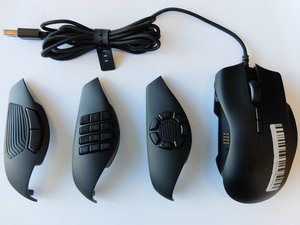
鼠标侧板无法完全连接到鼠标本体,且侧面板上的按键在按压时无反应。
磁铁无法完全吸合
侧板与鼠标本体之间的磁铁可能无法完全吸合。请将侧板完全拆下并重新正确安装。如果面板与本体之间仍然存在物理连接不良的问题,请拆下侧板,检查面板内部的两块磁铁是否齐全(鼠标内部前端有一块较大的圆形磁铁,后端内部有一块较小的方形磁铁)。如果磁铁缺失,请联系 Razer 客服进行更换,或购买一个新的侧面板。
侧板或鼠标内部有污垢
鼠标连接部位内部如果有污垢,可能会阻碍侧面板与鼠标本体之间的连接。拆下鼠标侧面板,清理掉可见的碎屑。用棉签或超细纤维布轻轻清洁鼠标本体和侧面板。同时,务必轻轻清洁金色的电气连接触点,确保侧面板按键的发送端与接收端之间没有物理阻隔。
LED 灯不亮(鼠标驱动程序与 Synapse 3 软件)
Razer Naga Trinity 的 LED 灯光功能(为滚轮和部分侧面板提供照明)无法工作。
鼠标驱动程序过时
如果鼠标驱动程序过时,LED 灯可能无法点亮。请拔下鼠标,卸载鼠标驱动程序。重新安装驱动程序,并确保安装的是 Synapse 3。
鼠标内部的 LED 灯故障
鼠标内部的 LED 灯可能损坏,或者无论驱动程序或软件是否有问题,它都无法工作。请联系 Razer 客服更换 LED 组件。
左右主按键无法点击
鼠标的左右点击按键在按压时无功能响应。
鼠标驱动程序过时
有时如果鼠标驱动程序过时,鼠标将无法执行左键或右键点击。请拔下鼠标,卸载鼠标驱动程序。重新安装驱动程序,并确保安装的是 Synapse 3。通过 Razer Synapse 在此处 更新或重新安装鼠标驱动程序/配置软件。
计算机软件过时
如果你的电脑没有鼠标正常运行所需的正确软件,鼠标可能会对点击无响应。请拔下鼠标,更新电脑软件,然后重新连接鼠标。
USB 接口无法工作
如果 USB 接口无法工作,或者线缆连接不到位,鼠标上的按钮将无法工作。请拔下鼠标线缆并将其插入另一个 USB 接口以获得更好的连接。
滚轮卡顿
Naga Trinity 对滚轮滚动动作无响应或响应过慢。
鼠标驱动程序过时
如果你使用的鼠标驱动程序过时或未更新,滚轮可能会停止工作。请拔下鼠标,卸载鼠标驱动程序。重新安装驱动程序,并确保安装的是 Synapse 3。
滚动锁定已开启
如果你的滚动锁定(Scroll Lock)已开启,鼠标的滚动功能将无法使用。有些电脑配有 Scroll Lock 键。如果你的电脑有该键,请尝试按一下将其关闭。如果你的电脑没有 Scroll Lock 键,可以手动开启或关闭:前往“开始”>“设置”>“轻松使用”>“键盘”。在键盘页面找到“滚动锁定”按钮,点击即可开启或关闭。
滚轮槽内有污垢
随着鼠标的使用,碎屑可能会堆积在滚轮槽内,导致滚轮难以操作。要解决此问题,请取下滚轮,用干净的棉签或超细纤维布清理滚轮以及槽内的碎屑。
光学传感器偏移
Naga Trinity 鼠标对移动无响应。
鼠标已断开连接
Naga Trinity 鼠标可能与你的笔记本电脑断开了连接。请将鼠标重新连接到电脑。
光学传感器上有灰尘或污垢
Naga Trinity 鼠标的光学传感器内可能有污垢或灰尘,阻碍传感器检测移动。请使用干净的棉签清除传感器上的任何灰尘或污垢。
未在电脑上下载鼠标软件
Naga Trinity 鼠标无法连接到系统,是因为系统版本未达到鼠标的标准。Naga Trinity 需要 Razer Synapse 3 软件,该软件在 PC 上兼容 Windows 7 或更高版本,或在 Mac 上兼容 Mac OS X 10.9 或更高版本。建议更新系统;如果无法将系统升级至兼容要求,请退回鼠标。也有可能是系统未下载安装 Naga Trinity 专用的 Synapse 3。通过 Razer Synapse 在此处 安装鼠标驱动程序/配置软件。

团队

Embry-Riddle Aeronautical University, Team S6-G2, Salas Fall 2019 Embry-Riddle Aeronautical University, Team S6-G2, Salas Fall 2019 的会员
ERAU-SALAS-F19S6G2
4 名成员
创作了60篇指南

5条评论
I am still having issues with this. It does not make sense to me because one of my side panels works (the one with two buttons) however, I have only ever used the circular seven button one prior. The reason this is so confusing and frustrating to me is that it is recognized as being plugged in. The buttons light up, and it appears in synapse. ONE of the three works, but it isnt the one I use. I have tried cleaning it, but know that would not be the issue anyways because one of them works, and the other two dont. As I mentioned I have only ever used the seven button attachment, and it worked fine until two or three days ago. I have scoured the internet and not found a single solution. I have tried the following: restarting my PC. Looking for driver updates for the mouse. Looking for software update for synapse. Uninstalling mouse from PC. Uninstalling Synapse. Reinstalling both. Nothing has worked. The only panel working is the two button one, which I personally find useless. Disappointed to pay $70 for junk.
James Krejci - 回复 分享
I am having issues with the 12 button panel. The panel will get recognized as the 2 button panel instead and the light color on the panel will get out of sync with the light color on top of the mouse. Removing the panel and replacing it will sometimes enable the buttons but it will revert to recognizing the 2 button panel while in the middle of playing a game. I haven’t seen anything that is causing this issue, but it happens multiple times within a few hours of gaming.
Russell Moody - 回复 分享
I am having issues with my Naga Trinity. When clicking with the left mouse button, it will either not register at all, or register as a double click sometimes.
Anthony Nichols - 回复 分享
Mine just does not work at all I've done everything it says, and yet I still cant figure out why it doesnt work, ive checked razors website and it works with my pc but for some reason it does not work
Blocklng - 回复 分享
Its a fcking joke! The sidebuttons dont work at all, lights are non functioning and i cant connect is to synapse
Jan Bengele - 回复 分享