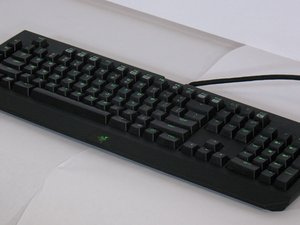
学生贡献的维基
此维基页面由我们教育项目的学生团队编写。
宏/可编程按键无法使用
你的电脑无法正确识别键盘。
未安装驱动程序
如果电脑无法识别键盘,请确保键盘已完全插入 USB 接口。如果电脑弹出“无法检测到设备”的窗口,请搜索 Razer Blackwidow Chroma。点击“立即下载”,并根据你的系统选择“Microsoft Windows”或“Mac OSX”。按照屏幕上的说明进行安装。
驱动程序故障
如果电脑可以识别键盘,请尝试在文档或网页浏览器中打字。如果键盘对你的输入没有响应,请尝试使用 Windows 键。如果所有按键均无响应,请搜索 Razer Blackwidow Chroma。点击“立即下载”,并根据你的系统选择“Microsoft Windows”或“Mac OSX”。按照屏幕上的说明进行安装。
未通电
你的键盘未通电。
USB 连接故障
如果键盘未通电,请尝试拔下 USB 连接器,并将其插入另一个 USB 接口。这是判断键盘是否通电的最佳方法。如果此方法无效,请确保你使用的是正确的 USB 连接器。
键盘不发光
你的键盘完全不发光或仅部分发光。
键盘连接不良
如果键盘不发光,请确保所有连接线都已完全插入正在使用的电脑接口中。检查是否有 USB 接口处于休眠模式。要执行此操作,请进入电脑的“设备管理器”,点击“通用串行总线控制器”旁边的“+”号。继续找到任何“根集线器 (Root Hub)”并选择“属性”。点击“电源管理”选项卡,确保每个“根集线器”选项卡下方的“允许计算机关闭此设备以节约电源”选项已被勾选。此外,在“控制面板”和“电源选项”中,选择“休眠”选项卡,然后取消勾选“启用休眠支持”。
灯光缺失/烧毁
如果某个按键不发光,请小心地撬下该键,查看按键下方是否有灯珠。如果没有灯珠,说明灯光缺失,需要更换灯珠。如果按键下方有灯珠,请尝试将其按入按键,看是否是因为接触不良。如果按键仍然不发光,说明灯珠很可能已经烧毁,需要更换新的灯珠。
按键无响应/缺失
你的键盘按键无法按下或有按键缺失。
按键脱落
如果键盘上有按键脱落,请先找到丢失的按键。找到按键后,检查其是否有严重损坏,以免无法重新安装到键盘上。随后,将按键小心地对准键盘上的正确位置,用力按压直至听到咔哒声,确保其安装到位。如果按键无法扣入到位,可能需要购买一个新的按键进行更换,因为它可能已经损坏。
按键卡住
如果按键无法按下或被卡住,很可能是因为按键下有异物。请小心地将卡住的按键撬起并拆下。拆下后,检查按键本身或键盘上是否有碎屑。清理完异物后,将按键轻轻放回正确位置,用力按压直至听到咔哒声,确保其安装到位。

团队

UW Tacoma, Team 2-6, Rose Winter 2017 UW Tacoma, Team 2-6, Rose Winter 2017 的会员
UWT-ROSE-W17S2G6
3 名成员
创作了36篇指南

25条评论
Keyboard USBs are plugged in but keyboard not working. (Never been a problem before as I’ve had this keyboard for three years) How am I supposed to check anything when I can’t log in to my pc.
emilyevebenson - 回复 分享
I have the same problem, but I got mine for Christmas this year (BlackWidow Chroma V2), the lights work and so do the function keys for gaming mode and brightness etc, and so does setting the keyboard into demo mode, but when trying to use normal keys or numpad nothing works, plugged into my xbox and all works fine
Tyler Baldwin - 回复 分享
my W button doesnt work unless i press it very hard, hats the problem here?
ADDRENALIN - 回复 分享
my “m” key has stopped working since this morning and nothing works to fix it. I’ve had this keyboard for not even 3 years and for the price, I’m not super happy since they had to exchange it 2 times during the warranty.
Suzie Bois - 回复 分享
Has been working for 2 years and still powers up and lights up but all of a sudden I cant type anyhting and is even connected to the latest version of synapse. Was working this morning and saved my color presets but now reverted to default presets and will only have changes from synapse save for small amount of time then changes back to default colors and cant type in docs or chrome or use windows key at all. Its BlackWidow Chroma keyboard and im running off a mac and tried on another computer and still didnt work. Wondering If theres a reset button or someway I can fix this cause its my only gaming keyboard and i wanna play mc and not have to buy a new one. Thanks
Dominic Barker - 回复 分享