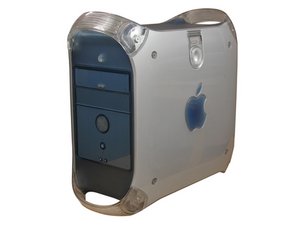
PowerMac G4 M5183 是 AGP 图形系列中的一个机型。所有 AGP 图形系列电脑(包括 M6921、M7232、M7824、M7825 和 M7827 等机型)都存在类似的问题,并有类似的解决方法。
注意: 本故障排除指南涵盖 PowerMac G4(AGP 图形系列)。
PowerMac G4 无法开机
你的电脑无法启动。
如果你的电脑无法开机,没有灯光显示,也听不到风扇运转的声音,请先检查它是否已连接到通电的电源插座。还要检查电脑后面板上的红色电压开关是否设置为正确的电源档位。如果电脑仍然无法通电,可能是你的 PMU 电池没电了、电源适配器故障,或者需要更换逻辑板。
PMU 电池没电
电源管理单元 (PMU) 管理着电脑的所有用电情况。当 PMU 电池没电时,需要更换电池并重置 PMU 板。如需更换 PMU,请查看我们的 PMU 维修指南。
电源适配器故障
如果更换 PMU 电池并重置 PMU 后电脑仍然无法启动,那么你可能需要 更换电脑的电源适配器。
逻辑板故障
如果更换电源适配器后仍未解决 PowerMac 的启动问题,那么你将需要 更换电脑的逻辑板。
显示屏无法工作
显示屏一片漆黑。
显卡故障
首先检查显示器是否正常工作。例如:你应该能看到显示器上的电源指示灯亮起。当你开启电脑时,应该能听到正常的启动声音,这表明电脑正在启动,但没有向显示器发送视频信号。如果显示器功能正常且电脑可以启动,但你只看到黑屏,你将需要 更换显卡。
逻辑板故障
如果更换显卡后仍未解决 PowerMac 的启动问题,那么你将需要 更换电脑的逻辑板。
键盘和/或鼠标无法工作
如果你能接触到另一台电脑,试着将键盘或鼠标插入那台电脑,看看它们是否功能正常。如果它们无法工作,请更换鼠标和键盘。否则,你将需要 更换 PowerMac 的逻辑板。
光驱问题
光盘无法被读取。
光盘损坏
如果光盘无法读取或读取时出现问题,可能是光盘上有划痕。检查光盘底部是否有可见的划痕。
光驱故障
如果光盘没有划痕,你仍然遇到问题,那么你将需要 更换光驱。此类问题包括无法弹出、读取光盘异常、出现尖锐的咔哒声和/或嗡嗡声。
音频问题
如果电脑的音频无法工作,请先检查你所使用的扬声器是否功能正常(即是否插好且已开启)。在另一台确定正常的系统上测试扬声器。如果扬声器功能正常,而电脑只是没有发送音频信号,那么你将需要 更换电脑的逻辑板。
开机时出现闪烁的问号
当电脑无法找到可启动的操作系统时,会显示闪烁的问号。这可能是因为操作系统损坏、电脑内存不足,或者硬盘即将损坏。
操作系统故障
尝试从操作系统 CD 启动。运行 Apple 的磁盘工具并尝试修复磁盘。你也可以尝试 Alsoft 的 DiskWarrior。如果这些方法无效,请重新安装操作系统。如果可以,请在重装系统前抹掉硬盘数据。
内存不足
这种情况相当罕见。如果你的内存不足以让电脑启动操作系统,可能会出现闪烁的问号。安装更多内存 或降级到较旧的操作系统可以解决此问题。运行 OS 9 需要 64MB 内存,运行 OS X 10.0-10.4 需要 128MB 内存,而 OS X 10.5 则需要 512MB 内存。
硬盘故障
硬盘可能已被抹掉、损坏或发生物理故障。如果硬盘已被抹掉,请将其格式化为 HFS+ 并重新安装操作系统。如果硬盘已损坏,你需要更换它。即将损坏的硬盘在完全失效前可能会出现间歇性的数据损坏。它们通常会逐渐变响并开始发出咔哒声。如果硬盘发出异常的咔哒声但仍能工作,请立即备份数据并 更换硬盘。
风扇噪音大
如果电脑风扇噪音很大,请先尝试清理它。如果清理风扇后噪音仍未降低到可接受的水平,那么你应该 更换风扇。
USB、火线 (FireWire)、以太网和/或音频接口无法工作
PowerMac 背面的所有接口(显示接口除外)都直接连接到逻辑板上。如果这些接口中的任何一个无法工作,首先检查接口内是否有杂物或污染物,并清理干净。如果接口仍然故障,那么你的电脑 需要更换逻辑板。
电脑时间不准确
如果你的电脑时间不准确,则说明 PMU 电池没电了,需要更换。电源管理单元 (PMU) 管理着电脑的所有用电情况,并在电脑断电时维持系统时间。当 PMU 电池没电时,需要更换电池并重置 PMU 板。

团队

Cal Poly, Team 13-24, Maness Winter 2010 Cal Poly, Team 13-24, Maness Winter 2010 的会员
CPSU-MANESS-W10S13G24
4 名成员
创作了156篇指南

9条评论
I turned my power Mac G4 on for the first time in 5 years. The computer started just fine, the mouse and keyboard were working just fine. After a few minutes the mouse and keyboard stopped functioning, I tried different USB ports and a different mouse with no luck. I restarted the computer and although the computer turns on, the display won’t startup and the computer starts to sound like the fan is working extra hard. I’ve restarted the computer at least three times now with similar results: no display, no start-up, and fan whirling loudly. Diagnosis?
Austin - 回复 分享
I
Well I'm a ten year old tech kid and my dad's g4 just stopped working. He hasn't used it for about a half a year and we just got a power outage about 2 weeks ago. I don't know if the power outage has anything to do with it but it was on sleep when that happend. I don't know if it needs a new PMU battery or what. maybe it just blew a fuse. I don't know. Tried unplugging and plugging back in. Tried holding down for 20 secs. It won't indicate power on the button board . He doesn't have a Apple studio display. Just a view sonic. Apple pro keyboard and Apple ball mouse. any ideas ?
Tristan - 回复 分享
my problem is where it turns on, makes the startup chime, and tries to look for any startup files, but it doesn’t find any, the keyboard and mouse work, but it makes a VERY high pitched noise, any thoughts on what is causing that? i think its the psu, but i don’t have a working spare to test it, great forum btw.
Mikah Andony - 回复 分享
My problem is on a Power Mac G4 Model M5183 after I replaced the battery and pressed the PSU button. The computer started up normally and I reset the time and clock. Everything worked normally. I restarted the computer from the menu and it came back normally without any problems. However after shutting the computer down from the menu and press the ON button, the computer starts to boot up for 7sec and stops. Nothing appears on the screen. So, I open the computer side panel and pressed the PSU button and pressed the ON button and the computer boots up normally. Shutting down the system from the menu results in no boot up, again. The only way to get to the start up screen is to press the reset PSU button. Using the RESTART from the drop down menu is fine. I tried to use the First Aid on the HD and everything comes back OK. Any comments on how the fix my problem, other than pressing the reset PSU button each time before boot up would be appreciated. Thanks!!
GNOK
Wendell - 回复 分享
I run a Protools mix system on my G4 .As of lately it is booting up saying extensions are off and i can not open anything. Mouse moves but nothing will open up. what do i do ???
oneil gray - 回复 分享