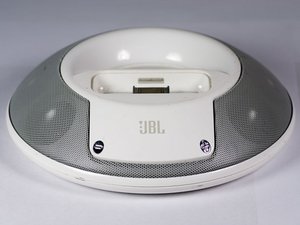
无法为你的 Apple 设备充电
连接时未出现 Apple 设备的充电指示。
检查电源
确保你的底座已连接至墙上插座或电脑,以便为设备充电。
错误消息“此配件不支持充电”
此问题可能是由于底座与 Apple 设备之间的连接不良所致。你可以通过断开 iPhone/iPod 的连接并执行以下操作来解决:
- 等待一分钟后再将其重新连接到 JBL 底座
- 清洁 JBL 底座和 Apple 设备上的连接器
- 重新启动底座和 Apple 设备的电源
无法播放音乐
电源已开启,但 JBL 音箱没有音乐播放。
检查 iPhone/iPod 是否显示已连接
如果你的 Apple 设备未显示已连接,请断开其与 JBL 底座的连接并重新连接。
音量为零
确保音量没有被关闭。调高设备和 JBL 音箱的音量。
通过辅助线缆连接
如果使用辅助线缆而非底座,请确保 JBL 音箱与设备之间的连接没有松动。
如果辅助线缆连接松动:
*断开并重新连接辅助线缆
*否则,请参阅:拆卸电路板
音乐失真
在播放音乐时,JBL 音箱发出静电声、嗡嗡声和/或杂音。
输入线缆连接可能不当
确保输入线缆没有松动。
音量过高
对于某些设备,音量过高可能会导致失真。请调低音量。
均衡器 (EQ) 设置过高
将均衡器设置更改为“平直”或将其关闭。
音源问题
如果失真仅出现在某些歌曲中,则可能是这些歌曲录制或下载不当。请从其他来源重新下载这些歌曲。
音箱松动或断开连接
连接音箱的一根或多根布线已断开。使用此指南重新连接它们:JBL On Stage II 扬声器更换
按钮失灵
音量卡在高音量或低音量位置,或者电源按钮无反应。
音量卡在高音量位置
可能存在短路。 [查看此指南。] 这是芯片级问题,涉及更换电路板上的表面贴装芯片
电源按钮
有关更换损坏按钮的信息,请参阅 JBL On Stage II 电源按钮更换。
底座接口松动
接口松动,导致底座无法播放 iPhone/iPod 中的音乐。
接口损坏
有关更换损坏接口的信息,请参阅 JBL On Stage II 30 针连接器更换。
无法开机
在其他国家/地区使用 JBL 音箱后,音箱现在无法工作。
检查电源
确保你的底座已连接至墙上插座或电脑,以便设备能够正常开机。
电源适配器故障
该设备使用的国家/地区可能与购买或日常使用地的电源标准不同。请购买不同的电源或电源转换器。[guide]

团队

Cal Poly, Team 9-28, Maness Winter 2014 Cal Poly, Team 9-28, Maness Winter 2014 的会员
CPSU-MANESS-W14S9G28
4 名成员
创作了84篇指南

5条评论
Regarding "Volume stuck on high", where is the mentioned guide?
Very frustrating that this speaker doesn't work properly after only 4 years.
goblazers - 回复 分享
I have a JBL micro stage II that worked great in China/HK on my 4th generation iPod. I purchased an iPod Nano Red here in the US, the speaker (using adapter from HK to US power) caused my iPod to skip songs even after a few notes or a few bars. I returned the iPod and it still skipped at the Apple store so it did damage the iPod. When I put in the new iPod, it skipped again. So I stopped using it. I was hoping to change the cord but it seems to be more mechanical than that. An Amazon customer complained of the same skipping.
lindamhot - 回复 分享
Is there a reset button
Roger Dick - 回复 分享
I just get a power hum
Roger Dick - 回复 分享
hi when i put my ipod on the dock the ipod turns it self of n then back on again y is that
tearahi taueki - 回复 分享