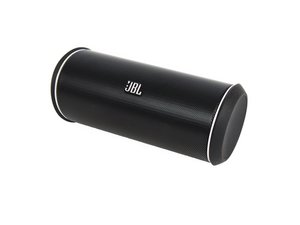
学生贡献的维基
此维基页面由我们教育项目的学生团队编写。
设备无法开机
设备没有反应,或没有任何开机迹象。
电池故障
电池无法保持电量或未达到标称的电池续航时间。JBL Flip 2 的电池需要更换。访问此指南以更换电池 此处。
电池未充电
插入充电线将为电池充电,设备即可开机。
音频失真
设备的扬声器出现噼啪声和/或声音失真。
扬声器故障
扬声器可能会在大音量下出现失真,或者声音闷到无法听清。在这种情况下,必须更换扬声器。如需更换扬声器,点击此指南此处。
声音数据损坏
传输到设备的声音数据可能已损坏。建议尝试使用其他音频文件。
AUX 线缆故障
损坏的 AUX 线缆会导致通过这些线缆播放音乐时数据失真。建议尝试使用另一根 AUX 线缆。
蓝牙连接断开
设备无法保持蓝牙连接和/或根本无法连接。
蓝牙干扰
有时来自其他设备的干扰会导致蓝牙连接断开。这类设备的例子包括 Wi-Fi 源、微波炉和其他电源。
蓝牙天线故障
如果手机或设备无法通过蓝牙连接到音箱,可能需要更换蓝牙天线。如需更换天线,请访问此指南此处。
重置音箱
按住“电源”按钮和“音量减”按钮,直到指示灯变为红色,即可重置 JBL Flip 2。
设备无法充电
设备可以连接,但无法给电池充电。
MicroUSB 充电口故障
如果 MicroUSB 充电口变松且无法给电池充电,则需要安装一个新的 MicroUSB 充电口。如需访问更换指南,请点击此处。
充电线故障
虽然可能性较小,但仍有可能是充电线发生了故障。我们建议尝试使用另一根充电线为 JBL Flip 2 充电。
AUX 接口无音频
设备无法通过 AUX 接口播放音乐。
AUX 接口故障
辅助输入接口允许连接没有蓝牙功能的设备,但有时该接口无法连接到设备。如需更换辅助接口,请点击我们的指南 此处。
AUX 线缆不良
如果 AUX 线缆已损坏,我们建议尝试使用 JBL Flip 2 的蓝牙功能,或者尝试使用另一根线缆播放音乐。

团队

USF Tampa, Team 11-2, Cheng Spring 2016 USF Tampa, Team 11-2, Cheng Spring 2016 的会员
USFT-CHENG-S16S11G2
4 名成员
创作了72篇指南

25条评论
My speaker dropped the Bluetooth connection from my iPad. No matter what I did, (reboot iPad, reset speaker, remove the device from the list, etc), it could not find the device or connect. I got an audio in/out cable and directly connected the speaker to my iPad. The next time I used the speaker, it connected to Bluetooth just fine.
jmyee - 回复 分享
Thank you so much for your input. It is the only way I can pair my JBL with devices. You are a life saver!
alisonzhou - 回复 分享
Ive been charging my phone for a day and a whole night straight, and its still low battery, i tried using another charger but its the same thing happening, i tried clicking the power button long (just like in phones cause that what i thought would work cause im just so paranoid to lose my speaker) then suddenly all the lights in the battery portion lit up even the red light is almost merging with the white light for a second or 2, and i was alarmed. What is happening? Im not sure but it still wont open though. What do i do?
kattrinnep - 回复 分享
My jbl 2 was charging and now it shows red n blue light ! Back n forth n wont come on! What could it be?only had it couple of weeks n never gotten wet or dropped
Emilio Castañeda - 回复 分享
I am not able to reset the speaker by the given method
When speaker if OFF then performing this method turns it ON and vice versa when it is already ON
I am trying to reset speaker because my 2 day old speaker is connecting to Bluetooth just fine but I cannot hear any sound which I am trying to play it from my phone.
Shubh garg - 回复 分享