学生贡献的维基
此维基页面由我们教育项目的学生团队编写。
按钮失灵
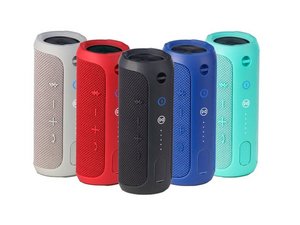
JBL Flip 3 按钮无法正常工作
可能的根本原因
检查设备是否已开机
检查以确保你的设备已开机。
检查电池是否没电
检查设备的电池是否没电,并根据需要充电或更换电池。
考虑设备是否接触过水
尽管 JBL Flip 3 音箱具有防溅功能,但如果按钮长时间接触水(例如设备被浸入水中而非仅仅被溅湿),按钮可能会失灵。
音频断断续续
音频播放断断续续或突然中断
可能的根本原因
蓝牙连接处于边缘范围或超出范围
如果你的设备超出了蓝牙发射器的工作范围,声音可能会断断续续,或突然中断。
物体干扰蓝牙信号
JBL Flip 3 与音频源之间的大型和/或致密物体可能会干扰信号传输,导致音频断断续续或中断。确保音频源与 JBL Flip 3 之间没有遮挡。
设备无法充电
设备电池无法保持电量或无法开始充电
可能的根本原因
检查电源插座
确保充电线已正确插入功能正常的插座中。
检查充电线
如果充电线有外露电线,或者充电线受到过损伤,则问题可能出在充电器本身,而非设备。
正确插入
确保充电线已完全插入设备。
蓝牙连接无响应
JBL Flip 3 无法正常连接蓝牙
可能的根本原因
开启设备
确保设备已正确开机。
拔下任何冲突的音箱
检查你是否连接了耳机或通过 AV 线缆连接了其他设备,这些设备可能会干扰你与 JBL Flip 的连接。
重新连接音乐播放器与音箱
从你设备的蓝牙内存中删除 Flip 音箱,然后重新连接。
与音箱的距离
确保你距离音箱的距离不要太远,以便正确连接。
设备无法开机
设备对按下电源按钮的操作无响应。
可能的根本原因
电池损坏
电池可能已损坏,需要更换。(指向电池更换页面的链接)
短路
电路可能因进水而损坏,可能需要更换电路板。(指向电路板更换页面的链接)
设备没电
将设备连接到充电器。在再次尝试开机前,先让设备充电一段时间。
充电线故障
使用新的充电器连接设备,以检查故障是出在设备还是充电线上。
重置设备
按住电源按钮约 30 秒以重置设备。设备在重置后可能会恢复正常功能。

团队

USF Tampa, Team S1-G2, Leahy Spring 2017 USF Tampa, Team S1-G2, Leahy Spring 2017 的会员
USFT-LEAHY-S17S1G2
5 名成员
创作了60篇指南

89条评论
its been only one week i bought the jbl flip 3. i bought it from japan and brought it in Bangladesh through my cousin. After using it from the 1st day, i have been facing the problem, its taking "auto restart" even though having enough charge left on the speaker. But if i play the speaker connecting through charger, it isn't making any trouble then.
I am looking for urgent solution for the problem.
(P.S. i have updated the firmware version of the speaker too)
Mehedi Hossain Onik - 回复 分享
i had same problem
Brian Knoop - 回复 分享
I am having same problem … how did you solve it ???
Joshi Namdev - 回复 分享
Please tell me how find JBL flip 3 battery and how to replace it ???
Gaurav Kushwaha - 回复 分享
My speaker isn't charging. It's new and on its second charge and the first light goes on when it's connected to power and it flashes but after leaving it charge for an hour or two the same light is still flashing and when try to turn it on the red light comes on and then goes off again.. what do I do?
Taylor - 回复 分享