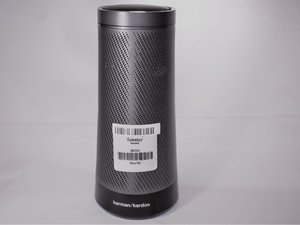
学生贡献的维基
此维基页面由我们教育项目的学生团队编写。
蓝牙传感器信号弱
设备无法通过蓝牙连接其他设备,或无法进入蓝牙配对模式。
开启蓝牙配对
询问 Cortana:“Hey Cortana, pair Bluetooth”,或按住蓝牙配对按钮。进入配对模式时,顶部面板会亮起。进入配对模式后,在你想要连接的设备上开启蓝牙,并选择 Invoke 扬声器。
拔下电源并重新接通
拔下电源线,等待十秒后再重新接通。当 Invoke 重新启动后,尝试再次进入蓝牙配对模式。
Factory reset speaker
=== 恢复出厂设置 ==
警告!所有设置都将被抹除。
在 Invoke 扬声器背面的麦克风开/关按钮左侧,有一个针孔,即恢复出厂设置按钮。用一根小针插入孔中并施加少量压力按下此按钮。如果操作正确,顶部面板将显示一个白圈。
LED 灯光暗淡或无反应
LED 灯不亮,或者有时闪烁,且在设备开启时无法保持常亮。
拔下电源并重新接通
拔下电源线,等待十秒后再重新接通。当 Invoke 重新启动后,检查 LED 灯是否亮起。
恢复出厂设置
警告!!所有设置都将被抹除。
在 Invoke 扬声器背面的麦克风开/关按钮左侧,有一个针孔,即恢复出厂设置按钮。用一根小针插入孔中并施加少量压力按下此按钮。如果操作正确,顶部面板将显示一个白圈。
LED 灯损坏
如果按照上述故障排除步骤后,LED 问题依然存在,可能需要更换 LED。
前往 LED 更换指南
扬声器声音失真
扬声器发出刺耳或不清晰的声音。
拔下电源并重新接通
拔下电源线,等待十秒后再重新接通。当 Invoke 重新启动后,尝试再次进入蓝牙配对模式。
恢复出厂设置
警告!所有设置都将被抹除。
在 Invoke 扬声器背面的麦克风开/关按钮左侧,有一个针孔,即恢复出厂设置按钮。用一根小针插入孔中并施加少量压力按下此按钮。如果操作正确,顶部面板将显示一个白圈。
扬声器故障
如果扬声器持续无法正常发声,可能需要更换一个或所有扬声器。
前往扬声器更换指南
Invoke 无法通电
设备无法启动。
电源线故障
线缆不应有任何撕裂或扭结,连接端不应弯曲或破损。
充电口故障
尝试晃动充电口中的电源线。如果充电口看起来异常松动,则可能需要更换充电口。
前往充电口更换指南
AI 无响应
当说出语音激活指令“Hey Cortana”时,Cortana 没有反应。
确保麦克风已开启
如果麦克风被静音,顶部面板上会出现一个红圈。要开启麦克风,请按下麦克风开/关按钮。
确保 Cortana 已设置好
确保 Cortana 应用已在其他设备上下载,并与 Invoke 扬声器正确设置。

团队

Eastern Washington University, Team S2-G2, Munoz Fall 2018 Eastern Washington University, Team S2-G2, Munoz Fall 2018 的会员
EWU-MUNOZ-F18S2G2
3 名成员
创作了60篇指南

42条评论
My invoke becomes unresponsive after a few mins whenplaying music from a paired Bluetooth device... every time. I did the whole setup as well as factory reset it already and same issue. I only use the invoke as a paired Bluetooth speaker, so it doesn't serve it's purpose when it keeps disconnecting. Please help!
Peter Bootoor - 回复 分享
Same issue here. Feels like the speaker is warm (not hot) near the top. 10-20 min max of play, and it will freeze completely. The light will then go amber and the unit reboots after a while. Really enjoy the sound from this device when it works, so this is very disappointing.
Rich Lockheart - 回复 分享
I am haveing an issue that started yesterday I just moved it to a different location and ever since then the led light sensor has been spiraling around and won’t even let me set it up to an account and so far I have tried holding down the microphone button, unplugging it and plugging it in, hitting the factory reset button. Also I have tried to see if I could do it manually with a mini usb male to usb male port and I did find connection problems because my computer would keep on restarting the device manager when I tried to run it does anyone know how to fix this.
kalebscott7798 - 回复 分享
Any luck? I’m having the same exact issue. One White LED circling around the top display. Powers on but unresponsive to bluetooth, mic button or reset pinhole. I don’t want to throw this speaker away.
rcheing - 回复 分享
Same. Looks like it is dead….
Andrey Stepanoff - 回复 分享