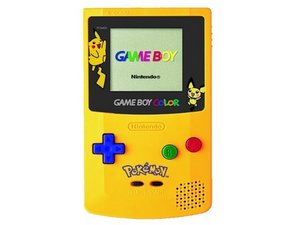
Game Boy Color 无法开机
设备无法开机。
电源开关处于关闭状态
检查电源开关是否处于“开”的位置,确保设备已开启。
电池电量耗尽或损坏
如果你的 Game Boy 无法开机,尤其是有一段时间没用的话,请尝试更换一组全新的 AA 电池。
显示屏故障
检查显示屏右侧的 LED 指示灯。如果它亮起,则可能是显示屏故障,需要进行更换。如需更换 LCD 显示屏,请参考 LCD 显示屏维修指南。
没有声音
你听不到 Game Boy 的扬声器发出任何声音。
声音已关闭
检查以确保声音已开启。如果音量“滚轮”完全拨向左侧,说明音量已调至最低。要开启声音,请将音量滚轮向右(顺时针)拨动,直到达到你想要的音量。
扬声器故障
如果已开启音量但仍然听不到扬声器发声,可能是连接问题或扬声器损坏。为了测试这一点,请将耳机插入游戏主机底部的耳机插孔并试听。如果耳机里能正常听到声音,那么很可能是扬声器硬件出了问题,需要更换该零件。
游戏卡死
当你正在进行激烈的宝可梦战斗时,设备突然停止响应了!
游戏卡带未完全插入
如果卡带没有完全插入,导致与 Game Boy Color 连接不良,可能会引起游戏卡死。请取出游戏卡带并用力重新将其插入卡槽中。当它正确且完全插入时,你应该会听到“咔哒”一声。
卡带内有灰尘
有时灰尘会在游戏卡带中堆积,导致插入 Game Boy 时连接不良。这会使你的主机难以读取卡带中的信息。要解决此问题,请将卡带从 Game Boy 中取出并清理灰尘。最快捷且最常用的方法是直接对着卡带吹气。
按钮失灵或粘滞
按钮无法始终响应按压操作。
清洁按钮
拆开你的设备并取下按钮。请参考 按钮维修指南 查看如何拆下按钮。使用干净的牙刷和温自来水,用牙刷刷洗按钮侧面。清洁后,让按钮彻底晾干,然后再装回设备中。
更换按钮
如果清洁后仍然无效,可能需要更换按钮。同样,按钮维修指南 是拆卸和维修按钮时的良好参考。
屏幕显示颜色溢出或污迹
屏幕上出现了本不该有的明显颜色。
LCD 屏幕破裂
如果 LCD 屏幕上即使在关闭状态下也一直有溢出的颜色或污迹,那么就需要更换 LCD 屏幕。 LCD 显示屏维修指南 概述了如何进行更换。

团队

Cal Poly, Team 19-47, Regan Winter 2013 Cal Poly, Team 19-47, Regan Winter 2013 的会员
CPSU-REGAN-W13S19G47
4 名成员
创作了108篇指南

13条评论
Everything was ok and the Gameboy was running when i kept it in my cupboard 2 years back and now when I took it out to give it to someone it is not turning on . What could be the cause ?? Somebody Please help ??
write2sid - 回复 分享
My Gameboy colour works fine but won't let me play for longer than 2 mins, I only have one game for it at the moment so I'm not sure if it's the game or the console, any ideas?
phoebe hall - 回复 分享
I just got a GBC with no sound so I replaced the speaker and the sound worked but the screen was not functioning normally. I took it apart again and re-seated the cable and now there is no screen at all. The game works as I can hear the sound.
Rodney Hubbard - 回复 分享
I have a gbc I replaced the battries.. it turns on the game is in.. But the screen just has the game boy logo and below is a black bar.. I haven't used this thing in a good 3 years..
Memorie Hoover - 回复 分享
I’ve had that problem, and most likely the Game Pak and/or the pins in the Gameboy need to be cleaned. That, or just turn the Gameboy off and then re-insert the Game Pak.
c08o - 回复 分享