学生贡献的维基
此维基页面由我们教育项目的学生团队编写。
电源无法开启
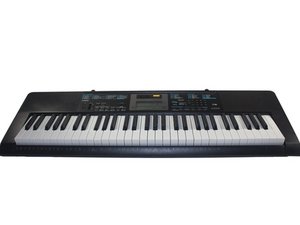
电子琴无响应且无法开启。
电池没电
如果你的电子琴由电池供电,电池可能安装不正确或已没电。请参考本指南进行更换。
电源适配器未完全插好
电源适配器可能未正确插入插座或电子琴。请确保电源适配器完全插入电子琴背面的“DC 9.5V”端口,该端口位于“PHONES/OUTPUT”和“MIC IN/SAMPLING”端口之间。此外,请确保电源适配器已完全插入墙壁插座。如果当前插座无效,请尝试将其插入另一个插座。
电源损坏
检查电源线是否有损坏,例如因卷绕或弯曲电线导致的可见电线或外皮磨损。如果电源线已完全插入 DC 9.5V 端口且无明显损坏,则可能是内部损坏或故障,需要更换。你可以在附近的乐器店或在线购买新的电源供应器。
声音播放不正常
声音无法正常发出或完全没有声音。
音量关闭或连接了耳机
确保电子琴背面“DC 9.5V”端口旁边的黑色圆形 PHONES/OUTPUT(即耳机)端口中没有插入任何设备。如果没有,你可能需要调节电源按钮旁边的黑色音量滑块。如果声音仍不正常,请尝试关闭电源后再重新开启。
扬声器故障
如果上述解决方案无效,则琴键上方的大型黑色长方形扬声器可能已损坏,需要参考本指南进行更换。
电脑连接不工作
电子琴无法与电脑交互。
未完全插好
USB 线缆可能未完全插入设备。请尝试将线缆插入电脑的另一个 USB 端口,或尝试将 USB 线缆重新插入电子琴背面“SUSTAIN”端口旁边的黑色方形 USB 端口。
需要重启软件
尝试关闭电子琴,并通过点击“X”按钮退出音乐软件。重新开启电子琴,然后双击软件图标以重启音乐软件。
琴键无响应
按下黑键或白键时没有声音,或者扬声器发出的声音不正确。
琴键卡住
检查长白键或短黑键之间是否有异物卡住,从而阻碍其按下。如果琴键间有物体卡住,尝试用手指将其取出。如果看不见任何东西,则可能是内部问题,必须参考本维修指南更换卡住的琴键。
系统限制
同时发声的音色上限为 48 种。同时点亮的按键不能超过四个。请停止同时按压超过 4 个琴键。
显示屏无法开启
显示屏无法开启或闪烁。
电池没电
如果显示屏无法开启或正在闪烁,电池可能安装不正确或已没电。请参考本指南进行更换。
显示屏损坏
如果键盘中央的显示屏无法开启或屏幕上没有任何显示,可能需要按照这些步骤进行更换。
按钮失灵
琴键上方的黑色按钮按下时无效或无响应。
按钮卡住
检查按钮侧面是否有异物卡住,导致其无法按下。使用手指或小螺丝刀清除发现的任何异物。
按钮损坏
如果按钮按下后仍无响应,则可能是内部问题,必须通过本维修指南更换按钮。

团队

Cal Poly, Team 13-2, Banghart Winter 2017 Cal Poly, Team 13-2, Banghart Winter 2017 的会员
CPSU-BANGHART-W17S13G2
3 名成员
创作了60篇指南

5条评论
Some keys will not respond but they are not damaged or stuck. Other keys will work but along side pressing them other keys will play there tone and light up while I'm only pressing on one.
Logan h - 回复 分享
I bought my son a Casio lk 100 keyboard on reverb. It came with old batteries in it that seemed to have leaked. Looks like it has not been played in a long time as there were spider webs on it! there was no power supply chord. The keyboard will not turn on with new batteries. Should I invest another 9.00 in a new power supply chord to see if it works? We are traveling and away for over a month and my little guy is missing his piano playing and lessons?
pmwilson2020 - 回复 分享
What if it just keeps turning off for no reason or if it turns off when the volume is high and I press a key on the keyboard
giwaniniola10@gmail.com - 回复 分享
My piano won’t stay on for long! I press the power button but then it will stay on for a short period of time. Then I’ll turn it on but I’ll play a couple keys and it turns off or I’ll press one key and there is a static sound and it all becomes unresponsive. Maybe it’s because I have had this piano for years but it just started acting weird, no one touched it but me.
CAD3NCEPLAYZ - 回复 分享
I've been searching everywhere for a schematic that's actually legible!
The issue with mine is that it'll work with batteries but not power adapter. I tried with a known good adapter. It's getting power. It's obvious a component in the power plug section that's burned out. Nothing appears bad though. This really sux! I bought this for my daughter for her bday and she hasn't even been able to use it!
Heather Hodge - 回复 分享