学生贡献的维基
此维基页面由我们教育项目的学生团队编写。
耳机无法开机
当电源开关处于开启位置时,耳机没有响应。
电池故障
如果已装入电池但电池指示灯不亮,请取出、检查并更换 AAA 电池。电池仓位于右侧耳机的顶部。请确保电池正负极安装正确,正极 (+) 朝下,负极 (-) 朝上。耳机正常工作时,电源指示灯应呈绿色亮起。
电池仓故障
如果电池是新的且极性安装正确,但耳机仍然无法开机,可能是电池仓内有灰尘或杂物。请使用压缩空气吹掉电池仓内的灰尘或杂物。耳机正常工作时,电源指示灯应呈绿色亮起;如果指示灯仍不亮,请使用棉签蘸取酒精清洁接触点。
降噪功能无法工作
音频播放正常,但降噪功能无法工作。
音频设备的音量未同步
如果耳机已开机并正确连接,但降噪功能无法工作,请确保音量旋钮未处于静音状态。如果线控音量已调至所需水平,但音量仍不理想,请确保音频设备已开启且未处于静音状态。
线缆连接不当
确保耳机连接正确。耳机可能连接不当,或者连接处已松动。拔下并重新连接耳机连接器的两端。确保辅助线缆端口内没有阻碍连接的杂物。
音量设置不当
如果耳机音量过大或过小,首先应检查线控。将线控设置为最高档,然后使用音频设备的音量控制将音量调节至所需水平。
音频线缆损坏
检查音频线缆的状况。如果线缆无法正常工作(磨损),你可能需要更换线缆或用电工胶带缠绕包裹。
仅单侧有声音
耳机仅从一侧发出声音。
声道平衡设置偏差
如果耳机仅一侧有声音,可能是声道平衡设置偏差。要确定这一点,你需要检查音频设备的声道平衡水平。如果音频设备具有声道平衡调节功能,则其设置可能不正确。请务必将其调节至中间水平。
连接不当
确保耳机连接正确。线缆可能已松动或连接不当。确保端口内没有杂物阻碍连接。拔下并重新插入线缆插头两端。
麦克风无法工作
线控上的语音控制功能没有响应。
设备不兼容
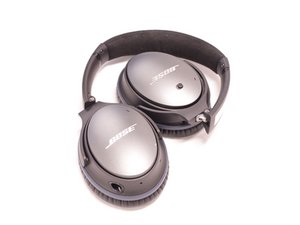
如果线控上的语音控制功能对你的声音没有响应,可能是因为你使用的设备与耳机不兼容。请查阅 Bose QuietComfort 25 的用户手册,确保你使用的是兼容设备。如果你使用的是兼容设备但语音控制仍无响应,则可能需要更换线缆。
连接不当
如果麦克风功能无法工作,线缆可能连接不完整。请检查并确保线缆两端连接正确。确保没有松动的杂物阻塞线缆端口。
音质差(有静电噪音)或无声音
耳机没有声音或声音断断续续。
音频插孔问题
如果扬声器中发出大量的静电噪音,先不要急着拆开耳机。问题可能出在耳机的音频插孔上。测试此问题的最简单方法是将耳机插入另一台设备。如果静电噪音消失,则说明之前的连接可能存在故障。如果静电噪音依然存在,则可能需要修理扬声器。
扬声器损坏
如果扬声器损坏且声音断断续续,则扬声器可能已损坏;这种情况会随时间推移而发生,也可能是由于音量过大造成损耗导致的。要解决此问题,需要找到并安装替换扬声器。

团队

Western Carolina University, Team 1-2, Virtue Spring 2017 Western Carolina University, Team 1-2, Virtue Spring 2017 的会员
WCU-VIRTUE-S17S1G2
4 名成员
创作了24篇指南

19条评论
Awesome!!! Cleaned with cotton stick and alcohol and light is on now'!!!
Debby Kang - 回复 分享
Use cotton stick with alcohol to clean the compartment. Light is on!!! Awesome!
Debby Kang - 回复 分享
Not sure of my problem. But when I try to play music with the noise cancelling on I cannot hear anything. I replaced the battery and the light is green. However now sound comes on. Sound quality is fine and normal if I dont switch on the noise cancelling capability.. Any suggestions?
Ahmed Abid - 回复 分享
I have an issue where sometimes noise only plays from one side, I need to start playing a bit with the headphone and press on the ear area to get the sound back on the other side (cables are plugged-in correctly and working). Any ideas on how to fix this?
Lavinia Speeckaert - 回复 分享
I’ve added this elsewhere, but it’s worth mentioning that many QC25s have a known defect (there are many people reporting this on the Bose forums and elsewhere) where one or the other speaker driver stops working suddenly. This can be distinguished from other issues from the fact that:
1. One side keeps working
2. Pressing the broken side against your head may restore partial function while pressing, and / or result in crackling noises
3. Noise cancelling as well as audio stop working on that side (if it’s just audio, it’s likely a cable issue instead)
If you have these symptoms, it is well worth contacting Bose via phone. Even if you are out of warranty, they will initially offer a replacement with a new unit for $135. I complained about the fact that this a known defect and a lot of money given what I had originally paid for the units, and they dropped the replacement charge to $71 and free shipping. They claim that the replacement units are newly manufactured (not refurbished) and the defect has been fixed.
bob - 回复 分享