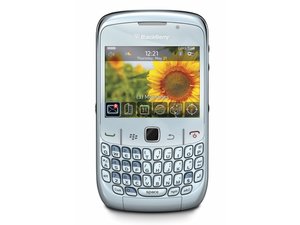
设备无法开机
无论你做什么,你的 BlackBerry 都无法开机。
电源开关
通过按住屏幕下方右侧的 红色电源/挂机 按钮即可开启 8520。
电池电量耗尽/损坏
8520 无法开机可能是因为电池电量耗尽或已损坏。将设备接入相应的充电器充电几分钟,然后再尝试开机。
显示屏故障
如果屏幕看起来没有任何反应,可能是因为显示屏故障。尝试拨打电话进行测试。(在此查看维修指南)。
手机无法充电
手机无法正常充电至满电状态。
老化电池
手机无法充电可能说明电池已经老化。这意味着电池已达到最大使用寿命,需要进行更换。判断电池是否需要更换的一种方法是将其安装到另一台功能正常的同型号手机上进行测试。如果测试手机也出现同样的充电问题,那么请更换电池 (在此查看维修指南)。
充电器损坏
手机无法充电也可能归因于充电器损坏。验证此问题的简单方法是将充电器连接到另一台功能正常的兼容手机上进行测试。如果测试手机无法充电,则请更换充电器。
充电口故障
如果确认电池和充电器都没有问题,那么问题可能出在连接充电器和手机的充电口上。如果是这种情况,则必须更换手机的主板 (在此查看维修指南)。
扬声器无声音
设备功能正常,但没有音频输出。
扬声器损坏
扬声器可能已损坏,需要更换。
软件过时
将你的设备连接到装有 BlackBerry 桌面软件的电脑上。恢复设备软件,如果有更新,请安装最新版本。
设备卡死
手机在进行某些操作后突然变得无响应
执行软重置
长按 红色电源/挂机 按钮直到手机关机。然后再按一次同一个按钮将手机重新开机。如果手机是因为运行了过多应用程序而卡死,这样操作可以让手机重启。
注意:这可以暂时缓解问题,但如果这种情况频繁发生,则可能存在更严重的问题。
软件过时
此问题可能是由软件漏洞或应用程序与手机当前的操作系统不兼容引起的。请将手机连接至电脑并从 BlackBerry 下载最新版本以更新软件。
执行恢复出厂设置
注意:这会将手机重置为出厂初始设置,并清除所有未存储在 SIM 卡上的内部内存数据。在执行此操作前,请先进行系统备份。
步骤:
- 进入 主屏幕 并按下 菜单 键
- 选择 设置
- 选择 选项
- 选择 安全选项
- 选择 常规设置
- 按下 菜单 键
- 选择 擦除手持设备
- 选择 继续
- 输入单词 blackberry
- 按下触控板=== 主板故障 ===
如果所有之前的选项都已尝试过,但手机仍然定期出现卡死现象,则可能是主板的问题。(在此查看维修指南)。
LCD 屏幕不亮
屏幕无法点亮,但手机仍具备其他功能(接听电话、连接电脑等)
取出并重新安装电池
这将执行一次重置,将各种设置恢复到原始出厂水平(包括背光),并可能缓解该问题。关于取出和更换电池的教程可以在 (这里) 查看。
注意:这会导致手机丢失未保存的数据
屏幕损坏
屏幕可能由于物理缺陷(例如裂纹)而失去功能。检查是否有可见的磨损或破裂迹象。如果显示有物理缺陷,则可能需要更换屏幕 (在此查看指南)。
主板故障
如果屏幕没有明显的损坏迹象,且之前未出现过此问题,则这可能是一个涉及主板故障的软件问题。如果是这种情况,则必须按照 (这里) 所示的教程更换主板。
触控板无响应
触控板对操作没有反应。
触控板故障
如果触控板按钮看起来僵硬、损坏或缺失,则需要更换。
主板故障
如果触控板没有任何故障史且没有损坏迹象,则可能是主板坏了;在这种情况下,请更换主板 (在此查看指南)。

团队

Cal Poly, Team 9-62, Walters Spring 2011 Cal Poly, Team 9-62, Walters Spring 2011 的会员
CPSU-WALTERS-S11S9G62
5 名成员
创作了60篇指南

10条评论
I have changed trackpad three times still it sometimes works sometimes not please tell me the solution what I can do? I m not interested to change my 8520 curve if any one has solution tell me on my mail id
gurinder782000 - 回复 分享
My Blackberry curve battery is creating a problem. It starts charging when plugged in. Some times after hours of charging, battery doesn't increase even 1% and sometimes it gets 30% charging in an hour. I have tried replacing of battery and battery charger both but none of them solved my problem. Please suggest better solution or else delete these obvious suggestions which are generally not needed by any user.
munirdayani - 回复 分享
hello good morning to all i have a problem in my device it cannot turn on it was showing the reading only and stay like that... who will helo on me when i try to removed the battery the put back again it show the white word blackberry it means reading then after that it shows only the blue word blackberry i dont know what i can do??? pls.. help me...
mariane paralejas - 回复 分享
my blackberry 8520 is completely frozen with a back wall paper with the blackberry logo and it says original blackberry smartphone. even if i take the battery out it goes straight back to that. i cant do anything. what do i now do and what is the problem?
Jane - 回复 分享
Hi Bro,i tried to upgrade my OS blackberry 8520 curve through PC,while the process is on unknowingly the USB wire got disconnected from the computer.Now my phone is just loading and loading and not getting started.Please help me to rework my blackberry curve.
Ananth - 回复 分享