跳转到主内容
加入维修社区 - 创建账户

你所需要的

本篇指南是分解流程而非维修指南。 如果您要维修您的Magic Trackpad,应参考我们的维修指南

    1. Magic Trackpad 拆解, Magic Trackpad 拆解: 步骤 1 中的图像 1,3 Magic Trackpad 拆解, Magic Trackpad 拆解: 步骤 1 中的图像 2,3 Magic Trackpad 拆解, Magic Trackpad 拆解: 步骤 1 中的图像 3,3
      • Magic Trackpad 是首款支持全套手势的台式机触控板,包括点击、滚动、轻扫和旋转,动动手指即可完成。

      • 要求:

      • Mac 台式机或笔记本电脑。

      • 蓝牙连接功能。

      • Mac OS X 10.6.4 或更高版本。

      • 当然,还有电池!(Apple 电池充电器 不包含在内)。

      • 正如 传闻 所证实,Magic Trackpad 的型号为 A1339。

      询问修复机器人

      添加评论

    2. Magic Trackpad 拆解: 步骤 2 中的图像 1,3 Magic Trackpad 拆解: 步骤 2 中的图像 2,3 Magic Trackpad 拆解: 步骤 2 中的图像 3,3
      • 这款 Magic Trackpad 的面积比目前 MacBook Pro 机型所配备的触控板大 80%。

      • 它采用了与其无线键盘相同的铝合金设计,实现了打字与手势操作的完美结合。

      • 当然,我们不能忘记它最吸引人的地方:那块 0.5 毫米厚、支持电容式触控且耐磨的玻璃表面。

      • 这些都很棒,但其内部结构究竟如何呢?

      询问修复机器人

      添加评论

    3. Magic Trackpad 拆解: 步骤 3 中的图像 1,3 Magic Trackpad 拆解: 步骤 3 中的图像 2,3 Magic Trackpad 拆解: 步骤 3 中的图像 3,3
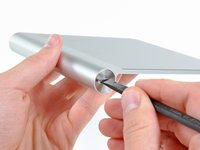
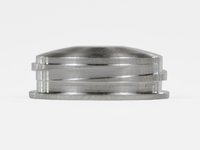
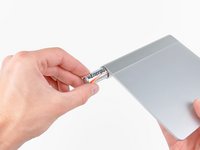
      • 拆卸电池的过程非常简单直接。旋转一下电池盖,两节 AA 电池就会滑出。

      • 看看这些 方扣螺纹!虽然方扣螺纹在所有导螺杆中拥有最高的 机械效率,但其制造难度使其难以在大多数应用中普及。

      • 苹果,为你关注细节的作风点赞。

      添加评论

    4. Magic Trackpad 拆解: 步骤 4 中的图像 1,3 Magic Trackpad 拆解: 步骤 4 中的图像 2,3 Magic Trackpad 拆解: 步骤 4 中的图像 3,3
      • 准备动手吧!

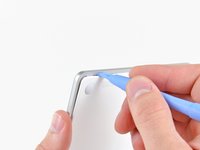
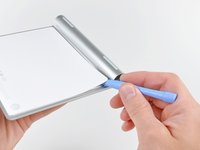
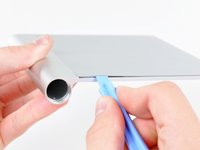
      • 使用塑料开启工具撬开下盖板,使其与周围左侧、右侧和顶部边缘的胶水分离。

      • 不要沿着底部撬起。那里有很多固定卡扣。

      • 切断大部分胶水后,下盖板就可以直接取下了。

      添加评论

    5. Magic Trackpad 拆解: 步骤 5 中的图像 1,3 Magic Trackpad 拆解: 步骤 5 中的图像 2,3 Magic Trackpad 拆解: 步骤 5 中的图像 3,3
      • 这个东西……其实没什么复杂的。

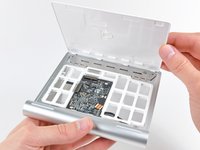
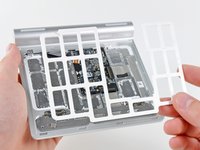
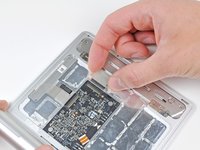
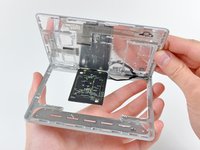
      • 经过一番准非破坏性的撬动后,可以将内部垫片从触控板上取下。

      • 这个垫片旨在防止一种极不可能发生的情况,即下盖板被挤压得足够用力,从而损坏逻辑板。

      询问修复机器人

      添加评论

    6. Magic Trackpad 拆解: 步骤 6 中的图像 1,3 Magic Trackpad 拆解: 步骤 6 中的图像 2,3 Magic Trackpad 拆解: 步骤 6 中的图像 3,3
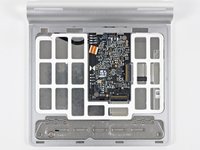
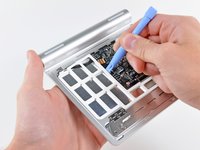
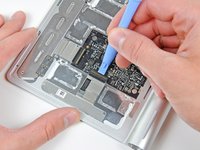
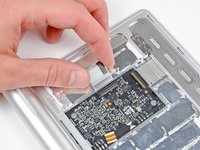
      • 接下来,断开连接电容式触摸板与逻辑板的两条排线。

      • 这些排线非常薄,而且粘贴在触摸板的底部。如果你打算拆下它们,请务必小心。

      询问修复机器人

      添加评论

    7. Magic Trackpad 拆解: 步骤 7 中的图像 1,2 Magic Trackpad 拆解: 步骤 7 中的图像 2,2
      • 我们注意到苹果新产品的设计趋势:轻薄美观 = 不易于用户维修。Magic Trackpad 也不例外。

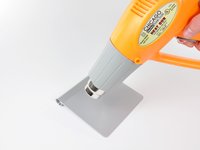
      • 在使用热风枪加热粘合剂后,可以小心地将触控板从铝合金底壳上撬下。

      • 这并非易事。我们需要大量的热量、开启撬片和塑料开启工具,才让这东西有所松动。

      添加评论

    8. Magic Trackpad 拆解: 步骤 8 中的图像 1,2 Magic Trackpad 拆解: 步骤 8 中的图像 2,2
      • 在松开将其固定在机身上的粘合剂后,即可轻松拆下触控板。

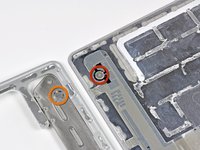
      • 这款 Magic Trackpad 使用一种独特的方式来触发鼠标按键。当你按压触控板顶部表面时,其前端边缘附近的两个橡胶垫会向上顶起连接在机身上的铰接板和紧定螺丝(图中橙色部分)。这会挤压电子鼠标按键开关(图中红色部分),从而产生标志性的“咔哒”声。

      添加评论

    9. Magic Trackpad 拆解: 步骤 9 中的图像 1,2 Magic Trackpad 拆解: 步骤 9 中的图像 2,2
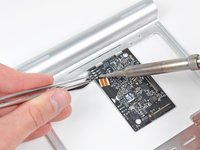
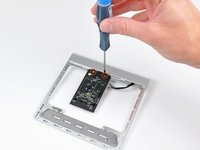
      • 要彻底拆下逻辑板,你必须先对连接至电池连接器/状态 LED 的四根导线进行解焊。

      • 拆下两颗十字螺丝后,即可将逻辑板从机壳中分离出来。

      添加评论

    10. Magic Trackpad 拆解: 步骤 10 中的图像 1,2 Magic Trackpad 拆解: 步骤 10 中的图像 2,2
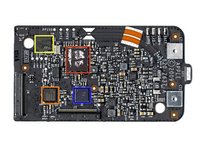
      • 在 Magic Trackpad 的逻辑板核心位置,有一颗用于蓝牙连接功能的 Broadcom BCM2042 芯片。

      • 这与 Magic Mouse 用于数据传输的芯片相同。

      • 我们找到了一颗 Broadcom BCM5974 触摸屏控制器芯片,它提供了多点触控功能。

      • 这与你在 iPhone、iPod Touch 和 MacBook Air 中看到的芯片是同一款。

      • 此外,一颗 SST 25WF020 提供了 2 Mbit 的串行闪存。

      • 这看起来是一颗 TI CD3238,Hearst 已将其确认为 RS232 线路驱动器/接收器。它也出现在最初带有 BCM5973A 的 iPhone 中。

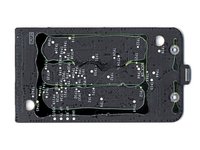
      • 逻辑板的背面除了一片漆黑和胶水外,别无他物。

      添加评论

    11. Magic Trackpad 拆解: 步骤 11 中的图像 1,1
      • 这就是它了:Magic Trackpad 被拆解成了九个难以重新组装的零件。

      • 关注我们的 拆解 页面,获取最新设备的内部解析!

      询问修复机器人

      添加评论

23指南评论

A great tear down. One question: Where is the bluetooth antenna? Is it just etched into the circuit board?

Doug - 回复 分享
Good question. It looks like the curved traces along the top of the board seen on step 10 could be the antenna, and they lead to a small metal pressure contact that mates into the aluminum chassis. My guess is that the chassis of the trackpad and/or those curved traces serve as the antenna.

Andrew Bookholt - 回复 分享

Step 3c, I was expecting to see an Apple-branded battery instead of a bunny-battery. When you get the Apple batteries, is there any reason to tear one of those apart to see if Apple is merely re-labeling someone else's battery or if they actually are building AA batteries?

plink53 - 回复 分享

Apple does not produce batteries, as much as they don’t produce LCD panels or SoC chips - at best, they design them or define specs, but mostly just source it from suppliers, such as Samsung (and SDI), LG and Desay. It makes no financial sense to be a one stop shop - and that’s why Trump’s Nevo-mercantilism is a sure fail. Sorry about the politics - it’s a *charged* topic lolz ;)

Idan - 回复 分享

Step 10, "2Mbit of serial flash memory" This means this device might be capable of storing/receiving data from the attached computer. It will be something we get to investigate to see what type of data it holds to see how it has to be treated in a government setting.

plink53 - 回复 分享

添加评论

浏览统计数据:

过去 24 小时: 11

过去 7 天: 67

过去 30 天: 241

总计 266,433