跳转到主内容
加入维修社区 - 创建账户

此翻译可能不反映源指南的最新更新。 帮助更新翻译查看源指南

why! N650DU RAM Memory

你所需要的

    1. why! N650DU RAM Memory, The Batteries: 步骤 1 中的图像 1,3 why! N650DU RAM Memory, The Batteries: 步骤 1 中的图像 2,3 why! N650DU RAM Memory, The Batteries: 步骤 1 中的图像 3,3
      • Unlock the button without spring

      • Slide the battery up while unlocking the button with spring

      询问修复机器人

      添加评论

    1. why! N650DU RAM Memory, Access to major components: 步骤 2 中的图像 1,3 why! N650DU RAM Memory, Access to major components: 步骤 2 中的图像 2,3 why! N650DU RAM Memory, Access to major components: 步骤 2 中的图像 3,3
      • Unscrew the two large screws circled in red

      • Unscrew the two small screws circled in green

      • Slide the plate down and lift the

      询问修复机器人

      添加评论

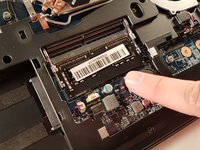
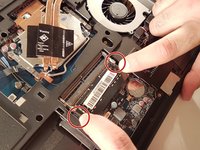
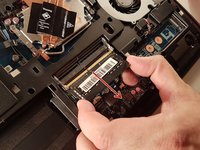
    1. why! N650DU RAM Memory, RAM memory: 步骤 3 中的图像 1,3 why! N650DU RAM Memory, RAM memory: 步骤 3 中的图像 2,3 why! N650DU RAM Memory, RAM memory: 步骤 3 中的图像 3,3
      • Spread the two arms holding the RAM bar

      • Remove the RAM card

      询问修复机器人

      添加评论

结论

To reassemble your device, follow the instructions in reverse order.

取消:我没有完成这个指南。

由衷感谢以下译者:

fr en

75%

irlanda正在帮助我们修复这个世界! 您也想加入吗?
开始翻译 ›

Felice Suglia

于06/15/13注册

33,634 声望

创作了283篇指南

0指南评论

添加评论

浏览统计数据:

过去 24 小时: 0

过去 7 天: 5

过去 30 天: 33

总计 545