此翻译由机器生成,尚未经过人工审核。 会说这种语言吗? 查看评论。

iPhone 3GS 后盖更换

最后更新于 2026年8月8日
浏览量: 54万
浏览统计数据:
- 过去24小时
- 9
- 过去 7 天:
- 53
- 过去 30 天:
- 240
- 总计
- 540,761
评论: 243
234 comments on steps, 9 guide comments.
Go to guide comments已完成: 292 293
292 人已将本指南标记为“已完成”。你会是下一个完成的人吗?
293 人已将本指南标记为“已完成”。包括你——干的漂亮!
收藏: 338 339
338 人已收藏(并订阅)本指南。你会是下一个吗?
339 人收藏(并订阅)了本指南——这其中包括你!


-
-
-
-
移除下列的 8 颗螺丝:
-
用于将主板固定至后壳的五颗 2.3 mm #00 半螺纹十字螺丝。
-
用于固定主板和摄像头的两颗 2.3 mm #00 全螺纹十字螺丝。
-
在 “Do not remove” 贴纸下方的一颗 2.9 mm #00 十字螺丝。
-
装回时的说明:
-
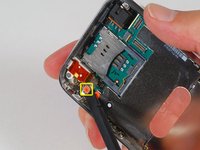
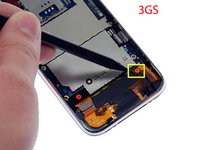
摄像头旁的那颗螺丝(右下角高亮标记的螺丝)有一条用于固定摄像头在位的金属条。
-
-
-
-
拆下以下 4 颗螺丝:
-
三颗 1.8 mm Phillips #00 螺丝,用于将耳机插孔和 GPS 天线固定在后壳上。请留意你拆下螺丝的顺序,因为左侧的那颗螺丝头稍大一些。
-
一颗位于耳机插孔附近塑料环中的 3.8 mm Phillips #00 螺丝。
-
-
-
-
-
-
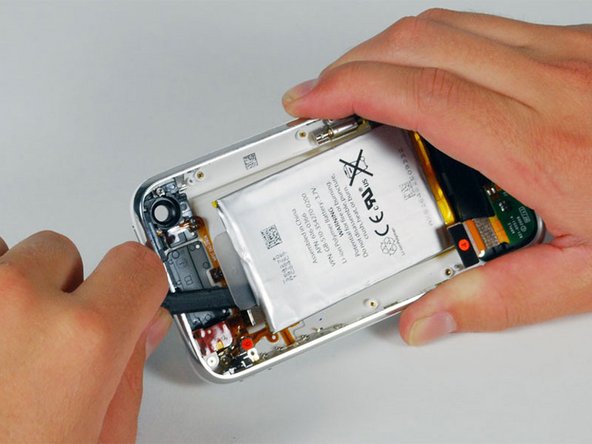
拧下两颗固定振动器与后壳的 1.9 mm Phillips #00 螺丝。
-
将振动器提起并从 iPhone 中取出。
-
请将这些螺丝与其他螺丝分开存放,因为它们的直径比其他螺丝更小。
-


 询问修复机器人






要重新组装设备,请按相反顺序执行这些说明。
292等其他人完成本指南。

9指南评论
I did it, including the removing of the bezel from the old rear panel and gluing it again on the new one.
It would be helpful to indicate that it could be necessary to reactivate the iPhone when finished, by pressing the Home an Power button for 10 seconds... And also perhaps to precise that the connector 3 must simply be pushed forward, as it is just slipped into the connector, on some models at least.
This is an awesome and easy to follow guide. I just reassembled my 3GS and have a couple of issues to resolve. The touch screen is the main issue. The touch screen works, but the calibration is off. Takes a few swipes to get it out of sleep mode and the keyboard response is haphazard. Any ideas what can be done to fix this. The other issue is SIM slot. No problem inserting the card, but can not pop it out. I know this has to do with the spacer because my back cover did not have a pre-drilled hole. I drilled one, but had problems seating the part. I figure I will fill the hole with plastic epoxy and re-drill unless someone has a suggestion. Perhaps I should order a new back with the hole drilled.
I was a bit daunted by the 'very difficult' rating of this one but went ahead anyway. Complete success, took me about 2 hours altogether as I went pretty slowly through the teardown. I am 61 years old, a woman, and have never taken a phone apart before. Just thought this might encourage some others, but extreme care is needed.
sudayamail - 回复 分享
Guide so should be completed all the way around for reassembly.
My iPhone 3GS had some issues with the mute button and on/off switch (not working properly) that I couldn't fix.
Also after reassembly the front metal bazel is not properly adherent as to the real panel as it was in origin.
Any suggestions?
Thanks iFixit!!!
I did it, thanks to you guys! Had to change the backcover, the power button and the mute button of an IPhone 3GS and thanks to you it was a success. Struggled a few times. Took me a long time to detach the battery from the old backcover. And the end of the disassembly there are a few steps missing in the tutorial since I had to transplant every little bit in the new backcover but I figured it out. When reassembling, steps 22-20 almost made me cry - $*&! mute button! Now the phone can be used again although some buttons do not work that good (tactile feedback is missing on the power and the volume buttons). By the way: it took me almost six hours to take the phone apart and put it back together. I'm still happy!
