跳转到主内容
加入维修社区 - 创建账户

iPad 3G Home Button Switch Replacement

你所需要的

  1. iPad 3G Home Button Switch Replacement, Display Assembly: 步骤 1 中的图像 1,3 iPad 3G Home Button Switch Replacement, Display Assembly: 步骤 1 中的图像 2,3 iPad 3G Home Button Switch Replacement, Display Assembly: 步骤 1 中的图像 3,3
    • If your display glass is cracked, keep further breakage contained and prevent bodily harm during your repair by taping the glass.

    • Lay overlapping strips of clear packing tape over the iPad's display until the whole face is covered.

    • This will keep glass shards contained and provide structural integrity when prying and lifting the display.

    • Do your best to follow the rest of the guide as described. However, once the glass is broken, it will likely continue to crack as you work, and you may need to use a metal prying tool to scoop the glass out.

    • Wear safety glasses to protect your eyes, and be careful not to damage the LCD screen.

    询问修复机器人

    添加评论

  2. iPad 3G Home Button Switch Replacement: 步骤 2 中的图像 1,2 iPad 3G Home Button Switch Replacement: 步骤 2 中的图像 2,2
    • The iPad shown in the photos may look slightly different from your iPad, but the procedure is the same.

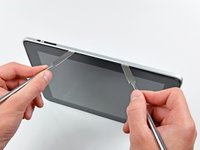
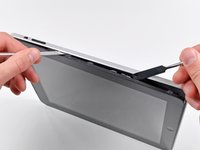
    • Insert a metal spudger between the right edge of the display assembly and the rear panel assembly.

    • Rotate the spudger away from you to release the tabs along the top edge of the display.

    添加评论

  3. iPad 3G Home Button Switch Replacement: 步骤 3 中的图像 1,2 iPad 3G Home Button Switch Replacement: 步骤 3 中的图像 2,2
    • Insert a second metal spudger between the top edge of the display assembly and the rear panel assembly to keep the tabs from snapping back into place.

    • Pry the display assembly away from the rear panel.

    询问修复机器人

    添加评论

  4. iPad 3G Home Button Switch Replacement: 步骤 4 中的图像 1,2 iPad 3G Home Button Switch Replacement: 步骤 4 中的图像 2,2
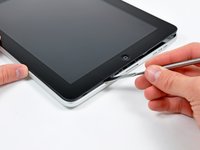
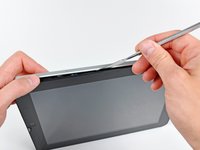
    • Continue prying the display assembly away from the rear panel along the bottom and left edges of the iPad.

    • Use extreme caution as you approach the top edge of the iPad. The digitizer ribbon cable is located near the edge of the rear panel and can easily be damaged.

    添加评论

  5. iPad 3G Home Button Switch Replacement: 步骤 5 中的图像 1,1
    • Lift the display assembly away from the rear panel assembly by its bottom edge.

    • Do not excessively lift the display assembly off the rest of the iPad, as a fragile antenna cable with very little slack still connects the two components.

    添加评论

  6. iPad 3G Home Button Switch Replacement: 步骤 6 中的图像 1,1
    • Use the flat end of a spudger to pry the antenna connector closest to the bottom of the iPad up off its socket on the communications board.

    添加评论

  7. iPad 3G Home Button Switch Replacement: 步骤 7 中的图像 1,1
    • In the following steps, you will disconnect the three cables attaching the display assembly to the logic board. The cables are for the following components:

    • Digitizer

    • Ambient Light Sensor

    • Display Data Cable

    询问修复机器人

    添加评论

  8. iPad 3G Home Button Switch Replacement: 步骤 8 中的图像 1,3 iPad 3G Home Button Switch Replacement: 步骤 8 中的图像 2,3 iPad 3G Home Button Switch Replacement: 步骤 8 中的图像 3,3
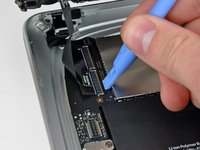
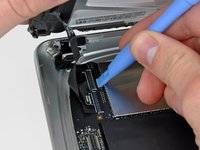
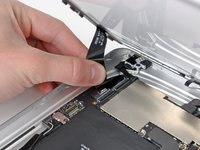
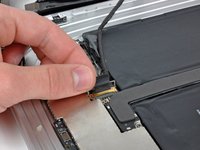
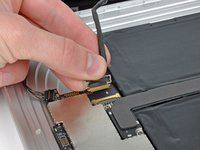
    • Use the edge of an iPod opening tool to flip up the retaining flaps holding the digitizer ribbon cables in their sockets on the logic board.

    • Be sure you are flipping up the retaining flap, not the socket itself.

    • Pull the digitizer ribbon cables straight out of their sockets.

    询问修复机器人

    添加评论

  9. iPad 3G Home Button Switch Replacement: 步骤 9 中的图像 1,1
    • Use an iPod opening tool to remove the ambient light sensor connector from its socket by gently prying upward.

    询问修复机器人

    添加评论

  10. iPad 3G Home Button Switch Replacement: 步骤 10 中的图像 1,2 iPad 3G Home Button Switch Replacement: 步骤 10 中的图像 2,2
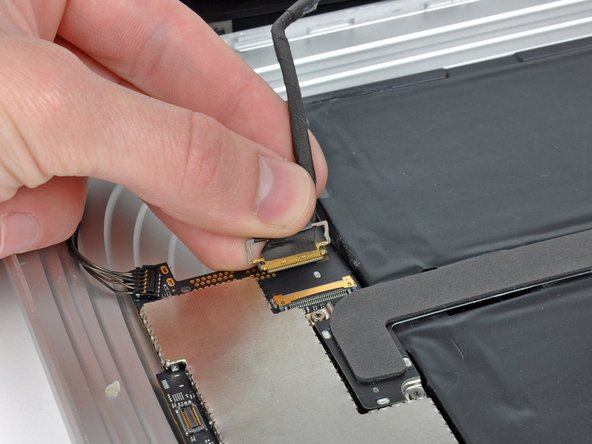
    • Disconnect the display data cable from the main board by flipping up the metal retainer by its black plastic pull tab.

    • Pull the cable connector away from its socket.

    • Pull the connector parallel to the face of the logic board.

    添加评论

  11. iPad 3G Home Button Switch Replacement: 步骤 11 中的图像 1,1
    • Remove the display assembly from the rear panel assembly.

    询问修复机器人

    添加评论

  12. iPad 3G Home Button Switch Replacement, Home Button Switch: 步骤 12 中的图像 1,1
    • Remove the two T5 Torx screws securing the home button switch board to the display frame.

    询问修复机器人

    添加评论

  13. iPad 3G Home Button Switch Replacement: 步骤 13 中的图像 1,1
    • Remove the home button switch board from the display frame.

    询问修复机器人

    添加评论

结论

To reassemble your device, follow these instructions in reverse order.

取消:我没有完成这个指南。

7等其他人完成本指南。

0指南评论

添加评论

浏览统计数据:

过去 24 小时: 2

过去 7 天: 11

过去 30 天: 70

总计 27,138