跳转到主内容
加入维修社区 - 创建账户

Yujin Robot iCLEBO Arte Battery Replacement Guide

你所需要的

  1. Yujin Robot iCLEBO Arte Battery Replacement Guide, Battery: 步骤 1 中的图像 1,3 Yujin Robot iCLEBO Arte Battery Replacement Guide, Battery: 步骤 1 中的图像 2,3 Yujin Robot iCLEBO Arte Battery Replacement Guide, Battery: 步骤 1 中的图像 3,3
    • Locate and unscrew the two 15mm screws with a Phillips #2 screwdriver.

    询问修复机器人
  2. Yujin Robot iCLEBO Arte Battery Replacement Guide: 步骤 2 中的图像 1,3 Yujin Robot iCLEBO Arte Battery Replacement Guide: 步骤 2 中的图像 2,3 Yujin Robot iCLEBO Arte Battery Replacement Guide: 步骤 2 中的图像 3,3
    • Remove both screws shown by rotating them counter-clockwise.

    询问修复机器人
  3. Yujin Robot iCLEBO Arte Battery Replacement Guide: 步骤 3 中的图像 1,1
    • Remove the battery compartment's lid.

    询问修复机器人
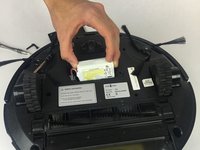
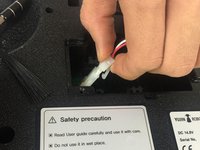
  4. Yujin Robot iCLEBO Arte Battery Replacement Guide: 步骤 4 中的图像 1,2 Yujin Robot iCLEBO Arte Battery Replacement Guide: 步骤 4 中的图像 2,2
    • Slide the battery out, and disconnect it from the robot by squeezing the tab on the power cable.

    • If you pull too hard on the connector without properly squeezing the tab, something will break.

    询问修复机器人
结论

To reassemble your device, follow these instructions in reverse order.

另外一个人完成了本指南。

Trent Bingel

于02/28/17注册

437 声望

创作了4篇指南

团队

USF Tampa, Team S2-G3, Nance Spring 2017 USF Tampa, Team S2-G3, Nance Spring 2017 的会员

USFT-NANCE-S17S2G3

4 名成员

创作了14篇指南

1指南评论

Tried 2 different new batteries and still won’t charge

desrn55 - 回复 分享

添加评论

浏览统计数据:

过去 24 小时: 0

过去 7 天: 6

过去 30 天: 29

总计 3,091