跳转到主内容
加入维修社区 - 创建账户

Wen 2307 Power Cable Replacement

你所需要的

    1. Wen 2307 Power Cable Replacement, Front Panel: 步骤 1 中的图像 1,1
      • Unscrew the locking sleeve.

      询问修复机器人

      添加评论

    2. Wen 2307 Power Cable Replacement: 步骤 2 中的图像 1,1
      • Remove the hanging clip.

      询问修复机器人

      添加评论

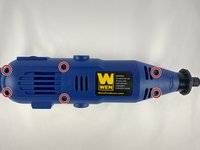
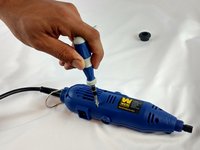
    3. Wen 2307 Power Cable Replacement: 步骤 3 中的图像 1,2 Wen 2307 Power Cable Replacement: 步骤 3 中的图像 2,2
      • Unscrew the six 8mm PH2 screws.

      询问修复机器人

      添加评论

    4. Wen 2307 Power Cable Replacement: 步骤 4 中的图像 1,1
      • While pressing the spindle lock button, unscrew the collet nut and remove it along with the brass collet.

      询问修复机器人

      添加评论

    5. Wen 2307 Power Cable Replacement: 步骤 5 中的图像 1,1
      • To remove the front panel, pry the device apart while holding the device with the other hand.

      • The front panel should come out easily.

      询问修复机器人

      添加评论

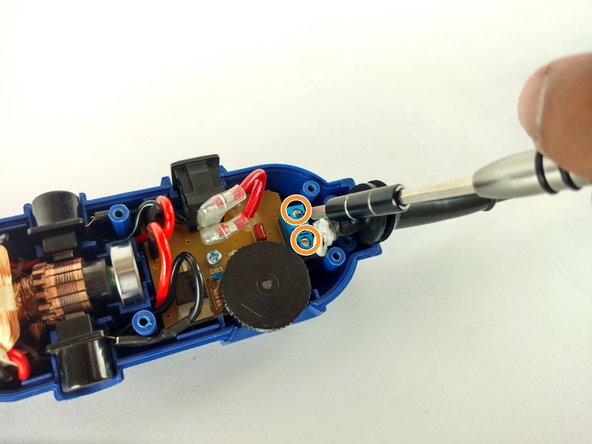
    1. Wen 2307 Power Cable Replacement, Power Cable: 步骤 6 中的图像 1,2 Wen 2307 Power Cable Replacement, Power Cable: 步骤 6 中的图像 2,2
      • Identify the screws.

      • Unscrew the two 3mm phillips PH2.

      • Don't forget to put them appart from the ones unscrewed before.

      • Don't forget to put them appart from the ones unscrewed before.

      • Phillips PH2

      • Flathead 2.5mm

      询问修复机器人

      添加评论

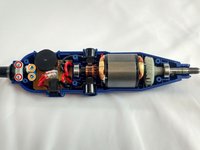
    2. Wen 2307 Power Cable Replacement: 步骤 7 中的图像 1,1
      • Remove the place boar carefully.

      询问修复机器人

      添加评论

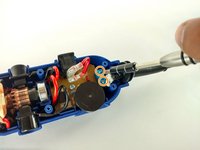
    3. Wen 2307 Power Cable Replacement: 步骤 8 中的图像 1,1
      • Pull out the power cable connectors.

      询问修复机器人

      添加评论

    4. Wen 2307 Power Cable Replacement: 步骤 9 中的图像 1,1
      • Pull out the cord sleve for the new cable replacement.

      询问修复机器人

      添加评论

结论

To reassemble your device, follow these instructions in reverse order.

取消:我没有完成这个指南。

团队

USF Tampa, Team 12-1, Eyestone Spring 2016 USF Tampa, Team 12-1, Eyestone Spring 2016 的会员

USFT-EYESTONE-S16S12G1

4 名成员

创作了13篇指南

0指南评论

添加评论

浏览统计数据:

过去 24 小时: 1

过去 7 天: 7

过去 30 天: 27

总计 806