跳转到主内容
加入维修社区 - 创建账户

Verizon Ellipsis Jetpack MHS800L Screen Replacement

你所需要的

    1. Verizon Ellipsis Jetpack MHS800L Screen Replacement, Plastic Case: 步骤 1 中的图像 1,3 Verizon Ellipsis Jetpack MHS800L Screen Replacement, Plastic Case: 步骤 1 中的图像 2,3 Verizon Ellipsis Jetpack MHS800L Screen Replacement, Plastic Case: 步骤 1 中的图像 3,3
      • Remove the SIM card, that is located on top of the Jetpack.

      询问修复机器人
      添加评论

    2. Verizon Ellipsis Jetpack MHS800L Screen Replacement: 步骤 2 中的图像 1,3 Verizon Ellipsis Jetpack MHS800L Screen Replacement: 步骤 2 中的图像 2,3 Verizon Ellipsis Jetpack MHS800L Screen Replacement: 步骤 2 中的图像 3,3
      在这个步骤中使用的工具:
      Phillips #00 Screwdriver
      $5.49
      • With the device on its back and the label facing you, remove the rubber screw cover on the top left corner of the device.

      • Under the rubber circle, remove the 1.25 mm screw using a Phillips #00 Screwdriver.

      • You may need to peel back a piece of double sided tape covering the screw hole.

      询问修复机器人

      添加评论

    3. Verizon Ellipsis Jetpack MHS800L Screen Replacement: 步骤 3 中的图像 1,1
      • Remove three 1.25 mm screws.

      添加评论

    4. Verizon Ellipsis Jetpack MHS800L Screen Replacement: 步骤 4 中的图像 1,1
      在这个步骤中使用的工具:
      iFixit Opening Picks (Set of 6)
      $4.95
      询问修复机器人
      添加评论

    5. Verizon Ellipsis Jetpack MHS800L Screen Replacement: 步骤 5 中的图像 1,1
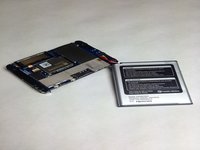
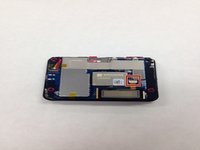
      • Once the cover is off, this is what your device will look like.

      询问修复机器人
      添加评论

    1. Verizon Ellipsis Jetpack MHS800L Screen Replacement, Battery: 步骤 6 中的图像 1,2 Verizon Ellipsis Jetpack MHS800L Screen Replacement, Battery: 步骤 6 中的图像 2,2
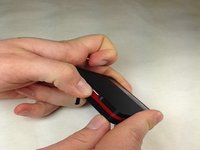
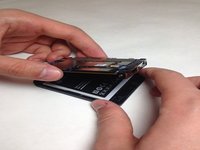
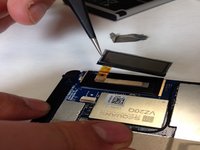
      • Once you have the case off of your device gently pull your battery away from the device.

      • Do not attempt to completely remove the battery, as it is still attached to the motherboard by wires.

      询问修复机器人
      添加评论

    2. Verizon Ellipsis Jetpack MHS800L Screen Replacement: 步骤 7 中的图像 1,2 Verizon Ellipsis Jetpack MHS800L Screen Replacement: 步骤 7 中的图像 2,2
      在这个步骤中使用的工具:
      Tweezers
      $4.99
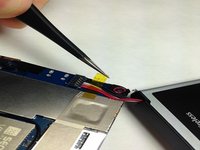
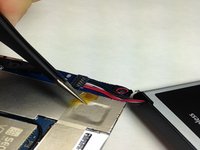
      • With a pair of Tweezers remove the yellow tape covering the battery wires.

      询问修复机器人

      添加评论

    3. Verizon Ellipsis Jetpack MHS800L Screen Replacement: 步骤 8 中的图像 1,1
      在这个步骤中使用的工具:
      Tweezers
      $4.99
      • After removing the tape you may use the Tweezers to remove the wiring harness from the circuit board.

      • Do not squeeze the wires to hard you may damage them and cause a short.

      添加评论

    4. Verizon Ellipsis Jetpack MHS800L Screen Replacement: 步骤 9 中的图像 1,1
      • You may now replace the battery in your Verizon Ellipsis Jetpack MHS800L.

      添加评论

    1. Verizon Ellipsis Jetpack MHS800L Screen Replacement, Screen: 步骤 10 中的图像 1,3 Verizon Ellipsis Jetpack MHS800L Screen Replacement, Screen: 步骤 10 中的图像 2,3 Verizon Ellipsis Jetpack MHS800L Screen Replacement, Screen: 步骤 10 中的图像 3,3
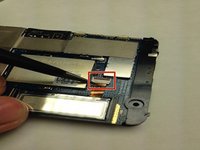
      • Locate the LCD screen cable and unlatch the harness connection form the circuit board.

      询问修复机器人

      添加评论

    2. Verizon Ellipsis Jetpack MHS800L Screen Replacement: 步骤 11 中的图像 1,2 Verizon Ellipsis Jetpack MHS800L Screen Replacement: 步骤 11 中的图像 2,2
      在这个步骤中使用的工具:
      Tweezers
      $4.99
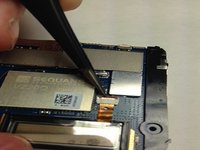
      • Using the Tweezers gently coax the display data cable out of circuit board connector.

      • Do not squeeze the display data cable to hard you may damage it and cause a short.

      询问修复机器人

      添加评论

    3. Verizon Ellipsis Jetpack MHS800L Screen Replacement: 步骤 12 中的图像 1,2 Verizon Ellipsis Jetpack MHS800L Screen Replacement: 步骤 12 中的图像 2,2
      在这个步骤中使用的工具:
      Tweezers
      $4.99
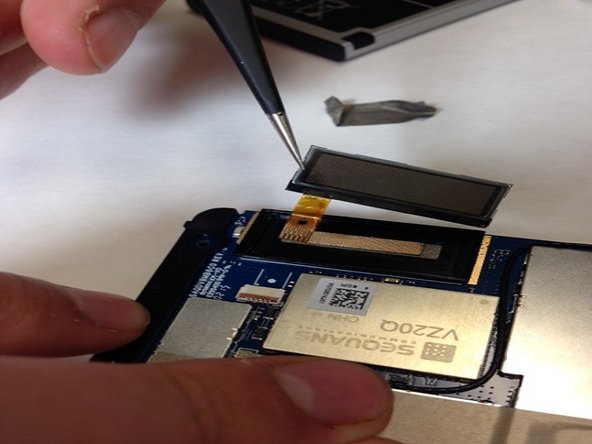
      • Gently insert the Tweezers underneath the LCD screen and lift the LCD screen off of the circuit board.

      询问修复机器人

      添加评论

结论

To reassemble your device, follow these instructions in reverse order.

取消:我没有完成这个指南。

另外一个人完成了本指南。

团队

IUPUI, Team 3-3, Baechle Spring 2016 IUPUI, Team 3-3, Baechle Spring 2016 的会员

IUPUI-BAECHLE-S16S3G3

4 名成员

创作了6篇指南

0指南评论

添加评论

浏览统计数据:

过去 24 小时: 0

过去 7 天: 8

过去 30 天: 29

总计 2,515