跳转到主内容
加入维修社区 - 创建账户

VTech InnoTab Max Cover Replacement

你所需要的

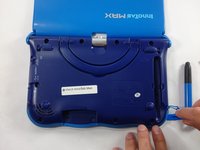
  1. VTech InnoTab Max Cover Replacement, Cover: 步骤 1 中的图像 1,3 VTech InnoTab Max Cover Replacement, Cover: 步骤 1 中的图像 2,3 VTech InnoTab Max Cover Replacement, Cover: 步骤 1 中的图像 3,3
    • Remove all screw caps from the back panel using a metal spudger.

    询问修复机器人

    添加评论

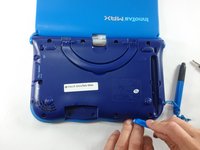
  2. VTech InnoTab Max Cover Replacement: 步骤 2 中的图像 1,3 VTech InnoTab Max Cover Replacement: 步骤 2 中的图像 2,3 VTech InnoTab Max Cover Replacement: 步骤 2 中的图像 3,3
    • Next remove all of the now uncovered screws.

    • If there is a cartridge in the device make sure to remove it.

    添加评论

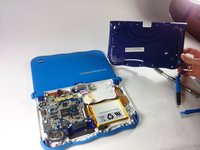
  3. VTech InnoTab Max Cover Replacement: 步骤 3 中的图像 1,2 VTech InnoTab Max Cover Replacement: 步骤 3 中的图像 2,2
    • Now that all of the screws have been removed, pry the back cover off using a plastic opening tool.

    询问修复机器人

    添加评论

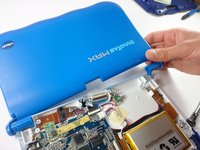
  4. VTech InnoTab Max Cover Replacement: 步骤 4 中的图像 1,2 VTech InnoTab Max Cover Replacement: 步骤 4 中的图像 2,2
    • Here you can see the back cover has been fully removed and you can now access the front cover.

    • To remove the front cover, remove the springs holding the pictured brackets in place, then pull it away.

    询问修复机器人

    添加评论

结论

To reassemble your device, follow these instructions in reverse order.

取消:我没有完成这个指南。

另外一个人完成了本指南。

团队

USF Tampa, Team S5-G5, Lacy Spring 2017 USF Tampa, Team S5-G5, Lacy Spring 2017 的会员

USFT-LACY-S17S5G5

3 名成员

创作了10篇指南

0指南评论

添加评论

浏览统计数据:

过去 24 小时: 0

过去 7 天: 7

过去 30 天: 38

总计 972