跳转到主内容
加入维修社区 - 创建账户

VTech InnoTab 2s Speaker Replacement

你所需要的

    1. VTech InnoTab 2s Speaker Replacement, Back Panel: 步骤 1 中的图像 1,1
      • Turn your device to where the back panel is facing you.

      询问修复机器人

      添加评论

    2. VTech InnoTab 2s Speaker Replacement: 步骤 2 中的图像 1,2 VTech InnoTab 2s Speaker Replacement: 步骤 2 中的图像 2,2
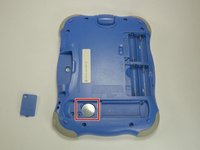
      • Lift the Leg all the way up and twist the bottom to remove.

      • Once the bottom part pops out the whole leg should just come off.

      • Remove any game cartridge from the device.

      询问修复机器人

      添加评论

    3. VTech InnoTab 2s Speaker Replacement: 步骤 3 中的图像 1,3 VTech InnoTab 2s Speaker Replacement: 步骤 3 中的图像 2,3 VTech InnoTab 2s Speaker Replacement: 步骤 3 中的图像 3,3
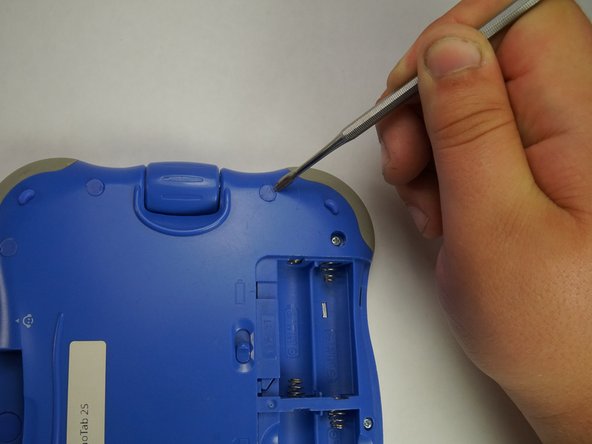
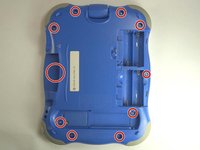
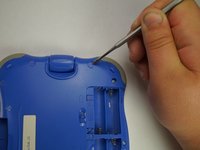
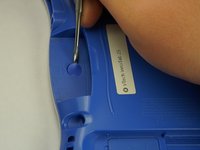
      • Remove all of the plastic tabs on the device. These are covering screws that will need to be removed.

      • These covers are made of hard plastic so they may be difficult to remove.

      • There is a special tab in the cartridge cover that is made of rubber, make sure to not break this tab.

      询问修复机器人

      添加评论

    4. VTech InnoTab 2s Speaker Replacement: 步骤 4 中的图像 1,2 VTech InnoTab 2s Speaker Replacement: 步骤 4 中的图像 2,2
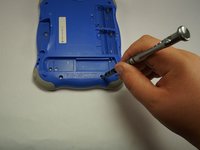
      • Remove all nine screws from the back of the device using a J0 bit.

      • Remove the small battery.

      询问修复机器人

      添加评论

    5. VTech InnoTab 2s Speaker Replacement: 步骤 5 中的图像 1,2 VTech InnoTab 2s Speaker Replacement: 步骤 5 中的图像 2,2
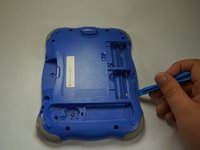
      • Using a plastic opening tool, detach the backplate from the front piece.

      • Do not use excessive force. Double check that you removed all the screws if the panel is not coming off easily.

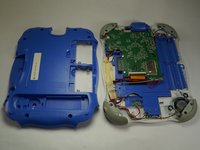
      • Once the backplate has been removed, you will have access to the circuit board.

      询问修复机器人

      添加评论

    1. VTech InnoTab 2s Speaker Replacement, Motherboard: 步骤 6 中的图像 1,1
      • First begin by removing the three cross-head screws using a J0 bit.

      询问修复机器人

      添加评论

    2. VTech InnoTab 2s Speaker Replacement: 步骤 7 中的图像 1,1
      • First remove the ribbon cables. There are two highlighted by the red squares

      • Do not apply too much pressure and make sure that the black plastic tabs are fully open before you pull the cable out.

      询问修复机器人

      添加评论

    3. VTech InnoTab 2s Speaker Replacement: 步骤 8 中的图像 1,1
      • Remove the camera from the assembly and put is a safe place so that it will not get damaged.

      询问修复机器人

      添加评论

    4. VTech InnoTab 2s Speaker Replacement: 步骤 9 中的图像 1,1
      • Remove the board from the main assembly.

      • Be careful not to pull too hard so that the cables aren't broken.

      询问修复机器人

      添加评论

    5. VTech InnoTab 2s Speaker Replacement: 步骤 10 中的图像 1,1
      • De-solder the points shown to fully remove the cables and free the board.

      • A soldering guide offered by IFIXIT can be found here Soldering Skills.

      询问修复机器人

      添加评论

    1. VTech InnoTab 2s Speaker Replacement, Speaker: 步骤 11 中的图像 1,1
      • Desolder these two points from the circuit board.

      • A soldering guide provided by iFixit can be found here: Soldering Skills.

      询问修复机器人

      添加评论

    2. VTech InnoTab 2s Speaker Replacement: 步骤 12 中的图像 1,1
      • Remove the two screws that are holding down the speaker.

      询问修复机器人

      添加评论

    3. VTech InnoTab 2s Speaker Replacement: 步骤 13 中的图像 1,1
      • Desolder the two wires that are connected to the speaker.

      • A soldering guide offered by IFIXIT can be found here: Soldering Skills.

      询问修复机器人

      添加评论

结论

To reassemble your device, follow these instructions in reverse order.

取消:我没有完成这个指南。

团队

USF Tampa, Team 5-1, Lacy Fall 2016 USF Tampa, Team 5-1, Lacy Fall 2016 的会员

USFT-LACY-F16S5G1

4 名成员

创作了12篇指南

1指南评论

Thank you for this guide. I have a Vtech (ELC) toy flip phone, which has similar issue. I think your guide is incomplete, has only 13 steps and stops at desoldering the speaker. What speaker shall I get, does it matter, or just the size matters? Thank you!

Scream - 回复 分享

添加评论

浏览统计数据:

过去 24 小时: 0

过去 7 天: 5

过去 30 天: 26

总计 671