跳转到主内容
加入维修社区 - 创建账户

Turtle Beach Stealth Ultra Front Facing Buttons Replacement

你所需要的

  1. Turtle Beach Stealth Ultra Front Facing Buttons Replacement, Back Plate: 步骤 1 中的图像 1,2 Turtle Beach Stealth Ultra Front Facing Buttons Replacement, Back Plate: 步骤 1 中的图像 2,2
    • Use tweezers to pull out rubber pieces in front of the screws.

  2. Turtle Beach Stealth Ultra Front Facing Buttons Replacement: 步骤 2 中的图像 1,2 Turtle Beach Stealth Ultra Front Facing Buttons Replacement: 步骤 2 中的图像 2,2
    • Remove the 10 mm screws using a Phillips #00 screwdriver.

  3. Turtle Beach Stealth Ultra Front Facing Buttons Replacement: 步骤 3 中的图像 1,2 Turtle Beach Stealth Ultra Front Facing Buttons Replacement: 步骤 3 中的图像 2,2
    • Remove the sticker on the back of the plate.

    • Remove the 10 mm screws from the back plate using a Phillips #00 screwdriver.

  4. Turtle Beach Stealth Ultra Front Facing Buttons Replacement: 步骤 4 中的图像 1,3 Turtle Beach Stealth Ultra Front Facing Buttons Replacement: 步骤 4 中的图像 2,3 Turtle Beach Stealth Ultra Front Facing Buttons Replacement: 步骤 4 中的图像 3,3
    • Use an iFixit opening tool to pry the front button plate and analog stick plate off.

    • Use a Phillips #00 screwdriver to remove the screws from the front plate on both sides of the controller.

    • Be cautious not to break the LCD screen while you move the opening tool around.

  5. Turtle Beach Stealth Ultra Front Facing Buttons Replacement: 步骤 5 中的图像 1,3 Turtle Beach Stealth Ultra Front Facing Buttons Replacement: 步骤 5 中的图像 2,3 Turtle Beach Stealth Ultra Front Facing Buttons Replacement: 步骤 5 中的图像 3,3
    • Use an opening tool to detach the front plate from the back.

    • You may need to work the opening tool all the way around the seam between the two plates.

  6. Turtle Beach Stealth Ultra Front Facing Buttons Replacement, Motherboard: 步骤 6 中的图像 1,2 Turtle Beach Stealth Ultra Front Facing Buttons Replacement, Motherboard: 步骤 6 中的图像 2,2
    • Use a Phillips #00 screwdriver to remove the 10 mm screws connecting the handles to the controller frame.

  7. Turtle Beach Stealth Ultra Front Facing Buttons Replacement: 步骤 7 中的图像 1,1
    • Detach the cables from the motherboard.

  8. Turtle Beach Stealth Ultra Front Facing Buttons Replacement: 步骤 8 中的图像 1,1
    • Remove the yellow ribbon cable from the handle.

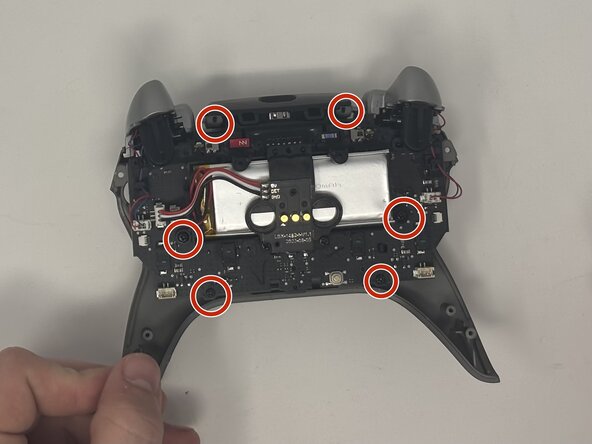
  9. Turtle Beach Stealth Ultra Front Facing Buttons Replacement: 步骤 9 中的图像 1,2 Turtle Beach Stealth Ultra Front Facing Buttons Replacement: 步骤 9 中的图像 2,2
    • Remove the six 10 mm screws connected to the motherboard using a Phillips #00 screwdriver.

  10. Turtle Beach Stealth Ultra Front Facing Buttons Replacement: 步骤 10 中的图像 1,1
    • Gently pull the motherboard away from the frame.

  11. Turtle Beach Stealth Ultra Front Facing Buttons Replacement, Front Facing Buttons: 步骤 11 中的图像 1,2 Turtle Beach Stealth Ultra Front Facing Buttons Replacement, Front Facing Buttons: 步骤 11 中的图像 2,2
    • Pull the buttons out from the front plate.

结论

To reassemble your device, follow these instructions in reverse order.

另外一个人完成了本指南。

团队

0指南评论

添加评论

浏览统计数据:

过去 24 小时: 1

过去 7 天: 13

过去 30 天: 73

总计 386