跳转到主内容
加入维修社区 - 创建账户

Turtle Beach Pure Air Button Microswitch Replacement

你所需要的

  1. Turtle Beach Pure Air Button Microswitch Replacement, Bottom Cover: 步骤 1 中的图像 1,2 Turtle Beach Pure Air Button Microswitch Replacement, Bottom Cover: 步骤 1 中的图像 2,2
    • Power off the mouse by moving the power switch to the center.

    询问修复机器人
  2. Turtle Beach Pure Air Button Microswitch Replacement: 步骤 2 中的图像 1,2 Turtle Beach Pure Air Button Microswitch Replacement: 步骤 2 中的图像 2,2
    • Peel back the mouse feet.

    • Remove the three 1.6mm screws using a JIS #000 screwdriver.

    • Remove the single 1.6mm screws using remove using a 1.3 mm hex screwdriver.

    询问修复机器人
  3. Turtle Beach Pure Air Button Microswitch Replacement: 步骤 3 中的图像 1,2 Turtle Beach Pure Air Button Microswitch Replacement: 步骤 3 中的图像 2,2
    • Carefully remove the bottom cover of the mouse.

    • Be cautious of the cable connecting the bottom cover to the rest of the mouse.

    询问修复机器人
  4. Turtle Beach Pure Air Button Microswitch Replacement: 步骤 4 中的图像 1,3 Turtle Beach Pure Air Button Microswitch Replacement: 步骤 4 中的图像 2,3 Turtle Beach Pure Air Button Microswitch Replacement: 步骤 4 中的图像 3,3
    • Disconnect the ribbon cable securing the upper shell to the motherboard.

    • Lift the locking clip to release the cable from its connector.

    询问修复机器人
  5. Turtle Beach Pure Air Button Microswitch Replacement, Motherboard: 步骤 5 中的图像 1,3 Turtle Beach Pure Air Button Microswitch Replacement, Motherboard: 步骤 5 中的图像 2,3 Turtle Beach Pure Air Button Microswitch Replacement, Motherboard: 步骤 5 中的图像 3,3
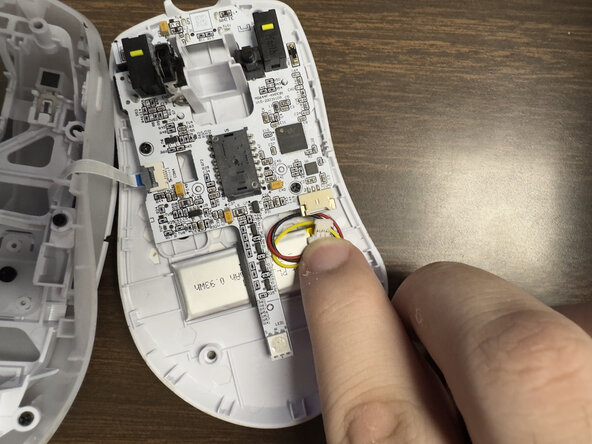
    • Carefully disconnect the battery clip from the motherboard socket by softly pulling the bottom of the clip.

    询问修复机器人
  6. Turtle Beach Pure Air Button Microswitch Replacement: 步骤 6 中的图像 1,2 Turtle Beach Pure Air Button Microswitch Replacement: 步骤 6 中的图像 2,2
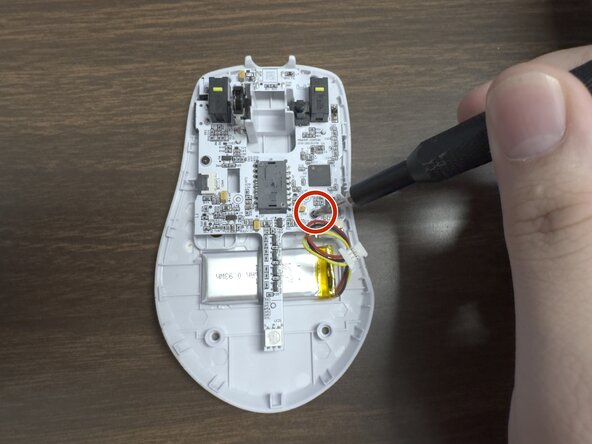
    • Remove the two 1.6 mm screws on the middle left and lower right sides with a JIS000 screwdriver to disconnect the motherboard from the lower shell.

    询问修复机器人
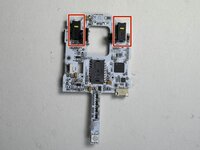
  7. Turtle Beach Pure Air Button Microswitch Replacement: 步骤 7 中的图像 1,2 Turtle Beach Pure Air Button Microswitch Replacement: 步骤 7 中的图像 2,2
    • Gently lift the motherboard out of the housing.

    询问修复机器人
  8. Turtle Beach Pure Air Button Microswitch Replacement, Scroll Wheel: 步骤 8 中的图像 1,3 Turtle Beach Pure Air Button Microswitch Replacement, Scroll Wheel: 步骤 8 中的图像 2,3 Turtle Beach Pure Air Button Microswitch Replacement, Scroll Wheel: 步骤 8 中的图像 3,3
    • Pull the scroll wheel out of its mounting.

    询问修复机器人
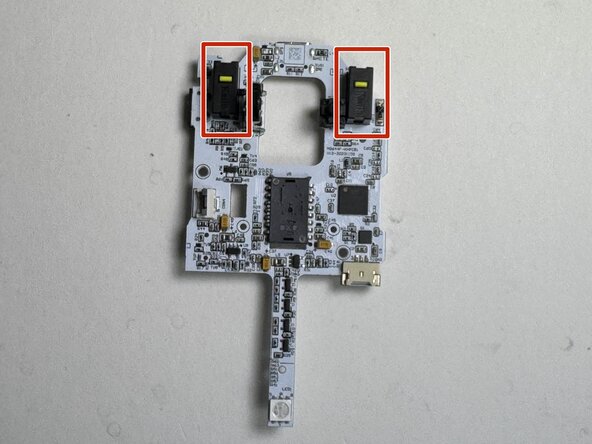
  9. Turtle Beach Pure Air Button Microswitch Replacement, Button Microswitch: 步骤 9 中的图像 1,2 Turtle Beach Pure Air Button Microswitch Replacement, Button Microswitch: 步骤 9 中的图像 2,2
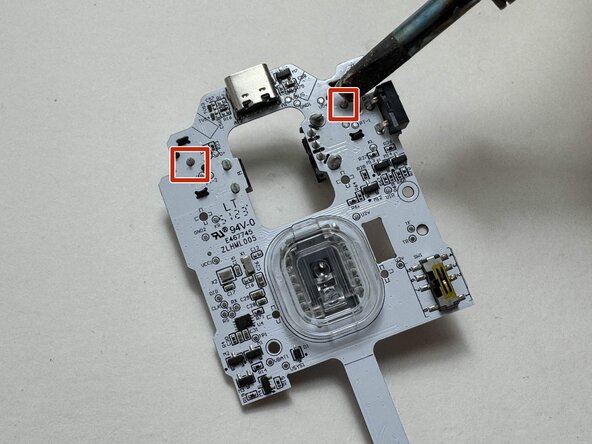
    • Carefully lift the motherboard to expose the rear side of the board, including the microswitch solder joints.

    • Desolder the solder joints of the microswitch.

    询问修复机器人
结论

This guide is rated Moderate for disassembly. Replacing the microswitch itself requires soldering and is recommended only for users with advanced repair experience.To reassemble your device, follow these instructions in reverse order.

Malachi Davis

于02/04/26注册

245 声望

创作了2篇指南

0指南评论

添加评论

浏览统计数据:

过去 24 小时: 9

过去 7 天: 12

过去 30 天: 14

总计 45