跳转到主内容
加入维修社区 - 创建账户

Top Shell

你所需要的

  1. Top Shell, Engage Wired Optical Mouse Top and Outer Shell Removal: 步骤 1 中的图像 1,1
    • Flip the mouse over and peel off the stickers on the perimeter of the bottom of the mouse.

    添加评论

  2. Top Shell: 步骤 2 中的图像 1,1
    • Use the Phillips #1 screwdriver to remove four 5 mm screws from the bottom of the mouse.

    • Use the Phillips #1 screwdriver to remove the two 9 mm screws from the bottom of the mouse.

    询问修复机器人

    添加评论

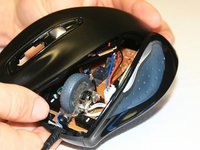
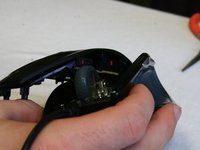
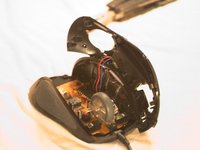
  3. Top Shell: 步骤 3 中的图像 1,3 Top Shell: 步骤 3 中的图像 2,3 Top Shell: 步骤 3 中的图像 3,3
    • Grab the top shell of the mouse and lift up to remove.

    询问修复机器人

    添加评论

  4. Top Shell: 步骤 4 中的图像 1,1
    • The capacitors on this board can release stored electrical energy if touched.

    • Touch your capacitor discharge tool to the capacitor leads on the board to release the stored energy. If leads are inaccessible, wait until you've removed the board from the mouse body.

    添加评论

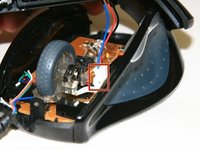
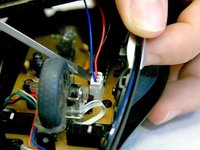
  5. Top Shell: 步骤 5 中的图像 1,2 Top Shell: 步骤 5 中的图像 2,2
    • Use a spudger to pry underneath the white plug and pop it out to disconnect the upper board from the lower board.

    添加评论

  6. Top Shell, Top Shell: 步骤 6 中的图像 1,1
    • Remove the 5 mm round head screw holding the middle piece to the top piece.

    • The outermost shell will now separate from the middle structure.

    询问修复机器人

    添加评论

结论

To reassemble your device, follow these instructions in reverse order.

取消:我没有完成这个指南。

3等其他人完成本指南。

David

于01/16/13注册

1,316 声望

创作了4篇指南

团队

Cal Poly, Team 18-36, Regan Winter 2013 Cal Poly, Team 18-36, Regan Winter 2013 的会员

CPSU-REGAN-W13S18G36

3 名成员

创作了30篇指南

0指南评论

添加评论

浏览统计数据:

过去 24 小时: 5

过去 7 天: 9

过去 30 天: 36

总计 2,253