跳转到主内容
加入维修社区 - 创建账户

SteelSeries Apex 64145 Key Replacement

你所需要的

    1. SteelSeries Apex 64145 Key Replacement, Key: 步骤 1 中的图像 1,1
      • Unplug the keyboard from the computer.

      询问修复机器人

      添加评论

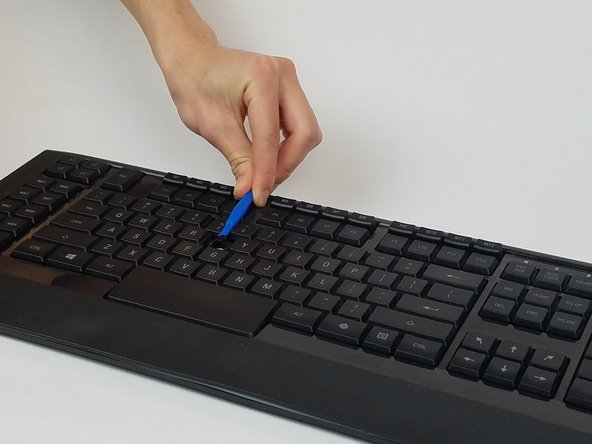
    2. SteelSeries Apex 64145 Key Replacement: 步骤 2 中的图像 1,1
      • Insert the plastic opening tool underneath the edge of the key.

      询问修复机器人

      添加评论

    3. SteelSeries Apex 64145 Key Replacement: 步骤 3 中的图像 1,2 SteelSeries Apex 64145 Key Replacement: 步骤 3 中的图像 2,2
      • Gently pry the damaged key with the plastic opening tool at an upward angle.

      询问修复机器人

      添加评论

    4. SteelSeries Apex 64145 Key Replacement: 步骤 4 中的图像 1,1
      • If replacing, prepare your new key for insertion.

      • If key is dirty, wash the key with room temperature water and dry off the key with a towel.

      询问修复机器人

      添加评论

    5. SteelSeries Apex 64145 Key Replacement: 步骤 5 中的图像 1,1
      • Gently push the key back into the slot until you hear a click.

      询问修复机器人

      添加评论

结论

To reassemble your device, follow these instructions in reverse order.

取消:我没有完成这个指南。

另外一个人完成了本指南。

团队

USF Tampa, Team S1-G1, Nance Spring 2017 USF Tampa, Team S1-G1, Nance Spring 2017 的会员

USFT-NANCE-S17S1G1

4 名成员

创作了10篇指南

1指南评论

very easy… if u can find new keycap. those are customs not sold

T T - 回复 分享

添加评论

浏览统计数据:

过去 24 小时: 0

过去 7 天: 8

过去 30 天: 34

总计 6,446