跳转到主内容
加入维修社区 - 创建账户

Sony Xperia Z Ultra Front Camera Replacement

你所需要的

  1. Sony Xperia Z Ultra Front Camera Replacement, Battery: 步骤 1 中的图像 1,1
    • Use the small suction cup to lift the back panel:

    • Press the small suction cup on to the middle of the back panel.

    询问修复机器人

    添加评论

  2. Sony Xperia Z Ultra Front Camera Replacement: 步骤 2 中的图像 1,1
    • While holding the Sony Xperia Z ultra down with your left hand, slightly pull the small suction cup upwards to create a small opening between the back panel and the front panel.

    • While continuing to pull the small suction cup upwards, insert the spudger in the small opening.

    • Pry the front panel downwards with the spudger while continuing to pull the small suction cup upwards.

    询问修复机器人

    添加评论

  3. Sony Xperia Z Ultra Front Camera Replacement: 步骤 3 中的图像 1,1
    • Remove the back panel by pulling the small suction cup upwards.

    询问修复机器人

    添加评论

  4. Sony Xperia Z Ultra Front Camera Replacement: 步骤 4 中的图像 1,1
    • Remove the following six screws with a Phillips #000 screwdriver:

    • five silver 2.1 mm screws

    • one gold 3.1 mm screw

    询问修复机器人

    添加评论

  5. Sony Xperia Z Ultra Front Camera Replacement: 步骤 5 中的图像 1,1
    • Pry the plastic motherboard shield open by placing the spudger under the shield and running it along the edges.

    询问修复机器人

    添加评论

  6. Sony Xperia Z Ultra Front Camera Replacement: 步骤 6 中的图像 1,1
    • Use care to remove the motherboard shield, as it may break. The motherboard shield is made of a very thin plastic.

    • Remove the motherboard shield by lifting the lower end upwards first.

    询问修复机器人

    添加评论

  7. Sony Xperia Z Ultra Front Camera Replacement: 步骤 7 中的图像 1,2 Sony Xperia Z Ultra Front Camera Replacement: 步骤 7 中的图像 2,2
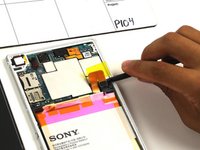
    • Detach the battery connection cable by prying it upward with the spudger.

    询问修复机器人

    添加评论

  8. Sony Xperia Z Ultra Front Camera Replacement: 步骤 8 中的图像 1,1
    • Pry the upper end of the antenna upwards with the spudger.

    询问修复机器人

    添加评论

  9. Sony Xperia Z Ultra Front Camera Replacement: 步骤 9 中的图像 1,1
    • Detach the antenna by pulling the upper end upwards and outwards.

    询问修复机器人

    添加评论

  10. Sony Xperia Z Ultra Front Camera Replacement: 步骤 10 中的图像 1,1
    • Insert the spudger underneath the battery and run it back and forth to remove any adhesive.

    询问修复机器人

    添加评论

  11. Sony Xperia Z Ultra Front Camera Replacement: 步骤 11 中的图像 1,1
    • Remove the battery from the phone.

    询问修复机器人

    添加评论

  12. Sony Xperia Z Ultra Front Camera Replacement, Front Camera: 步骤 12 中的图像 1,1
    • Use care to pry the front camera off, as it can easily be damaged if too much force is used. The connection from the front facing camera to the motherboard is delicate.

    • Pry the connection upwards from the motherboard with the spudger to reveal the front facing camera.

    询问修复机器人

    添加评论

  13. Sony Xperia Z Ultra Front Camera Replacement: 步骤 13 中的图像 1,1
    • Remove the front facing camera by pulling upward on the flap to its right .

    询问修复机器人

    添加评论

结论

To reassemble your device, follow these instructions in reverse order.

取消:我没有完成这个指南。

4等其他人完成本指南。

Aaron Quinn

于10/01/15注册

930 声望

创作了3篇指南

团队

Cal Poly, Team 4-6, Maness Fall 2015 Cal Poly, Team 4-6, Maness Fall 2015 的会员

CPSU-MANESS-F15S4G6

4 名成员

创作了10篇指南

0指南评论

添加评论

浏览统计数据:

过去 24 小时: 0

过去 7 天: 5

过去 30 天: 41

总计 2,467