跳转到主内容
加入维修社区 - 创建账户

Sony PlayStation 3D Display Power Port Replacement

你所需要的

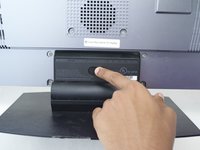
    1. Sony PlayStation 3D Display Power Port Replacement, Rear Case: 步骤 1 中的图像 1,2 Sony PlayStation 3D Display Power Port Replacement, Rear Case: 步骤 1 中的图像 2,2
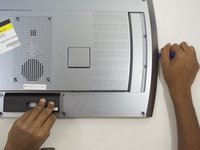
      • Remove the base by pushing in the button and sliding out the unit.

      添加评论

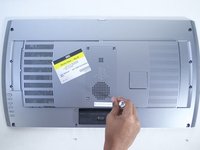
    2. Sony PlayStation 3D Display Power Port Replacement: 步骤 2 中的图像 1,3 Sony PlayStation 3D Display Power Port Replacement: 步骤 2 中的图像 2,3 Sony PlayStation 3D Display Power Port Replacement: 步骤 2 中的图像 3,3
      • Remove USB port cover from back plate with a metal spudger.

      • This will prevent the cover from falling under the back plate once it is removed.

      询问修复机器人

      添加评论

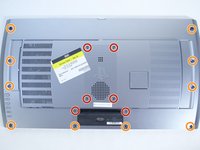
    3. Sony PlayStation 3D Display Power Port Replacement: 步骤 3 中的图像 1,2 Sony PlayStation 3D Display Power Port Replacement: 步骤 3 中的图像 2,2
      • With the Phillips #02 screwdriver, remove the six 6 mm length x 6 mm head screws from the back plate.

      • With the Phillips #02 screwdriver, remove the ten 6 mm length x 8 mm head screws from the back plate.

      • These screws have different threads and need to be kept separate.

      询问修复机器人

      添加评论

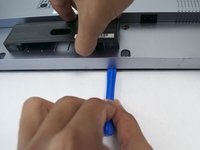
    4. Sony PlayStation 3D Display Power Port Replacement: 步骤 4 中的图像 1,3 Sony PlayStation 3D Display Power Port Replacement: 步骤 4 中的图像 2,3 Sony PlayStation 3D Display Power Port Replacement: 步骤 4 中的图像 3,3
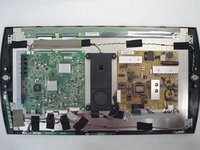
      • Remove back plate with a plastic opening tool by slowing prying around the entire plate.

      • Be gentle to avoid breaking the plastic clips which hold the plate.

      • Once separated the plate easily lifts off.

      询问修复机器人

      添加评论

    1. Sony PlayStation 3D Display Power Port Replacement, Power Port: 步骤 5 中的图像 1,3 Sony PlayStation 3D Display Power Port Replacement, Power Port: 步骤 5 中的图像 2,3 Sony PlayStation 3D Display Power Port Replacement, Power Port: 步骤 5 中的图像 3,3
      • With the Phillips #02 screwdriver, remove the two 5mm length x 7mm head screws from the left and right side of the power port plate.

      询问修复机器人

      添加评论

    2. Sony PlayStation 3D Display Power Port Replacement: 步骤 6 中的图像 1,3 Sony PlayStation 3D Display Power Port Replacement: 步骤 6 中的图像 2,3 Sony PlayStation 3D Display Power Port Replacement: 步骤 6 中的图像 3,3
      • Remove the power port by depressing the white tab attached to the wires.

      询问修复机器人

      添加评论

结论

To reassemble your device, follow these instructions in reverse order.

取消:我没有完成这个指南。

另外一个人完成了本指南。

Logan Simon

于10/08/15注册

234 声望

撰写一个指南

团队

Cal Poly, Team 12-16, Maness Fall 2015 Cal Poly, Team 12-16, Maness Fall 2015 的会员

CPSU-MANESS-F15S12G16

4 名成员

创作了50篇指南

0指南评论

添加评论

浏览统计数据:

过去 24 小时: 3

过去 7 天: 14

过去 30 天: 40

总计 2,115