跳转到主内容
加入维修社区 - 创建账户

Sony Alpha NEX-C3 Control Wheel Replacement

你所需要的

  1. Sony Alpha NEX-C3 Control Wheel Replacement, Top Panel: 步骤 1 中的图像 1,1
    • Turn the camera off by sliding the power switch.

    询问修复机器人

    添加评论

  2. Sony Alpha NEX-C3 Control Wheel Replacement: 步骤 2 中的图像 1,1
    • Use a Phillips head 000 screwdriver to remove the 4.0mm screw inside the USB port.

    询问修复机器人

    添加评论

  3. Sony Alpha NEX-C3 Control Wheel Replacement: 步骤 3 中的图像 1,1
    • Use a Phillips head 000 screwdriver to remove the one 4.0mm screw on the side opposite of the USB port near the shutter button.

    询问修复机器人

    添加评论

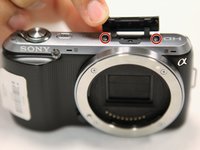
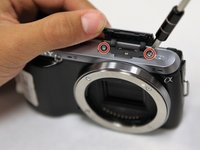
  4. Sony Alpha NEX-C3 Control Wheel Replacement: 步骤 4 中的图像 1,2 Sony Alpha NEX-C3 Control Wheel Replacement: 步骤 4 中的图像 2,2
    • Open the flap at the top of the camera.

    • Use a Phillips head 000 screwdriver to remove the two 4.0mm screws inside.

    询问修复机器人

    添加评论

  5. Sony Alpha NEX-C3 Control Wheel Replacement: 步骤 5 中的图像 1,1
    • Gently lift off the top panel with your hands.

    询问修复机器人

    添加评论

  6. Sony Alpha NEX-C3 Control Wheel Replacement, Back Panel: 步骤 6 中的图像 1,1
    • Use a Phillips head 000 screwdriver to remove the 4.0mm screw at the side opposite of the USB port.

    询问修复机器人

    添加评论

  7. Sony Alpha NEX-C3 Control Wheel Replacement: 步骤 7 中的图像 1,2 Sony Alpha NEX-C3 Control Wheel Replacement: 步骤 7 中的图像 2,2
    • Use a Phillips head 000 screwdriver to remove the three 4.0mm screws on the bottom of the camera.

    询问修复机器人

    添加评论

  8. Sony Alpha NEX-C3 Control Wheel Replacement: 步骤 8 中的图像 1,1
    • Tilt up the LCD screen.

    • Use a Phillips head 000 screwdriver to remove the two coarse 4.0mm screws near the bottom of the camera.

    询问修复机器人

    添加评论

  9. Sony Alpha NEX-C3 Control Wheel Replacement: 步骤 9 中的图像 1,1
    • Gently pry off the back panel, by wiggling it around the LCD screen.

    询问修复机器人

    添加评论

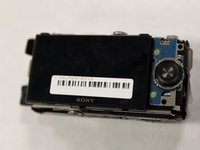
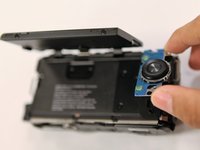
  10. Sony Alpha NEX-C3 Control Wheel Replacement, Control Wheel: 步骤 10 中的图像 1,2 Sony Alpha NEX-C3 Control Wheel Replacement, Control Wheel: 步骤 10 中的图像 2,2
    • Tilt up the LCD screen.

    • Grab the silver plate, and gently pry it up.

    询问修复机器人

    添加评论

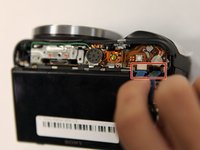
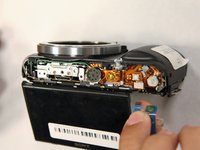
  11. Sony Alpha NEX-C3 Control Wheel Replacement: 步骤 11 中的图像 1,2 Sony Alpha NEX-C3 Control Wheel Replacement: 步骤 11 中的图像 2,2
    • Gently pinch blue ribbon cable, and pull it out of the port.

    询问修复机器人

    添加评论

结论

To reassemble your device, follow these instructions in reverse order.

取消:我没有完成这个指南。

3等其他人完成本指南。

团队

0指南评论

添加评论

浏览统计数据:

过去 24 小时: 5

过去 7 天: 16

过去 30 天: 81

总计 4,380