跳转到主内容
加入维修社区 - 创建账户

Sony Alpha NEX-C3 Battery Replacement

    1. Sony Alpha NEX-C3 Battery Replacement, Battery: 步骤 1 中的图像 1,1
      • Slide the power switch to off.

      询问修复机器人

      添加评论

    2. Sony Alpha NEX-C3 Battery Replacement: 步骤 2 中的图像 1,2 Sony Alpha NEX-C3 Battery Replacement: 步骤 2 中的图像 2,2
      • Slide the switch on the bottom of the battery flap to unlock it.

      询问修复机器人

      添加评论

    3. Sony Alpha NEX-C3 Battery Replacement: 步骤 3 中的图像 1,2 Sony Alpha NEX-C3 Battery Replacement: 步骤 3 中的图像 2,2
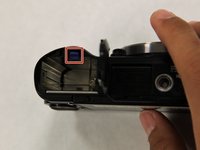
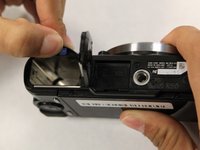
      • Push back the blue tab in the battery port.

      • Afterwards, the battery should pop up. Remove it with your hands.

      询问修复机器人

      添加评论

结论

To reassemble your device, follow these instructions in reverse order.

取消:我没有完成这个指南。

团队

0指南评论

添加评论

浏览统计数据:

过去 24 小时: 2

过去 7 天: 11

过去 30 天: 25

总计 1,467