跳转到主内容
加入维修社区 - 创建账户

Sony Alpha NEX-6 Control Wheel Replacement

你所需要的

    1. Sony Alpha NEX-6 Control Wheel Replacement, Battery: 步骤 1 中的图像 1,1
      • Prior to operating on this device, be sure the camera is turned OFF. With power, the camera can be a dangerous device to work with.

      • Turn the camera off by switching the power knob "OFF" text to the white selector dot.

      询问修复机器人

      添加评论

    2. Sony Alpha NEX-6 Control Wheel Replacement: 步骤 2 中的图像 1,1
      • Flip the camera upside-down and carefully place it on a flat surface.

      • With the lens facing outward, locate the battery compartment - indicated by a grooved latch.

      • Push the latch to the right to unlock the battery compartment. The door should flip upward.

      询问修复机器人

      添加评论

    3. Sony Alpha NEX-6 Control Wheel Replacement: 步骤 3 中的图像 1,1
      • With the compartment open, locate a blue tab shown with spudger

      • Press the tab to the side (to the left, or toward the camera wall). This will eject the camera battery.

      询问修复机器人

      添加评论

    1. Sony Alpha NEX-6 Control Wheel Replacement, Battery compartment screws: 步骤 4 中的图像 1,1
      • Remove the two 3.5mm Phillips #00 screws that hold the back case - located inside the battery compartment.

      询问修复机器人

      添加评论

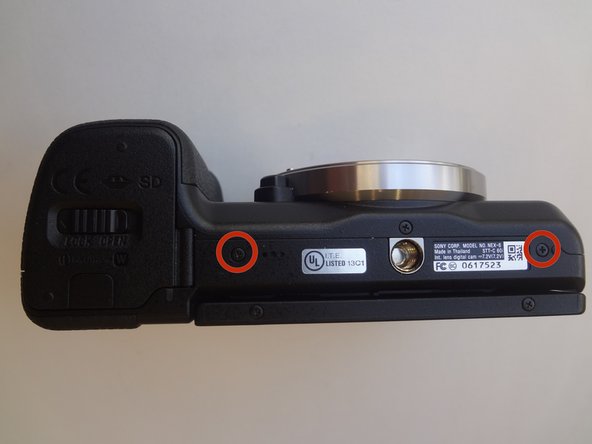
    2. Sony Alpha NEX-6 Control Wheel Replacement, Bottom screws: 步骤 5 中的图像 1,1
      • Remove the two 3.5mm Phillips #00 screws that hold the back case - located on the bottom of the camera.

      询问修复机器人

      添加评论

    3. Sony Alpha NEX-6 Control Wheel Replacement, Side screws: 步骤 6 中的图像 1,1
      • Remove the 3.5 mm Phillips #00 screw on the side of camera - located between the charging and HDMI ports.

      • Remove the 4.0 mm Phillips #00 screw on the side of the camera - located next to the WiFi sign.

      询问修复机器人

      添加评论

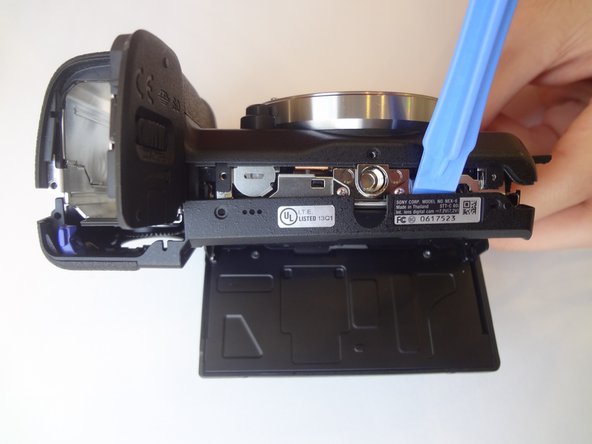
    4. Sony Alpha NEX-6 Control Wheel Replacement, Dis-attaching procedure: 步骤 7 中的图像 1,2 Sony Alpha NEX-6 Control Wheel Replacement, Dis-attaching procedure: 步骤 7 中的图像 2,2
      • Starting with the battery compartment gently begin to separate the back case front the camera.

      • Using a plastic opening tool, separate the bottom of the back case from the camera. Then proceed by separating the sides.

      • Gently lift the back case away from the camera an slide it down to completely remove the back case.

      询问修复机器人

      添加评论

    1. Sony Alpha NEX-6 Control Wheel Replacement, Control Wheel: 步骤 8 中的图像 1,2 Sony Alpha NEX-6 Control Wheel Replacement, Control Wheel: 步骤 8 中的图像 2,2
      • Pry out the ribbon cable by carefully pushing on its side tabs with a spudger.

      询问修复机器人

      添加评论

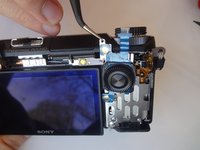
    2. Sony Alpha NEX-6 Control Wheel Replacement, Control wheel romoval: 步骤 9 中的图像 1,2 Sony Alpha NEX-6 Control Wheel Replacement, Control wheel romoval: 步骤 9 中的图像 2,2
      在这个步骤中使用的工具:
      Tweezers
      $4.99
      • Using a spudger, lift the metal locking tab located at the top right corner of control wheel assembly.

      • Using tweezers, carefully slide the assembly up to release it.

      询问修复机器人

      添加评论

结论

To reassemble your device, follow these instructions in reverse order.

取消:我没有完成这个指南。

5等其他人完成本指南。

Clayton Dale

于01/20/15注册

1,067 声望

创作了7篇指南

团队

USF Tampa, Team 11-2, Blackwell Winter 2015 USF Tampa, Team 11-2, Blackwell Winter 2015 的会员

USFT-BLACKWELL-W15S11G2

4 名成员

创作了63篇指南

0指南评论

添加评论

浏览统计数据:

过去 24 小时: 0

过去 7 天: 13

过去 30 天: 56

总计 6,056