简介
If you receive a new phone or are having some performance issues (i.e weak signal, phone won't turn on, phone won't connect to data) you may need a new sim card.
-
-
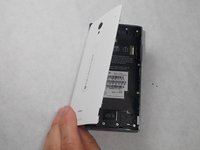
Peel back the back cover of the phone from the access point to remove it. It should come off easily using your hands.
 询问修复机器人
-
-
-
-
Push the sim card in, so that it pops out. Grab it with your fingers and slide it out.
-




To reassemble your device, follow these instructions in reverse order.
2等其他人完成本指南。

团队

UMass Dartmouth, Team 7-4, Catania Spring 2016 UMass Dartmouth, Team 7-4, Catania Spring 2016 的会员
UMASSD-CATANIA-S16S7G4
3 名成员
创作了40篇指南
