跳转到主内容
加入维修社区 - 创建账户

Samsung S85 Screen Replacement

你所需要的

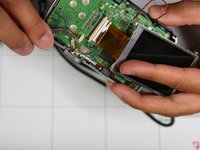
  1. Samsung S85 Screen Replacement, Screen: 步骤 1 中的图像 1,3 Samsung S85 Screen Replacement, Screen: 步骤 1 中的图像 2,3 Samsung S85 Screen Replacement, Screen: 步骤 1 中的图像 3,3
    • Remove 4 screws from bottom of camera

    • Remove 2 screws from side of camera

    • Remove 2 screws from side of camera

    • Place Screws on magnetic surface or location where they will not roll away

    询问修复机器人

    添加评论

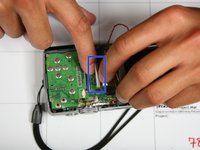
  2. Samsung S85 Screen Replacement: 步骤 2 中的图像 1,1
    • Squeeze area noted by blue square and pull outside shell apart from remaining camera.

    询问修复机器人

    添加评论

  3. Samsung S85 Screen Replacement: 步骤 3 中的图像 1,1
    • Remove two screws holding screen to circuit board marked by red circles

    询问修复机器人

    添加评论

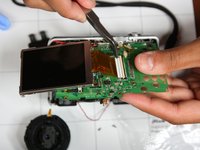
  4. Samsung S85 Screen Replacement: 步骤 4 中的图像 1,3 Samsung S85 Screen Replacement: 步骤 4 中的图像 2,3 Samsung S85 Screen Replacement: 步骤 4 中的图像 3,3
    在这个步骤中使用的工具:
    Tweezers
    $4.99
    • Lift screen up such that orange circuit ribbon fully extends

    • Flip white peg up noted by blue box

    • Using tweezers gently remove orange circuit ribbon from white peg. Make sure white peg remains up otherwise ribbon may tear.

    添加评论

结论

To reassemble your device, follow these instructions in reverse order.

取消:我没有完成这个指南。

另外一个人完成了本指南。

0指南评论

添加评论

浏览统计数据:

过去 24 小时: 1

过去 7 天: 14

过去 30 天: 55

总计 1,028