跳转到主内容
加入维修社区 - 创建账户

Samsung L100 Setting Knob Spring

你所需要的

    1. Samsung L100 Setting Knob Spring, Removing Back Cover: 步骤 1 中的图像 1,3 Samsung L100 Setting Knob Spring, Removing Back Cover: 步骤 1 中的图像 2,3 Samsung L100 Setting Knob Spring, Removing Back Cover: 步骤 1 中的图像 3,3
      • Remove the six external screws from the camera using a Phillips #0 screwdriver.

      • After the screws has been removed, the bottom of the back half of the external case should be loosened from the camera.

      • Be careful, make sure you don't lose the screws.

      询问修复机器人

      添加评论

    2. Samsung L100 Setting Knob Spring: 步骤 2 中的图像 1,2 Samsung L100 Setting Knob Spring: 步骤 2 中的图像 2,2
      • Open the battery cover that's located on the bottom right side of the camera and carefully remove the battery.

      询问修复机器人

      添加评论

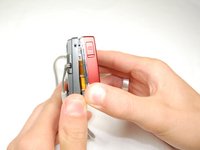
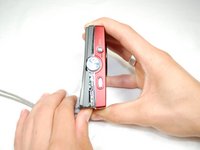
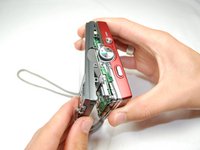
    3. Samsung L100 Setting Knob Spring: 步骤 3 中的图像 1,3 Samsung L100 Setting Knob Spring: 步骤 3 中的图像 2,3 Samsung L100 Setting Knob Spring: 步骤 3 中的图像 3,3
      • Slide your fingernail or a plastic spudger in the groove from the bottom to the top right side of the camera.

      询问修复机器人

      添加评论

    4. Samsung L100 Setting Knob Spring: 步骤 4 中的图像 1,1
      • Carefully squeeze the top right corner of the camera and pry off the external cover.

      • If you hear a "cracking" sound. This is normal.

      • Continue to pull the external cover and it will come off cleanly.

      • Be cautious of the flash capacitor. It carries an electrical charge, that may give you an unpleasant shock.

      询问修复机器人

      添加评论

    5. Samsung L100 Setting Knob Spring: 步骤 5 中的图像 1,1
      • Carefully pull off the back cover, parts behind the back of the case might fall out.

      添加评论

    1. Samsung L100 Setting Knob Spring, Flash Circuit Board: 步骤 6 中的图像 1,1
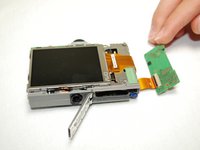
      • Remove the screws holding the circuit board.

      • After you remove the screws, carefully remove the circuit board.

      询问修复机器人

      添加评论

    2. Samsung L100 Setting Knob Spring: 步骤 7 中的图像 1,2 Samsung L100 Setting Knob Spring: 步骤 7 中的图像 2,2
      • Remove the front cover, it comes off easily.

      • Buttons might fall out when you remove the front cover.

      询问修复机器人

      添加评论

    3. Samsung L100 Setting Knob Spring: 步骤 8 中的图像 1,1
      • Face camera towards you.

      • Remove the two screws from circuit board on the left side of the lens.

      询问修复机器人

      添加评论

    4. Samsung L100 Setting Knob Spring: 步骤 9 中的图像 1,1
      • Carefully hold up the circuit board, while it's still connected to the camera.

      • Remove all five screws that's on top of the camera.

      询问修复机器人

      添加评论

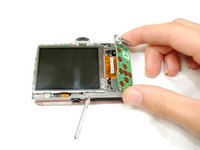
    5. Samsung L100 Setting Knob Spring: 步骤 10 中的图像 1,3 Samsung L100 Setting Knob Spring: 步骤 10 中的图像 2,3 Samsung L100 Setting Knob Spring: 步骤 10 中的图像 3,3
      • Carefully push up the top of the circuit board.

      • Pull up flash circuit board from top of camera.

      询问修复机器人

      添加评论

    1. Samsung L100 Setting Knob Spring, Setting Knob Spring: 步骤 11 中的图像 1,1
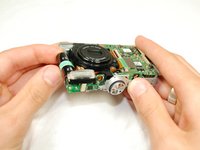
      • Face the bottom of the Flash Circuit board towards you.

      • Remove the one screw that's located on the left side of the lens.

      询问修复机器人

      添加评论

    2. Samsung L100 Setting Knob Spring: 步骤 12 中的图像 1,1
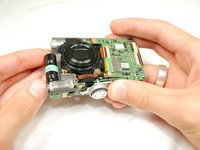
      • Take the flash circuit board and turn it over.

      • Remove the plastic setting knob.

      • Make sure to keep copper spring inside of the slot.

      询问修复机器人

      添加评论

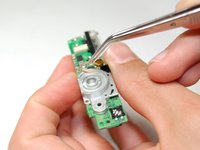
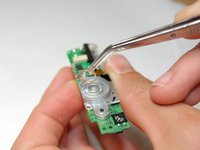
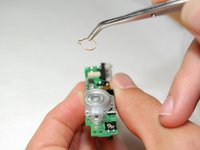
    3. Samsung L100 Setting Knob Spring: 步骤 13 中的图像 1,3 Samsung L100 Setting Knob Spring: 步骤 13 中的图像 2,3 Samsung L100 Setting Knob Spring: 步骤 13 中的图像 3,3
      在这个步骤中使用的工具:
      Tweezers
      $4.99
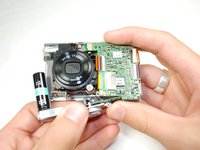
      • Take out and replace the Setting Knob Spring with tweezers.

      询问修复机器人

      添加评论

结论

To reassemble your device, follow these instructions in reverse order.

取消:我没有完成这个指南。

andyhe

于04/15/10注册

81 声望

撰写一个指南

团队

Cal Poly, Team 6-17, Maness Spring 2010 Cal Poly, Team 6-17, Maness Spring 2010 的会员

CPSU-MANESS-S10S6G17

4 名成员

创作了10篇指南

0指南评论

添加评论

浏览统计数据:

过去 24 小时: 2

过去 7 天: 9

过去 30 天: 38

总计 3,573