跳转到主内容

Samsung Impression LCD Flex Cable Replacement

你所需要的

  1. Samsung Impression LCD Flex Cable Replacement, Battery: 步骤 1 中的图像 1,1
    • Orient the phone with the screen facing downward.

    • Slide the panel away from the camera using your thumb. This will expose the battery.

  2. Samsung Impression LCD Flex Cable Replacement: 步骤 2 中的图像 1,2 Samsung Impression LCD Flex Cable Replacement: 步骤 2 中的图像 2,2
    • Insert the tip of the spudger on the left side of the battery.

    • Pry the battery out. It will pivot in the direction of the white arrow.

  3. Samsung Impression LCD Flex Cable Replacement, Back Cover: 步骤 3 中的图像 1,1
    • Remove the six 3.5 mm screws using a Phillips #000 screwdriver. Unscrew in a counterclockwise direction.

  4. Samsung Impression LCD Flex Cable Replacement: 步骤 4 中的图像 1,1
    • Gently pry around the edges with the spudger to remove back panel.

    • It may help to slide the touchscreen upwards when removing the back panel.

    • The side buttons will become loose and will fall out, so put these in a safe place.

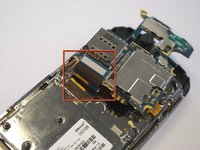
  5. Samsung Impression LCD Flex Cable Replacement, Circuit Board: 步骤 5 中的图像 1,1
    • Gently remove the black wire to free the circuit board.

    • Remove the wire by gently prying up the gold terminator attached to the green circuit board.

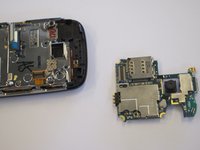
  6. Samsung Impression LCD Flex Cable Replacement: 步骤 6 中的图像 1,2 Samsung Impression LCD Flex Cable Replacement: 步骤 6 中的图像 2,2
    • Gently tug the black and blue ribbon upwards to release the circuit board.

  7. Samsung Impression LCD Flex Cable Replacement, Keyboard: 步骤 7 中的图像 1,1
    • Remove the two base screws along the edge of the silver piece, where you just removed the black end piece.

    • The screws are 2.7mm in length.

    • The bottom black end cap will snap out.

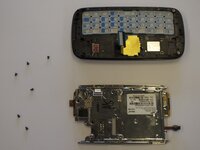
  8. Samsung Impression LCD Flex Cable Replacement: 步骤 8 中的图像 1,2 Samsung Impression LCD Flex Cable Replacement: 步骤 8 中的图像 2,2
    • Remove the six 2.7 mm screws holding the silver plate on and set aside (fig. 1).

    • Separate the silver plate and phone frame (fig. 2).

  9. Samsung Impression LCD Flex Cable Replacement: 步骤 9 中的图像 1,1
    • The silver piece you are left with is the physical keyboard assembly.

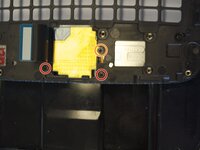
  10. Samsung Impression LCD Flex Cable Replacement, LCD Flex Cable: 步骤 10 中的图像 1,2 Samsung Impression LCD Flex Cable Replacement, LCD Flex Cable: 步骤 10 中的图像 2,2
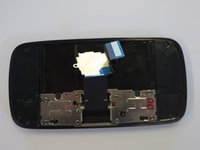
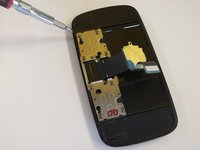
    • Remove the 3 screws holding down the flex cable.

    • The two screws on the black frame are 2.0 mm in length.

    • The top right screw that goes through the circle port on the flex cable is 2.3 mm.

    • Remove the keyboard slider frame. The flex cable should be exposed, but not free.

  11. Samsung Impression LCD Flex Cable Replacement: 步骤 11 中的图像 1,1
    • Remove the four 3.5 mm outer screws.

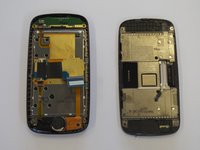
  12. Samsung Impression LCD Flex Cable Replacement: 步骤 12 中的图像 1,3 Samsung Impression LCD Flex Cable Replacement: 步骤 12 中的图像 2,3 Samsung Impression LCD Flex Cable Replacement: 步骤 12 中的图像 3,3
    • Slide the phone apart and remove the 3.5 mm screw on the top middle (fig. 1).

    • Remove the outer shell by prying the edges off with your fingers or a small screwdriver (fig. 2).

    • The device will now be in two pieces (fig. 3).

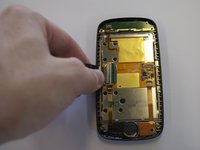
  13. Samsung Impression LCD Flex Cable Replacement: 步骤 13 中的图像 1,2 Samsung Impression LCD Flex Cable Replacement: 步骤 13 中的图像 2,2
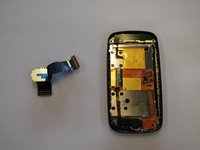
    • Lift the tab underneath the blue tape and gently pull the flex cable (fig. 1).

    • The flex cable will now be completely free (fig. 2).

结论

To reassemble your device, follow these instructions in reverse order.

2等其他人完成本指南。

Saul Villatoro

于04/25/11注册

260 声望

创作了7篇指南

团队

Cal Poly, Team 8-10, Regan Spring 2011 Cal Poly, Team 8-10, Regan Spring 2011 的会员

CPSU-REGAN-S11S8G10

4 名成员

创作了23篇指南

0指南评论

添加评论

浏览统计数据:

过去 24 小时: 2

过去 7 天: 2

过去 30 天: 8

总计 7,573