跳转到主内容
加入维修社区 - 创建账户

Samsung Galaxy Note 3 Rear Facing Camera Replacement

你所需要的

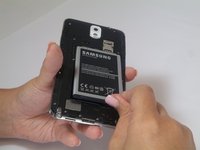
    1. Samsung Galaxy Note 3 Rear Facing Camera Replacement, Remove the rear case: 步骤 1 中的图像 1,1
      • Insert a fingernail or plastic opening tool in the gap between the rear case and the base of the phone.

      询问修复机器人

      添加评论

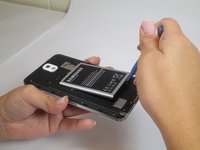
    2. Samsung Galaxy Note 3 Rear Facing Camera Replacement, Remove Case from the Base: 步骤 2 中的图像 1,2 Samsung Galaxy Note 3 Rear Facing Camera Replacement, Remove Case from the Base: 步骤 2 中的图像 2,2
      • Slide your fingernail or plastic opening tool along the edge of the rear case.

      • Lift the case gently from the base.

      添加评论

    1. Samsung Galaxy Note 3 Rear Facing Camera Replacement, Battery: 步骤 3 中的图像 1,2 Samsung Galaxy Note 3 Rear Facing Camera Replacement, Battery: 步骤 3 中的图像 2,2
      • Insert a fingernail or plastic opening tool into the small gap between the battery and the phone base.

      • Lift the battery out of its recess.

      询问修复机器人

      添加评论

    1. Samsung Galaxy Note 3 Rear Facing Camera Replacement, S Pen: 步骤 4 中的图像 1,1
      • Place your fingernail in the groove of the stylus pen.

      • Pull the stylus pen away from the phone.

      询问修复机器人

      添加评论

    1. Samsung Galaxy Note 3 Rear Facing Camera Replacement, Unscrew Back Chassis: 步骤 5 中的图像 1,1
      • Remove the twelve 4mm Phillips #00 screws from the back chassis.

      询问修复机器人

      添加评论

    2. Samsung Galaxy Note 3 Rear Facing Camera Replacement, Remove Back Chassis: 步骤 6 中的图像 1,1
      • Insert the plastic opening tool into the Stylus Pen placement holder.

      • Lift the plastic opening tool so that the midframe separates from the base.

      询问修复机器人

      添加评论

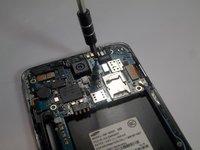
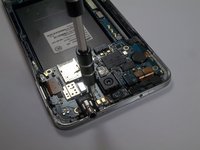
    1. Samsung Galaxy Note 3 Rear Facing Camera Replacement, Screw Removal: 步骤 7 中的图像 1,2 Samsung Galaxy Note 3 Rear Facing Camera Replacement, Screw Removal: 步骤 7 中的图像 2,2
      • Remove the single screw beside headphone jack.

      添加评论

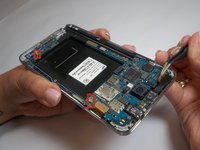
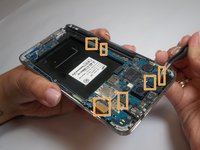
    2. Samsung Galaxy Note 3 Rear Facing Camera Replacement, Unfasten Clips and Cable Connectors: 步骤 8 中的图像 1,2 Samsung Galaxy Note 3 Rear Facing Camera Replacement, Unfasten Clips and Cable Connectors: 步骤 8 中的图像 2,2
      在这个步骤中使用的工具:
      Tweezers
      $4.99
      • Use tweezers to remove both antenna clips.

      • Use a spudger to disconnect six cable connectors.

      询问修复机器人

      添加评论

    3. Samsung Galaxy Note 3 Rear Facing Camera Replacement, Motherboard Removal: 步骤 9 中的图像 1,1
      • Pull up on the motherboard with tweezers.

      添加评论

    1. Samsung Galaxy Note 3 Rear Facing Camera Replacement, Unclipping the Camera: 步骤 10 中的图像 1,1
      • Unclip the camera connecting cable using the plastic opening tool from the motherboard

      • Remove loose camera from base

      询问修复机器人

      添加评论

结论

To reassemble your device, follow these instructions in reverse order.

取消:我没有完成这个指南。

37等其他人完成本指南。

Brittany Gail

于09/23/14注册

8,581 声望

创作了8篇指南

团队

USF Tampa, Team 2-2, Blackwell Fall 2014 USF Tampa, Team 2-2, Blackwell Fall 2014 的会员

USFT-BLACKWELL-F14S2G2

4 名成员

创作了56篇指南

3指南评论

Awesome, phone disassembly and fingernail painting at same time :) Thanks for your time to post this!

Chris G - 回复 分享

Hi

Thanks for the nice instructions

Do you know if I can use a Note 4 camera (or any better!) for my Note 3?

Are they different in connections?

Thanks

hameidfehri - 回复 分享

I shall be very thankfull for this act of kindness

Malik wajdan ali - 回复 分享

添加评论

浏览统计数据:

过去 24 小时: 2

过去 7 天: 7

过去 30 天: 47

总计 14,260