跳转到主内容
加入维修社区 - 创建账户

Samsung Chromebook Pro Battery Replacement

你所需要的

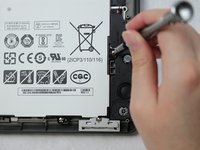
  1. Samsung Chromebook Pro Battery Replacement, Battery: 步骤 1 中的图像 1,2 Samsung Chromebook Pro Battery Replacement, Battery: 步骤 1 中的图像 2,2
    • Remove the eight 30 mm screws from the edges of the case with the JIS J000 screw bit.

  2. Samsung Chromebook Pro Battery Replacement: 步骤 2 中的图像 1,3 Samsung Chromebook Pro Battery Replacement: 步骤 2 中的图像 2,3 Samsung Chromebook Pro Battery Replacement: 步骤 2 中的图像 3,3
    • Slide the plastic opening tool in a corner at a steep angle, and lift to remove the outer case.

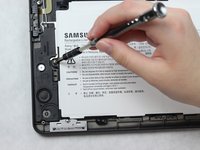
  3. Samsung Chromebook Pro Battery Replacement: 步骤 3 中的图像 1,2 Samsung Chromebook Pro Battery Replacement: 步骤 3 中的图像 2,2
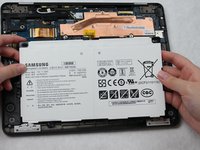
    • Remove the four 30 mm screws surrounding the battery with the JIS J000 screw bit.

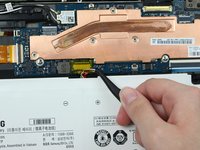
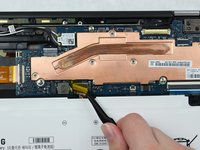
  4. Samsung Chromebook Pro Battery Replacement: 步骤 4 中的图像 1,3 Samsung Chromebook Pro Battery Replacement: 步骤 4 中的图像 2,3 Samsung Chromebook Pro Battery Replacement: 步骤 4 中的图像 3,3
    在这个步骤中使用的工具:
    Tweezers
    $4.99
    • Lift the connecting wires to disconnect from the slot with the precision tweezers.

    • Lift battery to remove once the wire is disconnected.

结论

To reassemble your device, follow these instructions in reverse order.

4等其他人完成本指南。

1指南评论

How do I know which battery to order? Is there a specific part number?

Will - 回复 分享

添加评论

浏览统计数据:

过去 24 小时: 3

过去 7 天: 15

过去 30 天: 47

总计 3,251