跳转到主内容
加入维修社区 - 创建账户

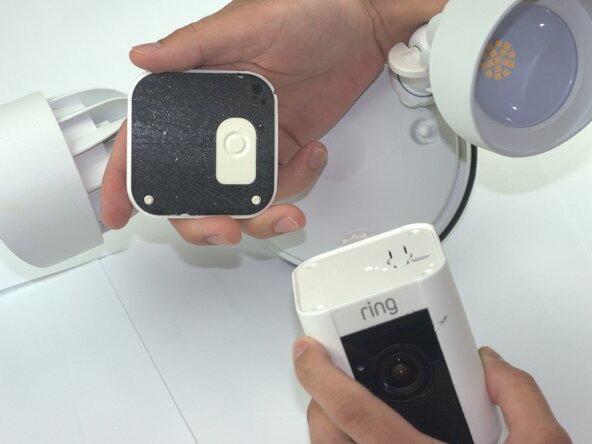
Ring Floodlight Cam Camera Module Replacement

你所需要的

  1. Ring Floodlight Cam Camera Module Replacement, Motherboard: 步骤 1 中的图像 1,2 Ring Floodlight Cam Camera Module Replacement, Motherboard: 步骤 1 中的图像 2,2
    • Remove the external cover with a Jimmy tool.

    询问修复机器人

    添加评论

  2. Ring Floodlight Cam Camera Module Replacement: 步骤 2 中的图像 1,2 Ring Floodlight Cam Camera Module Replacement: 步骤 2 中的图像 2,2
    • Remove the four outer cover 4.5mm screws with a Philips 1 screwdriver.

    询问修复机器人

    添加评论

  3. Ring Floodlight Cam Camera Module Replacement: 步骤 3 中的图像 1,1
    • Remove the internal cover.

    询问修复机器人

    添加评论

  4. Ring Floodlight Cam Camera Module Replacement: 步骤 4 中的图像 1,1
    • Disconnect the flexible flat cable (FFC) from the motherboard.

    询问修复机器人

    添加评论

  5. Ring Floodlight Cam Camera Module Replacement: 步骤 5 中的图像 1,1
    • Remove the three-prong connector with angled tweezers.

    询问修复机器人

    添加评论

  6. Ring Floodlight Cam Camera Module Replacement: 步骤 6 中的图像 1,1
    • Remove the 2mm screws with a Phillips #00 screwdriver.

    询问修复机器人

    添加评论

  7. Ring Floodlight Cam Camera Module Replacement: 步骤 7 中的图像 1,2 Ring Floodlight Cam Camera Module Replacement: 步骤 7 中的图像 2,2
    • Remove the power supply.

    • Disconnect the power supply from the device.

    询问修复机器人

    添加评论

  8. Ring Floodlight Cam Camera Module Replacement: 步骤 8 中的图像 1,1
    • Remove the 2mm screws with a Phillips 00 screwdriver from the base connector.

    • From this step forward use a low profile wrench instead of a screwdriver with the correct bit size to remove screws non-destructively.

    询问修复机器人

    添加评论

  9. Ring Floodlight Cam Camera Module Replacement: 步骤 9 中的图像 1,2 Ring Floodlight Cam Camera Module Replacement: 步骤 9 中的图像 2,2
    • Drill holes into the exterior with a 1/16 drill bit.

    • Skip this step unless you lack the specialized tools or other attempts to remove screws non destructively were unsuccessful.

    询问修复机器人

    添加评论

  10. Ring Floodlight Cam Camera Module Replacement: 步骤 10 中的图像 1,1
    • Unscrew the 2mm screws on the metal baseplate with a Phillips 00 screwdriver.

    询问修复机器人

    添加评论

  11. Ring Floodlight Cam Camera Module Replacement: 步骤 11 中的图像 1,1
    • Remove the metal baseplate.

    询问修复机器人

    添加评论

  12. Ring Floodlight Cam Camera Module Replacement: 步骤 12 中的图像 1,1
    • Remove the power connector from the motherboard using angled tweezers.

    询问修复机器人

    添加评论

  13. Ring Floodlight Cam Camera Module Replacement: 步骤 13 中的图像 1,1
    • Remove the front-end flexible flat cable (FFC) with angled tweezers.

    询问修复机器人

    添加评论

  14. Ring Floodlight Cam Camera Module Replacement: 步骤 14 中的图像 1,1
    • Remove the motion sensor flat flexible cable (FFC).

    询问修复机器人

    添加评论

  15. Ring Floodlight Cam Camera Module Replacement: 步骤 15 中的图像 1,2 Ring Floodlight Cam Camera Module Replacement: 步骤 15 中的图像 2,2
    • Remove the motherboard module.

    询问修复机器人

    添加评论

  16. Ring Floodlight Cam Camera Module Replacement, Camera Module: 步骤 16 中的图像 1,1
    • Drill holes with a 1/16 drill bit.

    询问修复机器人

    添加评论

  17. Ring Floodlight Cam Camera Module Replacement: 步骤 17 中的图像 1,2 Ring Floodlight Cam Camera Module Replacement: 步骤 17 中的图像 2,2
    • Remove the 2mm screws with an iFixit PH00 screwdriver.

    询问修复机器人

    添加评论

  18. Ring Floodlight Cam Camera Module Replacement: 步骤 18 中的图像 1,1
    • Peel the copper strip from camera module.

    • Remove the metal baseplate.

    询问修复机器人

    添加评论

  19. Ring Floodlight Cam Camera Module Replacement: 步骤 19 中的图像 1,2 Ring Floodlight Cam Camera Module Replacement: 步骤 19 中的图像 2,2
    • Unplug the WiFi antenna cables with angled tweezers.

    询问修复机器人

    添加评论

  20. Ring Floodlight Cam Camera Module Replacement: 步骤 20 中的图像 1,2 Ring Floodlight Cam Camera Module Replacement: 步骤 20 中的图像 2,2
    • Remove 2mm screws with a PH00 screwdriver.

    询问修复机器人

    添加评论

  21. Ring Floodlight Cam Camera Module Replacement: 步骤 21 中的图像 1,1
    • Remove the 3 pin power connector from the camera module.

    询问修复机器人

    添加评论

  22. Ring Floodlight Cam Camera Module Replacement: 步骤 22 中的图像 1,3 Ring Floodlight Cam Camera Module Replacement: 步骤 22 中的图像 2,3 Ring Floodlight Cam Camera Module Replacement: 步骤 22 中的图像 3,3
    • Remove the camera module.

    询问修复机器人

    添加评论

结论

To reassemble your device, follow these instructions in reverse order and before inserting power supply fill the drill holes with plastic putty.

取消:我没有完成这个指南。

Samuel Garcia

于02/04/26注册

381 声望

创作了2篇指南

团队

Texas Tech, Team 41-3, Johansen Spring 2026 Texas Tech, Team 41-3, Johansen Spring 2026 的会员

TTU-JOHANSEN-S26S41G3

4 名成员

创作了5篇指南

0指南评论

添加评论

浏览统计数据:

过去 24 小时: 0

过去 7 天: 21

过去 30 天: 26

总计 99