跳转到主内容
加入维修社区 - 创建账户

ProScan PLT7223G Motherboard Replacement

你所需要的

    1. ProScan PLT7223G Motherboard Replacement, Motherboard: 步骤 1 中的图像 1,1
      • Remove both 4 mm screws from the top of the tablet using a PH00 screw driver.

      询问修复机器人

      添加评论

    2. ProScan PLT7223G Motherboard Replacement: 步骤 2 中的图像 1,1
      • Use the blue opening tool to pry the tablet open.

      询问修复机器人

      添加评论

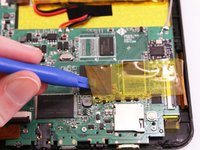
    3. ProScan PLT7223G Motherboard Replacement: 步骤 3 中的图像 1,2 ProScan PLT7223G Motherboard Replacement: 步骤 3 中的图像 2,2
      • Remove all yellow tape from the motherboard.

      询问修复机器人

      添加评论

    4. ProScan PLT7223G Motherboard Replacement: 步骤 4 中的图像 1,3 ProScan PLT7223G Motherboard Replacement: 步骤 4 中的图像 2,3 ProScan PLT7223G Motherboard Replacement: 步骤 4 中的图像 3,3
      • With the soldering tool remove the speaker wires, battery wires and gray wire that are connected to the motherboard.

      • Pay close attention to where each wire goes, so that you reconnect them in the correct order.

      询问修复机器人

      添加评论

    5. ProScan PLT7223G Motherboard Replacement: 步骤 5 中的图像 1,3 ProScan PLT7223G Motherboard Replacement: 步骤 5 中的图像 2,3 ProScan PLT7223G Motherboard Replacement: 步骤 5 中的图像 3,3
      • Lift all three ZIF connectors to disconnect the ribbon wire.

      询问修复机器人

      添加评论

    6. ProScan PLT7223G Motherboard Replacement: 步骤 6 中的图像 1,1
      • Use a PH00 screw driver to remove the three 4 mm screws holding the motherboard down.

      询问修复机器人

      添加评论

    7. ProScan PLT7223G Motherboard Replacement: 步骤 7 中的图像 1,1
      • Lift the motherboard off the device.

      询问修复机器人

      添加评论

结论

To reassemble your device, follow these instructions in reverse order.

取消:我没有完成这个指南。

2等其他人完成本指南。

1指南评论

Once the motherboard is out, what do you do ? Where do I go? More information would be appreciated.

rainbowsend14 - 回复 分享

添加评论

浏览统计数据:

过去 24 小时: 3

过去 7 天: 7

过去 30 天: 40

总计 1,867