跳转到主内容
加入维修社区 - 创建账户

PlayStation VR Processor Unit Cooling Fan Replacement

你所需要的

    1. PlayStation VR Processor Unit Cooling Fan Replacement, Processor Unit Cooling Fan: 步骤 1 中的图像 1,3 PlayStation VR Processor Unit Cooling Fan Replacement, Processor Unit Cooling Fan: 步骤 1 中的图像 2,3 PlayStation VR Processor Unit Cooling Fan Replacement, Processor Unit Cooling Fan: 步骤 1 中的图像 3,3
      • On one side of the console (the side adjacent to the fan vent), there will be two 6 mm screws. Unscrew them with a PH #000 screwdriver.

      询问修复机器人

      添加评论

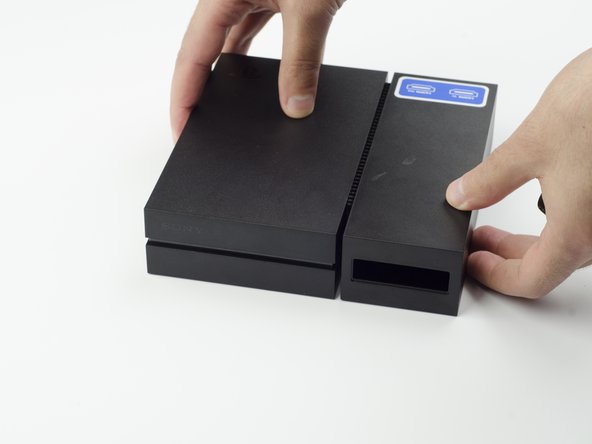
    2. PlayStation VR Processor Unit Cooling Fan Replacement: 步骤 2 中的图像 1,3 PlayStation VR Processor Unit Cooling Fan Replacement: 步骤 2 中的图像 2,3 PlayStation VR Processor Unit Cooling Fan Replacement: 步骤 2 中的图像 3,3
      • Press and slide the side panel (it will have the two ports) back to reveal an additional 6 mm screw.

      • Unscrew the 6mm screw with a PH #000 screwdriver.

      询问修复机器人

      添加评论

    3. PlayStation VR Processor Unit Cooling Fan Replacement: 步骤 3 中的图像 1,2 PlayStation VR Processor Unit Cooling Fan Replacement: 步骤 3 中的图像 2,2
      • Slide the panel back into place.

      询问修复机器人

      添加评论

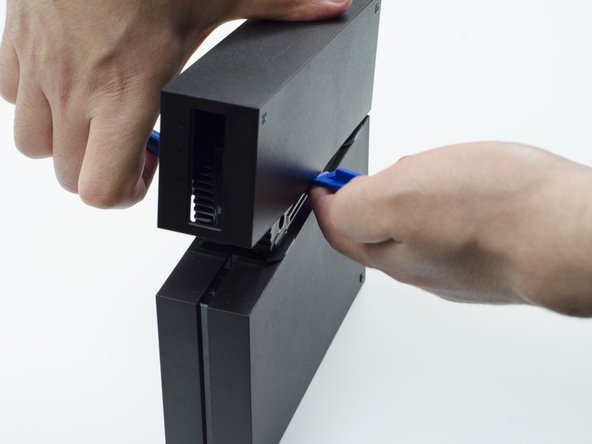
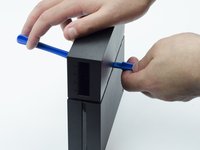
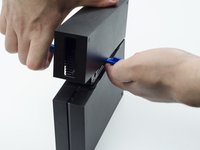
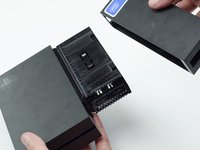
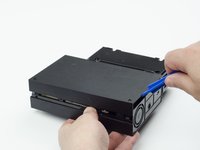
    4. PlayStation VR Processor Unit Cooling Fan Replacement: 步骤 4 中的图像 1,3 PlayStation VR Processor Unit Cooling Fan Replacement: 步骤 4 中的图像 2,3 PlayStation VR Processor Unit Cooling Fan Replacement: 步骤 4 中的图像 3,3
      • Using a plastic opening tool, carefully pry the panel from the main console to reveal the HDMI ports.

      • You will probably need to lift it on both sides in order for the panel to come loose.

      询问修复机器人

      添加评论

    5. PlayStation VR Processor Unit Cooling Fan Replacement: 步骤 5 中的图像 1,1
      • Turn the console over.

      • Unscrew the two 9 mm screws with a PH #000 screwdriver.

      询问修复机器人

      添加评论

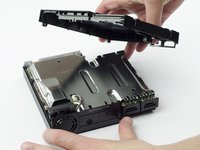
    6. PlayStation VR Processor Unit Cooling Fan Replacement: 步骤 6 中的图像 1,2 PlayStation VR Processor Unit Cooling Fan Replacement: 步骤 6 中的图像 2,2
      • With the plastic opening tool, carefully pry the console shell panel free and lift it away.

      询问修复机器人

      添加评论

    7. PlayStation VR Processor Unit Cooling Fan Replacement: 步骤 7 中的图像 1,2 PlayStation VR Processor Unit Cooling Fan Replacement: 步骤 7 中的图像 2,2
      在这个步骤中使用的工具:
      Tweezers
      $4.99
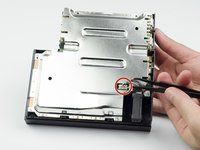
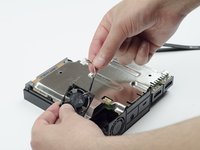
      • Using tweezers, carefully pull the multi colored bundled cable from its port connecting the fan to the console.

      • Carefully lift the fan and its wiring from the device.

      • Be mindful of damaging the wires.

      • Take care to keep your fingers away from the fan blades.

      询问修复机器人

      添加评论

结论

To reassemble your device, follow these instructions in reverse order.

取消:我没有完成这个指南。

8等其他人完成本指南。

Sarah Shand

于02/20/17注册

1,996 声望

创作了7篇指南

团队

USF Tampa, Team S3-G1, Sullivan Spring 2017 USF Tampa, Team S3-G1, Sullivan Spring 2017 的会员

USFT-SULLIVAN-S17S3G1

3 名成员

创作了54篇指南

4指南评论

Where do I get a replacement fan tho?

Ponos King - 回复 分享

I think is a 3x3 cm fan, alliexpres has some, but what voltage?

crus - 回复 分享

5V is what i have read

Ethan Amos - 回复 分享

Reference for fan when I have replaced mine : DELTA ELECTRONICS MODEL : ASB0305MA-01 DC 5V 0.19A

herossuperman - 回复 分享

添加评论

浏览统计数据:

过去 24 小时: 5

过去 7 天: 15

过去 30 天: 74

总计 10,781