跳转到主内容
加入维修社区 - 创建账户

Palm Zire m150 Screen Replacement

你所需要的

  1. Palm Zire m150 Screen Replacement, Screen: 步骤 1 中的图像 1,2 Palm Zire m150 Screen Replacement, Screen: 步骤 1 中的图像 2,2
    • Lift the flap on the Palm Zire M150 to see the back and all of the screws.

    询问修复机器人
  2. Palm Zire m150 Screen Replacement: 步骤 2 中的图像 1,1
    • Use the T6 bit screw driver, and carefully remove the screws at the top of the device.

    询问修复机器人
  3. Palm Zire m150 Screen Replacement: 步骤 3 中的图像 1,1
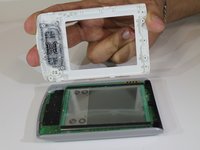
    • Turn the device over with the screen facing up. Gently pull the top and bottom cover from the device, as shown in the second photo.

    询问修复机器人
  4. Palm Zire m150 Screen Replacement: 步骤 4 中的图像 1,2 Palm Zire m150 Screen Replacement: 步骤 4 中的图像 2,2
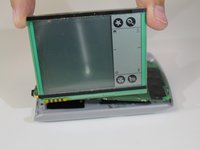
    • Carefully lift the screen from the device, and replace it with a new one.

    询问修复机器人
结论

To reassemble your device, follow these instructions in reverse order.

Kate

于01/26/16注册

528 声望

创作了5篇指南

团队

0指南评论

添加评论

浏览统计数据:

过去 24 小时: 0

过去 7 天: 3

过去 30 天: 37

总计 681