跳转到主内容
加入维修社区 - 创建账户

Optoma HD20 Color Wheel Replacement

你所需要的

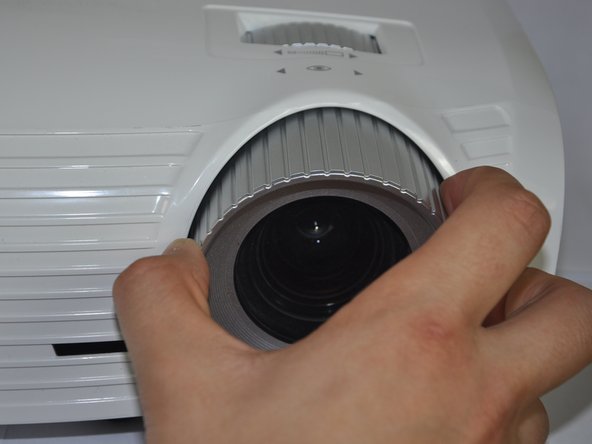
  1. Optoma HD20 Color Wheel Replacement, Disassembling Optoma HD20 Cover: 步骤 1 中的图像 1,2 Optoma HD20 Color Wheel Replacement, Disassembling Optoma HD20 Cover: 步骤 1 中的图像 2,2
    • Twist the focal cap clockwise until it is fully extended.

    • Remove the focal cap by pulling it straight out.

    添加评论

  2. Optoma HD20 Color Wheel Replacement: 步骤 2 中的图像 1,1
    • Use a Phillips #1 screwdriver to remove the three 7.5mm screws on the bottom of the device.

    询问修复机器人

    添加评论

  3. Optoma HD20 Color Wheel Replacement: 步骤 3 中的图像 1,1
    • Use a plastic opening tool to gently pry the top cover off of the device.

    • It is easier to pry off the cover from the back side just above the HDMI ports.

    询问修复机器人

    添加评论

  4. Optoma HD20 Color Wheel Replacement: 步骤 4 中的图像 1,1
    • When removing the cover, be cautious of the ribbon connecting the top buttons to the main circuit board. The ribbon must be disconnected before proceeding.

    • Remove the ribbon by disconnecting it from the main circuit board.

    • Lift up the clip holding it down and pull the ribbon out.

    添加评论

  5. Optoma HD20 Color Wheel Replacement, Color Wheel: 步骤 5 中的图像 1,1
    • Use the plastic opening tool to remove the wiring.

    添加评论

  6. Optoma HD20 Color Wheel Replacement: 步骤 6 中的图像 1,1
    • Use a Phillips #1 screwdriver to remove the 5.5 mm screws around the pin wheel.

    询问修复机器人

    添加评论

  7. Optoma HD20 Color Wheel Replacement: 步骤 7 中的图像 1,1
    • Use a Phillips #1 screwdriver to remove 1 more 5.5 mm screw.

    询问修复机器人

    添加评论

  8. Optoma HD20 Color Wheel Replacement: 步骤 8 中的图像 1,1
    • Using a flat head screw driver unscrew the back part to release the color wheel.

    • Do this carefully because these screws do not pull out.

    询问修复机器人

    添加评论

  9. Optoma HD20 Color Wheel Replacement: 步骤 9 中的图像 1,1
    • Once unscrewed, remove the color wheel, and replace the part.

    询问修复机器人

    添加评论

结论

To reassemble your device, follow these instructions in reverse order.

取消:我没有完成这个指南。

6等其他人完成本指南。

Trever

于01/22/15注册

1,282 声望

创作了6篇指南

团队

Cal Poly, Team 21-23, Maness Winter 2015 Cal Poly, Team 21-23, Maness Winter 2015 的会员

CPSU-MANESS-W15S21G23

4 名成员

创作了6篇指南

3指南评论

I've seen 5 guides say that the lens adjustment cover just pulls straight out, but even with significant force, it doesn't budge. Are there two different versions of the HD20 with two different designs for the cover?

srbaucom - 回复 分享

I couldn't get the shroud off until I had the plastic top of the projector mostly off.

dlwalter - 回复 分享

The shroud has clips on it that attach to some bolts coming off the lense so yeah, it will take some force to pop the clips.

dlwalter - 回复 分享

添加评论

浏览统计数据:

过去 24 小时: 3

过去 7 天: 13

过去 30 天: 64

总计 9,800