跳转到主内容
加入维修社区 - 创建账户

Omaker M4 Back Case Replacement

你所需要的

  1. Omaker M4 Back Case Replacement, Back Case: 步骤 1 中的图像 1,1
    • Flip the device over so the front of the speaker is facing down. Make sure to place the speaker on a flat surface

    询问修复机器人

    添加评论

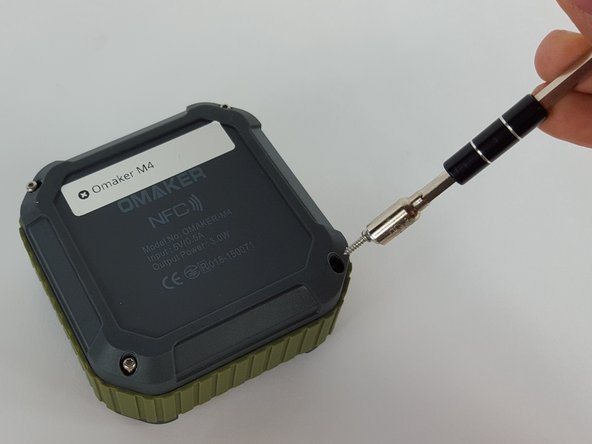
  2. Omaker M4 Back Case Replacement: 步骤 2 中的图像 1,2 Omaker M4 Back Case Replacement: 步骤 2 中的图像 2,2
    • Use a T6 Torx screwdriver to remove the four 9mm screws from the back of the device.

    询问修复机器人

    添加评论

  3. Omaker M4 Back Case Replacement: 步骤 3 中的图像 1,2 Omaker M4 Back Case Replacement: 步骤 3 中的图像 2,2
    • Use a magnet to remove the screws after unscrewing them and place them aside.

    询问修复机器人

    添加评论

  4. Omaker M4 Back Case Replacement: 步骤 4 中的图像 1,1
    • Carefully remove the back cover without breaking the battery wire.

    询问修复机器人

    添加评论

  5. Omaker M4 Back Case Replacement: 步骤 5 中的图像 1,2 Omaker M4 Back Case Replacement: 步骤 5 中的图像 2,2
    在这个步骤中使用的工具:
    Tweezers
    $4.99
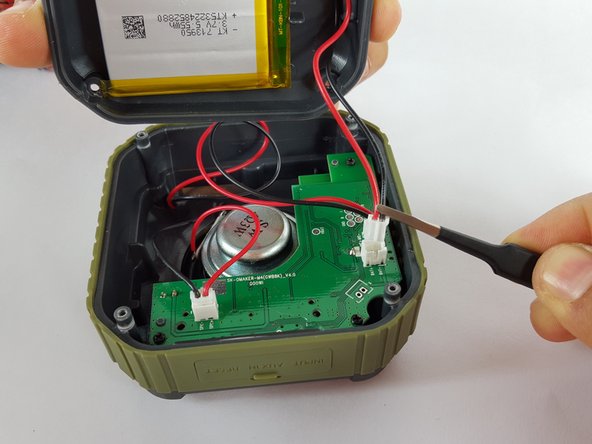
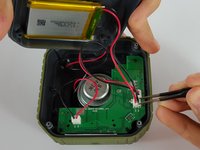
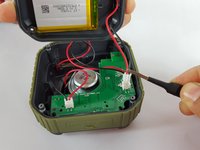
    • Remove the end of the battery connection from the motherboard by holding the end of the wire and carefully pulling it out of the socket using tweezers.

    • The battery is still attached to the back cover.

    询问修复机器人

    添加评论

结论

To reassemble your device, follow these instructions in reverse order.

取消:我没有完成这个指南。

3等其他人完成本指南。

[deleted]

于02/17/16注册

679 声望

创作了4篇指南

0指南评论

添加评论

浏览统计数据:

过去 24 小时: 0

过去 7 天: 10

过去 30 天: 39

总计 1,197