跳转到主内容
加入维修社区 - 创建账户

Olympus 850SW Battery Replacement

你所需要的

  1. Olympus 850SW Battery Replacement, Battery: 步骤 1 中的图像 1,1
    • Locate the battery compartment on the bottom panel of the camera.

    询问修复机器人
  2. Olympus 850SW Battery Replacement: 步骤 2 中的图像 1,2 Olympus 850SW Battery Replacement: 步骤 2 中的图像 2,2
    • Using a PH00 Phillips Screwdriver, unscrew the one screw located on the latch.

    询问修复机器人
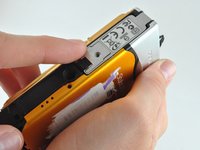
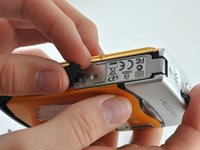
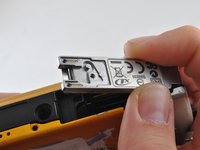
  3. Olympus 850SW Battery Replacement: 步骤 3 中的图像 1,3 Olympus 850SW Battery Replacement: 步骤 3 中的图像 2,3 Olympus 850SW Battery Replacement: 步骤 3 中的图像 3,3
    • Find the arrows on the compartment, remove the small black plastic piece, and release the latch.

    询问修复机器人
  4. Olympus 850SW Battery Replacement: 步骤 4 中的图像 1,1
    • Allow the latch to completely open and insert the battery, with the writing side up.

    • The battery slot is the bigger slot. The smaller slot is for the memory card.

    询问修复机器人
  5. Olympus 850SW Battery Replacement: 步骤 5 中的图像 1,1
    • Close the latch. You will hear a click when the compartment is fully closed.

    询问修复机器人
  6. Olympus 850SW Battery Replacement: 步骤 6 中的图像 1,1
    • Place the small black piece back in its' place.

    询问修复机器人
  7. Olympus 850SW Battery Replacement: 步骤 7 中的图像 1,1
    • Place the metal cover back over the closed latch, and screw the screw back in.

    询问修复机器人
结论

To reassemble your device, follow these instructions in reverse order.

另外一个人完成了本指南。

0指南评论

添加评论

浏览统计数据:

过去 24 小时: 2

过去 7 天: 13

过去 30 天: 77

总计 1,350